


Flipboard is a personalized content aggregation platform that lets users create their own digital magazines by curating content from different web publishers. The platform is also popular for consuming news and other content online. Flipboard provides news articles, blog posts, videos, and social media updates on a single platform. This is the reason it is popular among users. While Flipboard has a large user base, there could be several reasons why some users may think of deleting their Flipboard account. Some users may think of simplifying their online presence or might find that Flipboard no longer aligns with their current preferences. Whatever the reason, if you want to delete your Flipboard account, keep reading.
Deleting your Flipboard account is a straightforward process that ensures your personal information and preferences are removed from the platform. Follow these simple steps to delete your Flipboard account hassle-free.
Note: Flipboard clearly mentions that you cannot restore deleted accounts. So, think again before you proceed.
Delete Flipboard account
Delete Flipboard account on the web
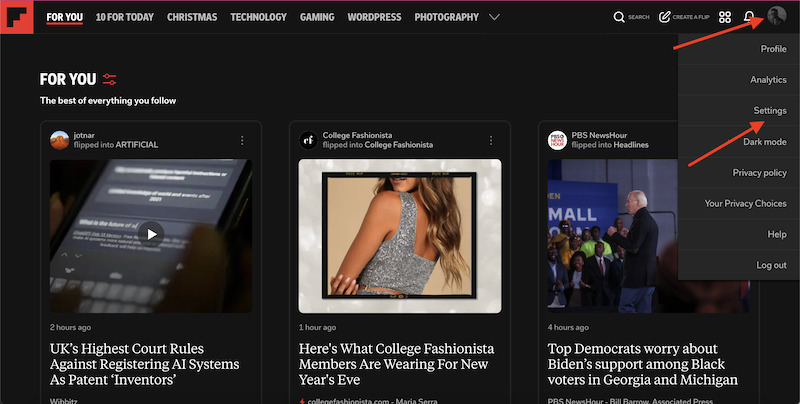
First of all, log into your Flipboard account using your preferred web browser. Make sure you enter the correct username and password associated with your account. Once logged in, navigate to the top-right corner of the screen, where you will find your profile picture. Click on it to open the drop-down menu, and then select “Settings.”
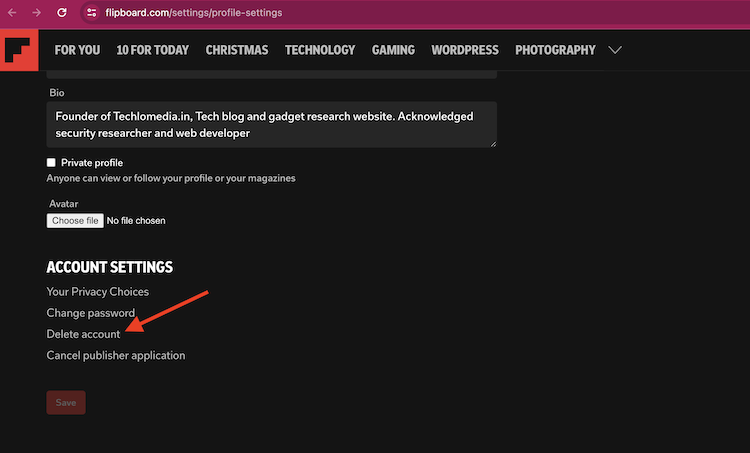
Within the account settings, make sure you are on the Profile settings page. This page may include details such as your email address, username, and any linked social media accounts. Take a moment to review this information before proceeding. Scroll down this Profile settings page until you find the option to delete your account. Once you have located the “Delete Account” option, click on it.
Flipboard will prompt you to confirm your decision by entering your Flipboard login credentials again. Input your password in the designated field and click “Confirm” or “Delete” to finalize the process.
After confirming your decision, Flipboard should display a confirmation message indicating that your account has been successfully deleted. You may also receive a confirmation email to the address associated with your Flipboard account.
Delete the Flipboard account on the mobile app
You can also delete your Flipboard account from the mobile app. The steps to delete the Flipboard account are the same on both Android and iOS apps.
To delete the Flipboard account from the mobile app, open the Flipboard mobile app. Tap on the profile icon at the bottom left corner. It will open your profile page. Now click the gear icon at the top right corner to open the Settings page. On the Settings page, click the Edit profile link. Now scroll down the page and click the Delete Account link.
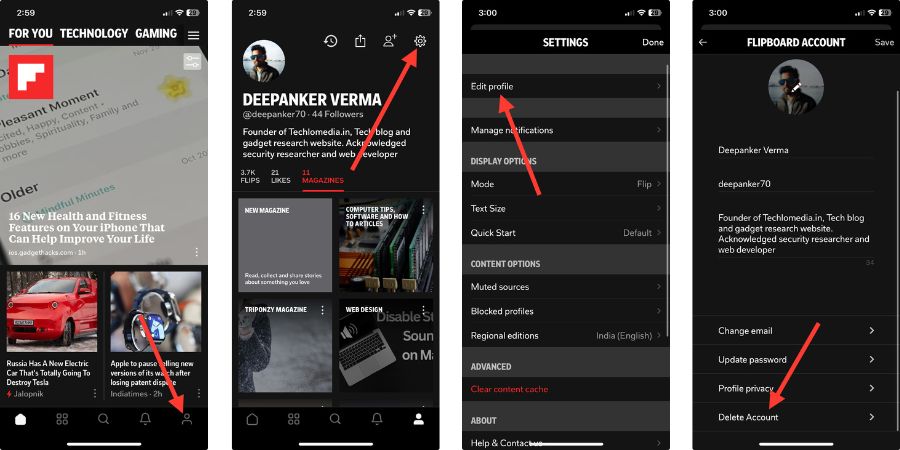
It will now open a new page where you need to enter Flipboard login credentials to confirm it’s you who is trying to delete your account. Then proceed to delete your account.
It will delete your Flipboard account.
Wrap Up
Deleting your Flipboard account is a quick and simple process. So, you can easily delete your Flipboard account whenever you want. I have written a detailed guide on how to delete a Flipboard account. Follow these step-by-step instructions to delete your Flipboard account and enjoy a more streamlined digital experience.
Keep in mind that once your account is deleted, all your saved content, preferences, and social connections on Flipboard will be permanently removed, so make sure you have backed up any essential information before taking this step.
See Similar Guides
- How to Delete Snapchat Account Permanently
- How to Delete Instagram Account Permanently
- How to Delete Telegram Account Permanently
- How to Delete Reddit Account Permanently
- How to Delete Twitter Account Permanently
- How to Delete Google Account Permanently
- How to Delete Facebook Account Permanently
- How to Delete WhatsApp Account
- How to Delete Pinterest Account
- How to Delete LinkedIn Account
- How to Delete Twitch Account
- How to Delete Dropbox Account







