


Bumble is a popular dating app that allows users to connect with potential matches based on their location, preferences, and interests. This is now a popular app among youths who are looking for partners for dating or hookups. However, there may come a time when you no longer wish to use the app. Either you don’t get the desired result from the app or you have already found your partner. In this case, you may want to delete your account. In this article, we will guide you on how to delete your Bumble account.
Also see: How to stay safe while using online dating apps
Delete Bumble Account
First of all, open the Bumble app on your phone. You can do this by tapping on the Bumble app icon on your home screen or app drawer.
Once you have opened the Bumble app, tap on the profile icon located at the bottom-right corner of the screen. This will take you to your Bumble profile. On your Bumble profile, tap on the gear icon located at the top-left corner of the screen. This will take you to the Settings page.
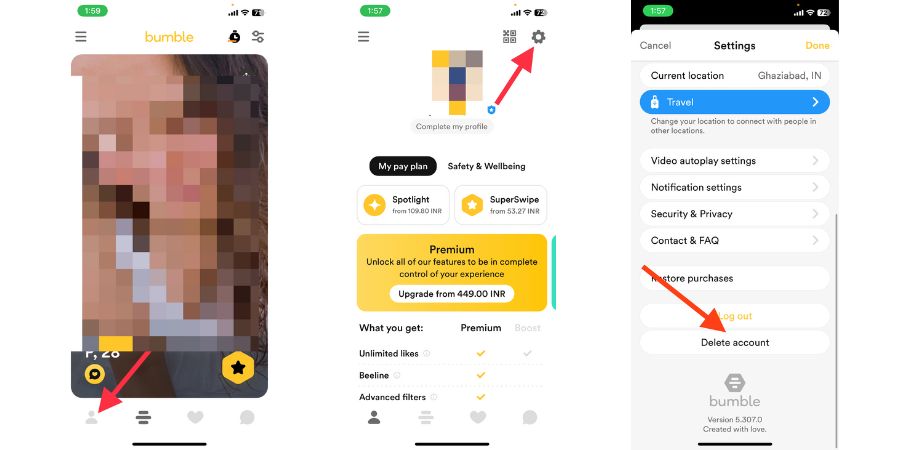
Scroll down to the bottom of the Settings page, and select “Delete Account”. This will take you to the “Delete Account” screen.
Bumble will ask you to select a reason for deleting your account from a drop-down menu. You can choose from options such as “Found/In a Relationship”, “Billing Issue”, “Dissatisfied with Service”, and Others.
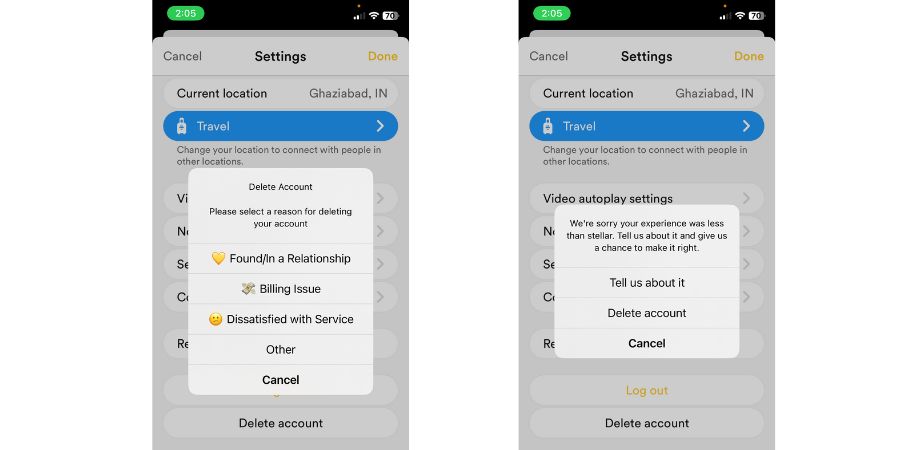
After selecting a reason, Bumble will ask you to confirm that you want to delete your account. If you are sure you want to proceed with the deletion, tap on “Delete Account” again.
Once you have deleted your Bumble account, you can also delete the app from your device. This will help ensure that you do not accidentally log in to the app again and reactivate your account.
To delete the Bumble app from your device, simply tap and hold on to the app icon until a menu appears. Select “Delete App” from the menu, and confirm the deletion when prompted.
Also see
Wrap Up
Deleting your Bumble account is a straightforward process. This process can be completed in just a few simple steps. If you no longer wish to use the app or have found a match and want to take a break, follow the steps added to this article to delete your Bumble account.
I hope this article was useful. I have already written several similar guides. See the links below.
- How to Delete Tinder Account Permanently
- How to Delete Snapchat Account Permanently
- How to Delete Instagram Account Permanently
- How to Delete Reddit Account Permanently
- How to Delete Telegram Account Permanently
- How to Delete Twitter Account Permanently
- How to Delete Google Account Permanently
- How to Delete Facebook Account Permanently







