Home » News » Facebook Messenger gets screen-sharing on Android ...

Facebook Messenger gets screen-sharing on Android and iOS

Facebook Messenger gets screen-sharing on Android and iOS

Add Techlomedia as a preferred source on Google. Preferred Source

Facebook’s messaging platform Messenger is adding another feature to compete against other video calling rivals. The company is adding screen sharing for iOS and Android mobile devices.

When you shared a screen during Messenger video call, you will be able to perform different things like accessing photos of camera roll or shopping on an E-commerce app. This will make a conversation engaging in certain cases.
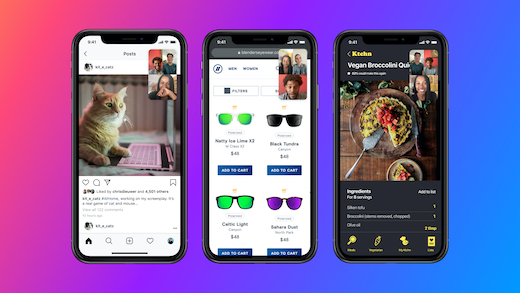
Facebook Messenger gets screen-sharing

You can share the screen with up to 8 people on Messenger group video calls and with up to 16 people in Messenger Rooms. The company has also promised to increase this limit to 50 for Messenger Rooms calls soon. Room creators will have the ability to limit the ability to screen share to just themselves or make it available to all.

Facebook says that this feature will help people stay close with loved ones even if they are physically apart.

Source

Follow Techlomedia on Google News to stay updated. Follow on Google News

Affiliate Disclosure:

This article may contain affiliate links. We may earn a commission on purchases made through these links at no extra cost to you.

Deepanker Verma

About the Author: Deepanker Verma

Deepanker Verma is the Founder and Editor-in-Chief of TechloMedia. He holds Engineering degree in Computer Science and has over 15 years of experience in the technology sector. Deepanker bridges the gap between complex engineering and consumer electronics. He is also a a known Security Researcher acknowledged by global giants including Apple, Microsoft, and eBay. He uses his technical background to rigorously test gadgets, focusing on performance, security, and long-term value.

Related Posts

Stay Updated with Techlomedia

Join our newsletter to receive the latest tech news, reviews, and guides directly in your inbox.