We are already aware that Google Wallet allows you to pay and complete transaction with just a tap. Google has been rolling out with new features after Apple Pay. Now, you can send and receive money from Gmail itself as easy as sending an email. It has been integrated with Google Wallet and it made us possible to send and receive money directly from Gmail.
Now, you can pay bills, share your rent amount with your friends and more by just sending the money through an email.
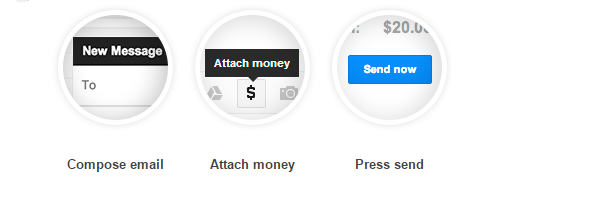
Open a compose email window in your Gmail and you will be shown a “$” symbol in between drive symbol and camera symbol. Click on “$” symbol to send and receive money by sending an email.
Steps to follow to send/receive money from Gmail:
STEP 1: Open Gmail and Click on Compose button.
STEP 2: Enter the email address of the person you want to send the amount to.
STEP 3: Click on the “$” icon and if you do not have a Google Wallet account, it asks you to create one.

STEP 5: To send money, enter the amount and choose the source of your amount.
STEP 6: To receive or request money, click on the Request and enter the amount.
STEP 7: Click on Attach and send the mail after checking it one more time.
Steps to receive money from Gmail:
STEP 1: Open the mail which has the attached money in your Gmail.
STEP 2: Click on Claim Money and login to your Google Wallet account to verify the identity.
STEP 3: Once your identity has been verified, go back to the mail and click on Claim money one more time. All the received money will be credited to your Google Wallet balance.
This is rolling out to US users and takes time to reach everyone. What do you think about this step from Google? Please, do share with us through comments.
Source: Google