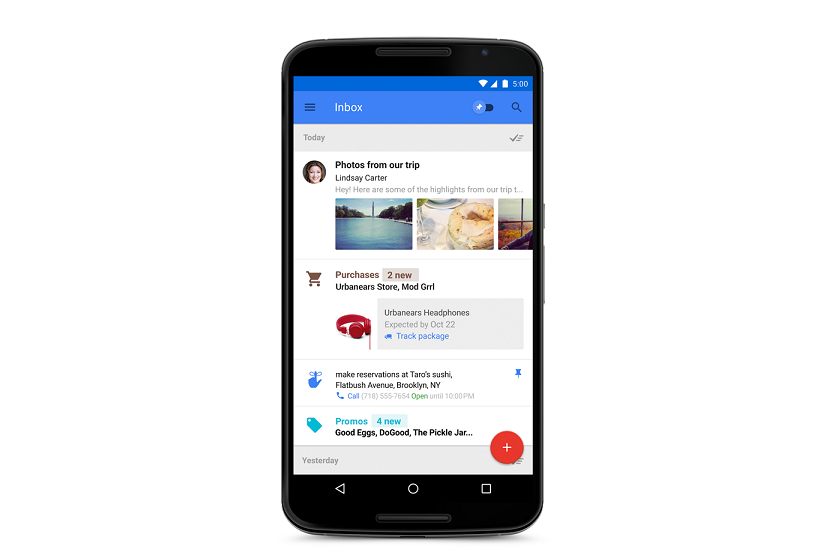
Google has launched a new app to manage emails called “Inbox”. This new app aims to provide better way of email management. It will display relevant informations such as appointments, booking and other important things in user-friendly way.
This service is an invite only service and few selected users will receive invites. Users can also request invite by sending email to [email protected]. A user who received invite can also invite their friends to use Inbox.
“Email started simply as a way to send digital notes around the office. But fast-forward 30 years and with just the phone in your pocket, you can use email to contact virtually anyone in the world…from your best friend to the owner of that bagel shop you discovered last week,” Sundar Pichai, SVP, Android, Chrome & Apps posted on Gmail blog.
This service will work along with Google’s existing email service Gmail, launched back in 2004. Inbox will be available on Web, Android and iOS devices. This service is by same people who work on Gmail. But Inbox is completely different. It is developed to show information in real-time. It lets you track reminders and appointments. This app was developed on the top of Gmail by enhancing the existing features of Gmail. It does not display the traditional list of emails but information which are important. It displays Google Now style cards at the right side with messages. You can also set the remainders to get Google now cards for specific emails. It also intelligently group emails to make you free from annoying emails.
Inbox offers Material design inspired UI. Animations are faster and smoother. Menu bars offers good color and looks perfect. But in iPhone, these design elements are muted.
There are basically three components of Inbox. These are Bundles, Highlights and Reminders, Assists, and Snooze.
Bundle helps to say organized automatically. It expands the categories introduced in Gmail last year, It meakes it easier to deal with similar type of emails.
Highlights is for displaying inportant information from messages. This includes flight itineraries, event information, and photos and documents emailed to you. It will also show information in real-time.
You can set your priorities to get remainders. So, you can easily track information.
You can sign into Inbox with your Gmail account and see all your old messages there.