Google Play allows installed apps to update itself automatically. If you do not want automatic update feature, you can either prevent individual app from updating or prevent all apps from updating from Google Play Store.
Follow these steps to stop Individual app from updating:
Open the Play Store app on your device.
Press the Menu button.
Select My apps.
Choose the app you don’t want to update.
Scroll down and uncheck the Allow automatic updating box.
Follow these steps for All apps
Open the Play Store app on your device.
Press the Menu button.
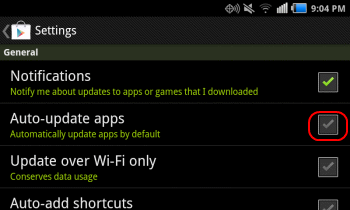
Tap Settings.
Uncheck the Auto-update apps selection. You may also want to uncheck the Notifications box to prevent notifications for app updates.
Share this article:
Follow Techlomedia on Google News to stay updated.
Affiliate Disclosure:
This article may contain affiliate links. We may earn a commission on purchases made through these links at no extra cost to you.
About the Author: Deepanker Verma
Deepanker Verma is the Founder and Editor-in-Chief of TechloMedia. He holds Engineering degree in Computer Science and has over 15 years of experience in the technology sector. Deepanker bridges the gap between complex engineering and consumer electronics. He is also a a known Security Researcher acknowledged by global giants including Apple, Microsoft, and eBay. He uses his technical background to rigorously test gadgets, focusing on performance, security, and long-term value.