
As advised by experts, we should always choose a strong password and never reuse a password. Now, when we have to deal with several online accounts, it is really hard to remember all the passwords. This is the reason password managers exist. Apple has its built-in password manager called iCloud Keychain but third-party password managers offer more functionality. I have tested several password managers available for iOS. Based on my findings, here is the list of the best password managers for iPhones and iPads.
Password managers are software programs that securely keep your password information, credit card numbers, and PINs. You just need to remember the master password, and all your passwords will be safe. Whenever you need to log in to the service, the password manager automatically fills in the password for the login. If you are not sure what password manager you should use, have a look at this list of the best password managers for iPhones and iPads.
Why does one need a password manager?
Now that most services are online, we need to remember too many passwords. It is not recommended to use the same password in other services. So, selecting a hard-to-guess and secure password for different services has become a pain. You cannot remember too many passwords when the recommended password is a randomly generated string of alphanumeric and special characters. This is the reason we need good password management software that helps us keep passwords organized and recall them when it is needed.
Here are the key features you need to look for in a good password manager
- Built-in Password Generator
- Password strength reports
- Auto-fill web forms
- 2-factor authentication
- Password syncing across multiple devices
- Password management for different apps
Also see:
Best Password Managers for iOS
Have a look at the best password managers for iOS. If you own an iPhone or iPad, download one of these password managers.
1. Dashlane
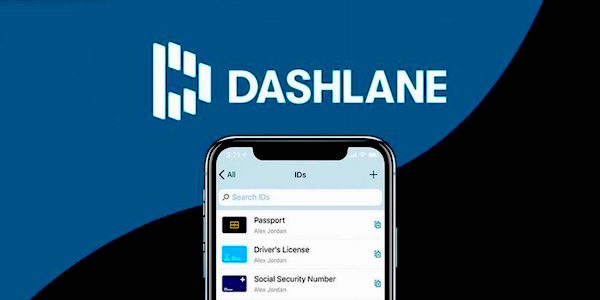
Dashlane is a user-friendly password manager that keeps your passwords safe. It automatically syncs your password across all of your devices and can auto-fill login credentials whenever you need them. It provides end-to-end encryption, password security auditing, two-factor authentication (2FA), and a range of other security features. The app also includes a VPN and promises zero connection slowdown. This password manager integrates seamlessly with the iOS platform. It is also compatible with Apple Watch, Face ID, Touch ID, and voice control.
This password manager is free to use for up to 50 passwords. For more passwords and other premium features, you need to purchase Dashlane Premium.
Platforms: Windows, Mac, iOS, Android, Linux, Chrome OS
Browser plugins: Chrome, Firefox, IE, Safari, Edge
2. 1Password

1Password is one of the oldest password managers available in the market. It uses AES 256-bit encryption along with other security measures to keep your password safe. The password manager comes with several notable features, like auto-filling passwords and other information that is saved. It also offers password auditing and breach monitoring to notify you if your password was leaked in a data breach.
1Password starts at $2.99 per month for an individual plan and costs $4.99/month for the family plan. You can use it on unlimited devices and save unlimited passwords. Users also get 1 GB of document storage.
Platforms: Windows, Mac, iOS, Android. Linux, Chrome OS, Darwin, FreeBSD, OpenBSD
Browser plugins: Chrome, Firefox, Safari, Edge, Brave
3. RoboForm
RoboForm is also an excellent password manager for iOS devices. This password manager uses AES-256-bit encryption and multi-factor authentication to keep your passwords safe. It also includes a built-in password generator and password sharing. The password auto-fill feature works well even in complex web forms.
RoboForm offers a free plan that allows unlimited passwords and logins. If you opt for a plaid plan, you also get cloud backup, two-factor authentication, and password synchronization across all of your devices. It costs $23.88/year for an individual plan and $47.75/year for a family plan.
Platforms: Windows, Mac, iOS, Android, Linux, Chrome OS
Browser plugins: Chrome, Firefox, IE, Safari, Edge, Opera
4. Keeper

Keeper is also one of the best and most secure password managers for the iOS platform. It can securely keep your passwords and provide an autofill option. It also supports Apple Watch’s biometric scanner to log into their Keeper vaults.
The tool also includes KeeperChat, an encrypted messaging app along with an encrypted messaging app, 10 GB of secure cloud storage, and dark web monitoring. The KeeperChat can be used to send and receive sensitive information. This chat features a self-destruct option where you can set a timer. After that time, messages will be permanently deleted.
Keeper offers a range of pricing options, including Personal, Family, Student, Business, and Enterprise. It starts at $1.66 per month and goes up to $4.99 per month. Even the personal plan offers unlimited password storage, unlimited devices, password synchronization, and 24/7 support.
Platforms: Windows, Mac, iOS, Android, Linux, Chrome OS
Browser plugins: Chrome, Firefox
5. LastPass

LastPass is also one of the best password managers for iOS. You get unlimited password storage on unlimited devices. The tool also includes a strong password generator, that can automatically capture new logins. You can also share your information securely via email, with an option to hide login data. This tool also offers multiple account recovery, a one-click password changer, and support for Face or Touch ID.
LastPass is free but you can purchase premium plans starting at $3 per month. The free version is already good enough for more people. In the paid version, you get One-to-many sharing, Unlimited shared folders, Dark web monitoring, and 1 GB Storage.
Platforms: Windows, Mac, iOS, Android, Linux, Chrome OS
Browser plugins: Chrome, Firefox, IE, Safari, Edge, Opera
6. NordPass

NordVPN is another impressive password manager from the creator of NordVPN. NordPass offers a clean and simple user experience with strong security measures. It has AES-256 encryption for keeping your password safe. You also get autofill for quick login into websites and apps. It features a password health checker and supports synchronization across all devices, including iOS. The app also has password health checker and random passwoed generator.
Platforms: Windows, Mac, iOS, Android, Linux, Chrome OS
Browser plugins: Chrome, Firefox, IE, Safari, Edge, Opera
7. Enpass

Enpass is also a good password manager for iOS devices. It offers a unique approach to data storage. Users can store their vault locally on their devices. You can save your credit card, license, finances, notes, and other information to keep it safe. It also supports various cloud services for backup and offers a straightforward interface optimized for iOS. You also get Cross-platform support and Cloud sync options.
Platforms: Windows, Mac, iOS, Android, Linux, Chrome OS
Browser plugins: Chrome, Firefox, IE, Safari, Edge, Opera
Wrap Up
This was the list of the best password managers for iOS. If you use an iPhone and other Apple devices, you can go with any of these password managers. The options listed above offer a range of features that cater to different preferences and security requirements, ensuring that your online credentials remain safe and accessible. If you want a free option, I recommend LastPass. The free version of LastPass is also good enough to keep most passwords, and it can be used on multiple devices.