
LinkedIn is a popular social media platform for professionals where people mostly talk about career growth, jobs, and professional skills. The platform now boasts more than 800 million users where people actively post different content. LinkedIn is also a platform where creators publish long articles, photos, and videos. If you like a video posted by someone on LinkedIn and want to download it, there is no default option to download the video. So, you will have to rely on third-party LinkedIn video downloaders. In this article, I will explain different ways to download LinkedIn videos.
Note: Videos shared on LinkedIn may be the original work of the creator. So downloading it without the owner’s consent will be wrong. You can download the video to watch it offline but you cannot use it in any commercial work. Using a video from other creators can be a punishable offense by the law.
Why Download LinkedIn Videos?
There could be several reasons why you may think of downloading LinkedIn videos. You can download LinkedIn videos for offline access. It can also be useful to save important content for future reference. You may also want to share the video without someone who doesn’t have a LinkedIn account.
How to get a link to a LinkedIn post
First of all, you need to know how to get the link to a post on Linkedin.
To get the link to the video post on LinkedIn for the web, click on three horizontal and click Copy link to the post
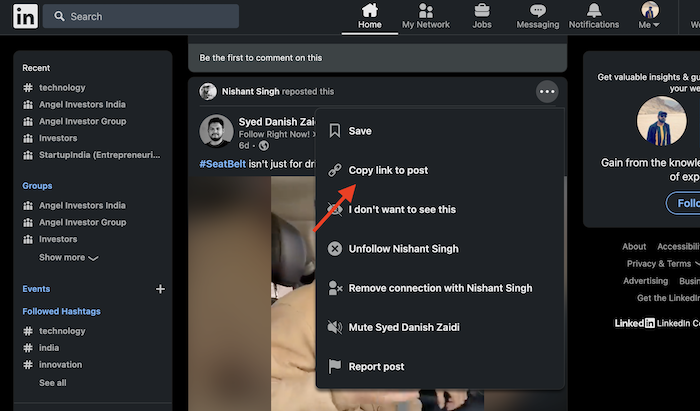
If you are on the LinkedIn mobile app, you can tap the vertical three-dot icon at the top right corner of the post and then tap Share via. It will give you the link to the LinkedIn post.

Now when you know how to get a link to the LinkedIn post, let’s see how to download LinkedIn videos.
Download LinkedIn videos
2. Keepoffline: Online LinkedIn video downloader
Keepoffline is an all-in-one video download website that lets you download videos from different websites including Moj, LinkedIn, Pinterest, Mitron, Chingari, ShareChat, and more. It has a dedicated LinkedIn video downloader page. You just need to paste the LinkedIn video URL and click the Download button. I have already told you how to get the link to a LinkedIn post.

This is an online LinkedIn video downloader. So, it works on all devices. You just need to open this LinkedIn video downloader on a web browser to download videos from Linkedin. It lets you download videos in several formats including MP4, MP3, M4P, and MPV.
2. YMP4 LinkedIn video downloader

This is another free online LinkedIn video downloader that works with LinkedIn video links. Paste the video link and click the Go button. It will provide you with the LinkedIn video download link.
3. Video Downloader Plus (Chrome Extension)
If you use Google Chrome browser, Video Downloader Plus is a good extension for downloading videos. This Chrome extension supports almost all websites including LinkedIn. It automatically detects the video on the page and provides a link to download it. It supports Facebook, X, LinkedIn, Twitch, Vimeo, Dailymotion, and more. After you have Installed the Chrome extension, start browsing Linkedin on the browser. Whenever you find a video on Linkedin, this extension will add a link to download the video.

I have tested this Chrome extension and it worked well.
Wrap Up
Now you know how to download videos from Linkedin. Downloading LinkedIn videos is relatively straightforward using the methods outlined above. All these online tools let you download LinkedIn videos. You can use online tools on both PC and smartphone. If you use Chrome, install the Chrome extension to download the LinkedIn videos. Whether you prefer using online tools, browser extensions, developer tools, or third-party software, each method has its advantages. Always ensure you are following ethical guidelines when downloading and using the content.
Also see:
- How to download YouTube Shorts videos
- How to Download Instagram Reels Videos
- How to Download Instagram Videos
- How to Download Facebook Videos