

Your mobile number plays an important role in your Aadhaar verification. It is required for receiving OTPs, logging into government apps, completing KYC, using DigiLocker, filing income tax returns, and accessing many banking services. If the mobile number linked to your Aadhaar is not active, you will face issues in using most Aadhaar-based services.
There are several situations when you may want to update your Aadhaar mobile number. You might have switched to a new number, lost your old SIM, changed your network provider, or your old number may not be working anymore. In all these cases, updating your mobile number becomes necessary for smooth access to Aadhaar services.
Earlier, changing the mobile number in Aadhaar always required a visit to an Aadhaar Seva Kendra. You had to submit a request, verify biometrics, and wait for the update. But now, with the newly launched Aadhaar app, you can update your mobile number easily online without visiting a centre. However, you still need to have access to an older phone number to change it online. If you don’t have access to an older number, you still need to visit the Aadhaar centre to change the number.
If you don’t have access to an existing registered phone number, you need to visit the nearest Aadhaar Enrolment Centre and fill out the Correction/ Aadhaar Update form. After paying the fee, you will receive an acknowledgement slip with the URN. In a few days, the new number will be updated in your Aadhaar card.
If you still have the currently registered Aadhaar number, you can do this online.
Recently, UIDAI released a new Aadhaar app that makes it easy to change the Aadhaar-registered number online. But you need to first register in the app using your Aadhar number and OTP verification. It will also do face authentication and ask you to set a passkey to protect the app. This setup is necessary for using the app.
Now that you have installed the app and registered using your Aadhaar number and existing number, you are ready to change the Aadhar registered number.
Open the app and scroll down until you see the Services section. Here, tap “Update My Aadhaar.” Then tap Mobile Number Update.
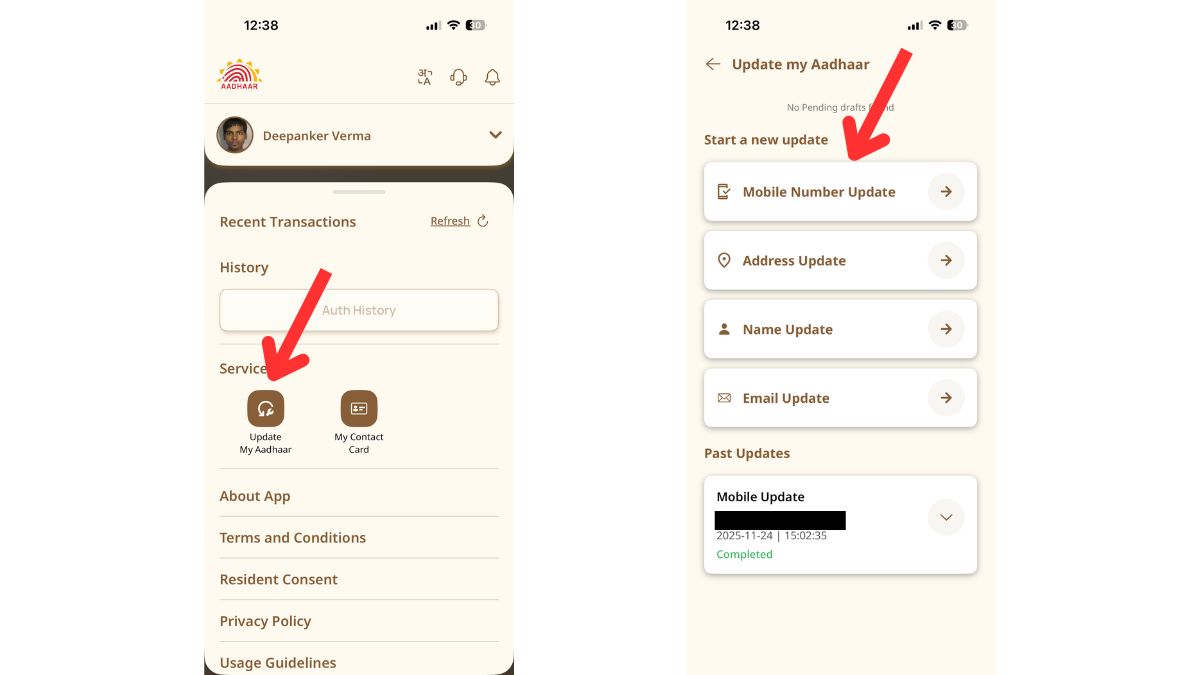
Then it opens a screen where you get details of processing time, processing fee, and requirements. Tap Continue. Now it shows your currently registered mobile number and a text box to enter the new mobile number.
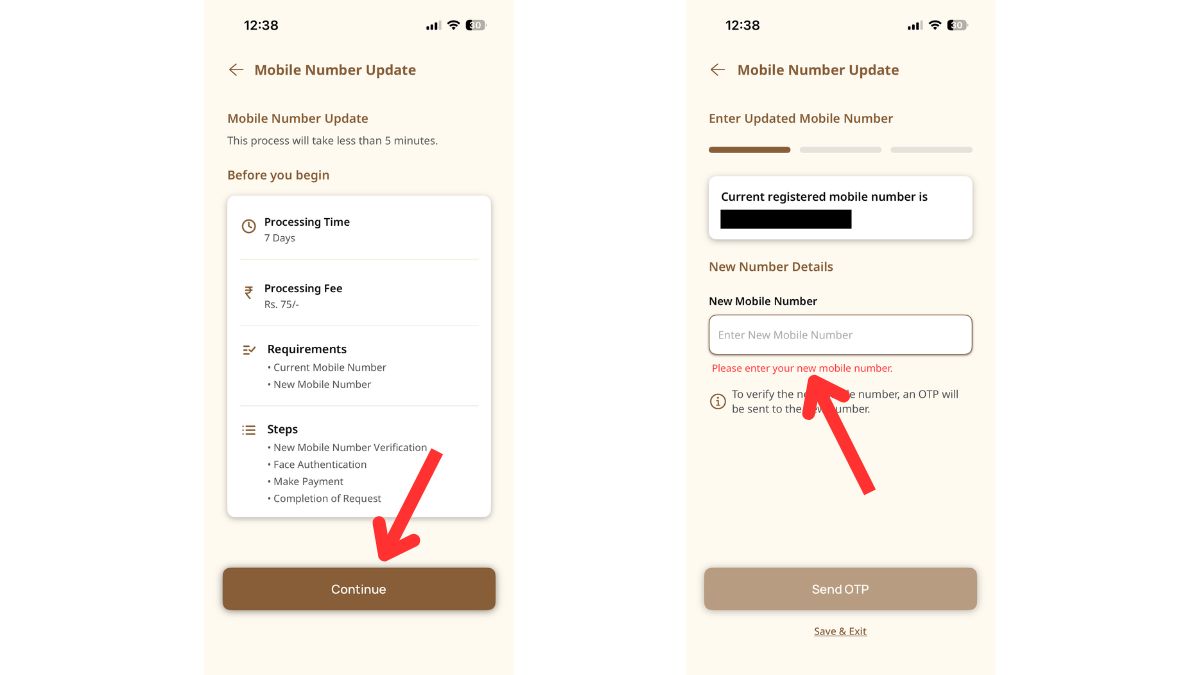
Enter your new phone number and tap Send OTP. It will send you OTP to your existing phone number.
Once you enter the OTP, it will accept your request. Although it asks to wait for up to a week, but in most cases, the request is processed within a few hours.
Wrap up
The new Aadhaar app has made mobile number updates very easy. You no longer need to visit an Aadhaar Seva Kendra or wait in long lines. With just a few steps, you can change your registered mobile number online and continue using all Aadhaar-based services without any interruption.