There are many kind of things and task which we want to remember and for that we use remainders of our phones. There is a nice Android app which sets the remainder at the pop up message and shows these pop ups each time we unlock the phone. This is a nice thing when we have something important to remember. This app is known as toastr which allow users to define a custom message which will be shown each time use unlock the device.
Now, you’ll never miss out an important reminder again in a hurry, since the message itself will always be right before your eyes each time you unlock your phone.
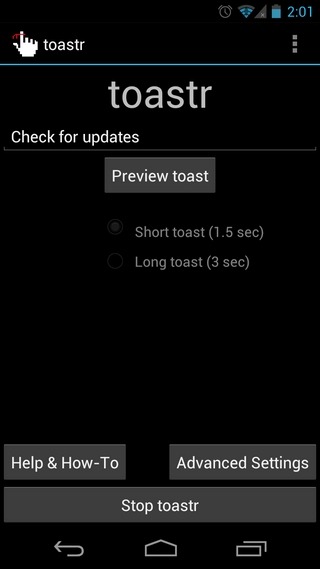 Follow these steps to use the app
- Install the Toastr app from Google Play Store.
- Run the app.
- Add a message to float as a reminder when you unlock your phone.
- Choose whether it should float for 1.5 seconds or 3 seconds.
- Click “Start toastr” and you’re good to go.
There is also a pro version of the app is available which allows users to customize the notificatio box of the message. This app also allows users to see the preview of toastr notification before malking it live on the device.
Download toastr (Free)
Download toastr Pro (Paid)