Home » News » How to hide facebook ticker

How to hide facebook ticker

How to hide facebook ticker
Deepanker Verma January 31, 2012 How To, web

Add Techlomedia as a preferred source on Google. Preferred Source

Facebook had launched a ticker window few months back which allow users to know what their friends are dong on facebook. This is a realtime news box at the top right corner of the facebook wall. But you can also hide this ticker winodw, if you do not like to see this news box on your wall.

Follow these steps to hide this ticker window

Click on the hide sidebar to hide sidebar which contains chat and ticker.

Now your siderbar is not visible but your ticker is shifted at the above of sponsored stories and recommendations.
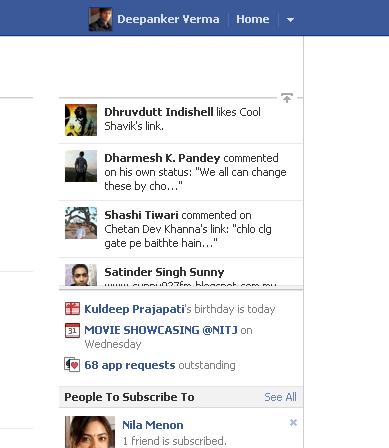
Now find the up arrow just above the ticker. Click on this to hide your ticker.

This arrow will now changed to down arrow. Click on this to show the ticker again.


If you will show your side bar again, your ticker will be there but hiding the sidebar will hide the ticker too.

Follow Techlomedia on Google News to stay updated. Follow on Google News

Affiliate Disclosure:

This article may contain affiliate links. We may earn a commission on purchases made through these links at no extra cost to you.

Deepanker Verma

About the Author: Deepanker Verma

Deepanker Verma is the Founder and Editor-in-Chief of TechloMedia. He holds Engineering degree in Computer Science and has over 15 years of experience in the technology sector. Deepanker bridges the gap between complex engineering and consumer electronics. He is also a a known Security Researcher acknowledged by global giants including Apple, Microsoft, and eBay. He uses his technical background to rigorously test gadgets, focusing on performance, security, and long-term value.

Related Posts

Stay Updated with Techlomedia

Join our newsletter to receive the latest tech news, reviews, and guides directly in your inbox.