
Choosing the right monitor is more important than most developers think. You spend hours staring at text, switching between windows, and debugging code. A poor display can lead to eye strain, headaches, and even lower productivity. A good one makes everything feel easier and sharper.
In this guide, I will explain what really matters when buying a monitor for coding, and then suggest a few solid options you can consider.
What Developers Should Look For in a Monitor
The first thing that matters is text clarity. Coding is mostly reading and writing text, so sharpness is more important than flashy features. This is why resolution and panel type matter more than refresh rate or extreme brightness.
A 27-inch monitor with 1440p resolution is the sweet spot for most developers. It gives you enough space to open multiple windows side by side while keeping text crisp. If you go lower, like 1080p on a large screen, text starts to look soft. If you go higher, like 4K, everything becomes very sharp, but scaling can sometimes be inconsistent depending on your setup.
Next is the panel type. IPS panels are the best choice for development work. They offer consistent colors and, more importantly, better viewing angles and text clarity. TN panels should be avoided, and VA panels are decent but not as reliable for sharp text.
Refresh rate is not a major factor here. A 60Hz or 75Hz monitor is more than enough for coding. Higher refresh rates feel smoother, but they do not add much value for development work.
You should also look for features like anti-glare coating, flicker-free technology, and a height-adjustable stand. These small things make a big difference during long coding sessions.
Flat vs Curved Monitors
Flat monitors are generally better for coding. Text looks natural and straight across the screen.
Curved monitors only make sense if you are going for an ultrawide setup. For standard sizes, they do not add much benefit and can sometimes feel unnecessary.
Should Developers Buy OLED Monitors?
OLED monitors look amazing at first glance. They offer deep blacks, high contrast, and vibrant colors. But for coding, they are not the best choice. The biggest concern is burn-in. Developers often keep the same windows open for hours, such as code editors, terminals, and browser tabs. Over time, this static content can leave permanent marks on an OLED screen.
Another issue is text clarity. OLED panels use a different subpixel structure, which can make text look slightly less sharp compared to IPS displays. This may not bother everyone, but when you spend the entire day reading code, it becomes noticeable.
OLED also tends to be more expensive, and the benefits it offers are not very useful for coding. It makes more sense for gaming or watching content.
Just to summarize:
Go for a 27-inch 1440p IPS monitor with a flat screen. It offers the best balance of sharp text, screen space, and comfort. Avoid OLED for long coding sessions due to burn-in risk and text clarity issues.
Best Budget Monitors for Programmers in 2026
| Monitor | Key Highlight | Best For | Price |
|---|---|---|---|
| BenQ RD280U | More vertical space for coding | Heavy coding, productivity | ₹49,989 |
| Dell P2725QE | Sharp text + smooth experience | Premium work setups | ₹37,599 |
| Dell S2725DSM | Smooth UI + good ergonomics | Daily coding + multitasking | ₹22,999 |
| BenQ GW2790Q | Coding + eye comfort features | Budget developers | ₹14,999 |
| Acer SA272U P1 | Best value + high refresh rate | Budget + performance users | ₹12,999 |
Premium Picks (If Budget Is Not an Issue)
1. BenQ RD280U
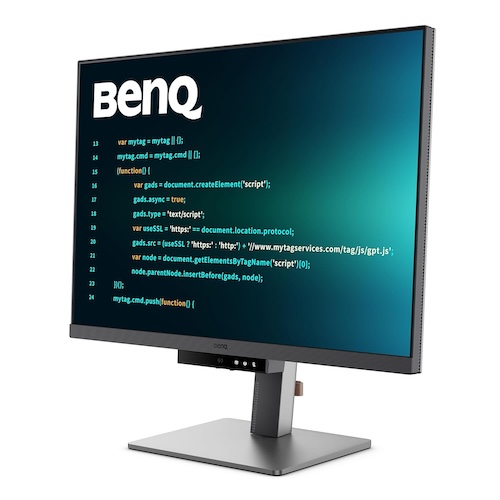
The BenQ RD280U 28.2-inch is a very different kind of monitor, built specifically for developers rather than general users. It comes with a 28.2-inch 4K+ IPS panel (3840 × 2560), which is sharper than standard 4K and offers more vertical space. It offers a 3:2 aspect ratio, which lets you see more lines of code on screen compared to regular 16:9 monitors
BenQ has also focused heavily on coding experience. You get dedicated coding modes that improve text contrast and make it easier to differentiate code elements. There is also a quick-access coding hotkey, which lets you switch modes instantly without going into settings.
It also offers MoonHalo backlight, which adds soft ambient lighting behind the monitor. It helps reduce eye strain, especially when working in low light conditions. Along with this, the monitor includes Night Hours Protection, which automatically adjusts brightness and lighting based on your environment.
The monitor also has 95% P3 coverage, so it works well for frontend developers and designers. The 1200:1 contrast ratio is decent for an IPS panel, and viewing angles are consistent.
The monitor includes USB-C with 90W power delivery. It also supports daisy chaining, which is useful if you want a multi-monitor setup without extra clutter.
BenQ has also paid attention to ergonomics. The monitor is designed for long usage with features that support better posture and reduced fatigue. It also uses recycled materials, which is a small but good addition.
Why this is a great pick:
- More vertical space with 3:2 aspect ratio (see more code)
- 4K+ resolution for very sharp text
- Dedicated coding modes and shortcut key
- Strong eye comfort features with smart lighting
- USB-C with 90W charging and daisy chain support
Price: Rs. 49,989
Buy Here: Amazon
Dell P2725QE 27
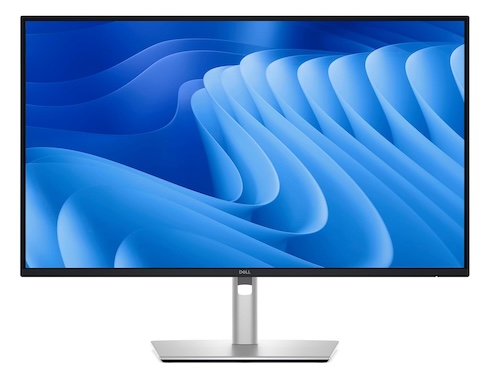
Dell P2725QE 27 is an impressive monitor with some notable features for professionals. You get a 27-inch 4K IPS panel, which means very sharp text. This is especially useful for developers who spend hours reading and writing code. Everything looks cleaner and easier on the eyes. It also has 100Hz refresh rate which makes scrolling smoother and reduces visible flicker. The overall experience feels more fluid compared to standard 60Hz monitors.
Dell has also added ComfortView Plus, which reduces blue light without affecting colors. This helps during long working hours, especially if you code late at night.
Color performance is solid with 99% sRGB coverage and support for over 1 billion colors. If you also do frontend work or UI design, this adds extra value. The 1500:1 contrast ratio is better than typical IPS panels, so blacks look deeper and overall visuals feel more balanced.
Another practical feature is the front-facing pop-out ports. You get quick access to USB-C and USB-A, which is useful for plugging in devices without reaching behind the monitor. It also keeps the setup clean when not in use.
Why this is a great pick:
- Sharp 4K display for clear text
- 100Hz refresh rate for smoother experience
- Built-in eye comfort features
- Convenient front USB ports
- Reliable Dell build quality
Price: Rs. 37,599
Buy Here: Amazon
Mid-Range Sweet Spot
Dell S2725DSM
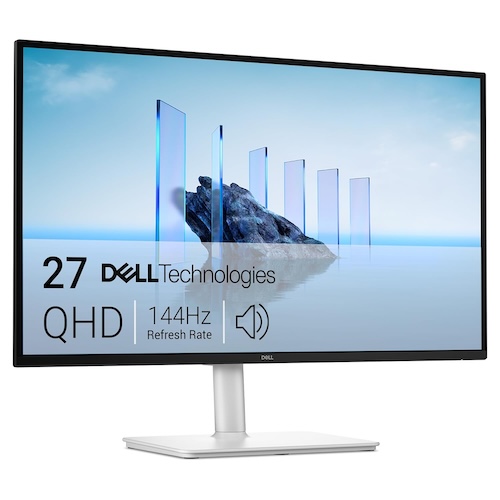
The Dell S2725DSM is a solid mid-range monitor that balances performance, features, and price very well. It comes with a 27-inch QHD (1440p) IPS panel, which offers sharp text and enough screen space for multitasking. It has 144Hz refresh rate, which makes scrolling and UI interactions feel noticeably smoother. The monitor also has 1ms MPRT, which helps reduce motion blur. While this is more useful for gaming, it still improves overall smoothness during daily use.
The monitor also includes dual 3W built-in speakers, which are decent for casual use. You get multiple sound profiles, so you can tweak audio based on what you are doing.
For long working hours, Dell has added TÜV-certified eye comfort features. It reduces harmful blue light without affecting colors, which helps reduce eye strain during extended coding sessions.
Ergonomics is another strong point. The stand supports height adjustment, tilt, swivel, and pivot, so you can easily adjust it for a comfortable setup. This is especially useful if you work long hours at your desk.
On the productivity side, features like Easy Arrange help you manage multiple windows efficiently. You can create layouts and quickly switch between them, which improves workflow.
Why this is a great pick:
- Sharp 1440p display for coding and multitasking
- 144Hz refresh rate for smoother experience
- Built-in speakers for convenience
- Strong eye comfort features
- Fully adjustable ergonomic stand
Price: Rs. 22,999
Buy here: Amazon
Budget Picks (Best Under ₹15K)
BenQ GW2790Q
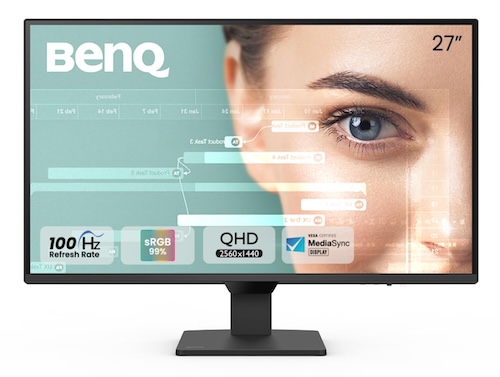
The BenQ GW2790Q is one of the most practical budget 1440p monitors for developers. It comes with a 27-inch QHD IPS panel (2560 × 1440), which delivers sharp text and enough space for multitasking. For coding, this is a big upgrade over 1080p.
It also features a 100Hz refresh rate, which makes scrolling and general usage feel smoother compared to standard 60Hz monitors. While not essential for coding, it improves the overall experience.
BenQ has added multiple dedicated modes like Coding Mode, ePaper Mode, and Mbook Mode. These are actually useful for developers, as they improve text contrast and reduce strain during long sessions.
Color performance is solid with 99% sRGB coverage and 350 nits brightness, so visuals look vibrant and accurate. This also makes it suitable for frontend work.
The monitor includes Brightness Intelligence (B.I. Gen2), which automatically adjusts brightness based on ambient light. This helps maintain eye comfort throughout the day without manual changes.
Connectivity is flexible with dual HDMI and DisplayPort, along with an easy input switch feature for quickly changing between devices.
Why this is a great pick:
- Affordable 1440p display with sharp text
- 100Hz refresh rate for smoother experience
- Dedicated coding and reading modes
- Strong eye comfort features with auto brightness
- Reliable color performance for daily work
Price: Rs. 14999
Buy Here: Amazon
acer SA272U P1
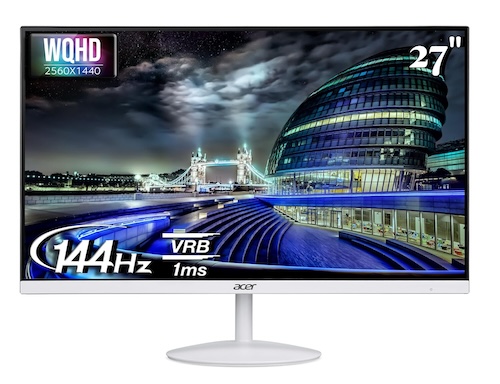
The Acer SA272U P1 is one of the most aggressive value-for-money monitors in this segment. It offers a 27-inch WQHD IPS panel (2560 × 1440), delivering sharp visuals and wide viewing angles, which is ideal for coding and multitasking.
One of its key highlights is the 144Hz refresh rate with 1ms VRB response time. This makes the overall experience very smooth, especially when scrolling through code or switching between windows quickly.
It also includes AMD FreeSync and HDR10 support, which helps in reducing screen tearing and improving contrast. While these features are more useful for gaming and media, they still add to the overall display quality.
The monitor comes with built-in speakers, which are convenient for casual use. You also get HDMI and DisplayPort connectivity, making it easy to connect with different devices.
For long usage, Acer has included VisionCare features like flicker-less technology, blue light reduction, and low dimming. These help reduce eye strain during extended work sessions.
Why this is a great pick:
- Sharp 1440p IPS panel at a very competitive price
- 144Hz refresh rate for smooth performance
- Built-in speakers for convenience
- Eye protection features for long usage
- Great overall value for money
Price: Rs. 12999
Buy Here: Amazon
Final Thoughts
If you are confused between all these options, here is a simple way to decide.
If budget is not an issue and you want something unique, the BenQ RD280U stands out. The extra vertical space actually improves coding productivity. But it is not for everyone.
If you want a safe premium option, the Dell P2725QE is a better all-rounder. You get sharp 4K clarity, smoother 100Hz experience, and practical features like USB-C.
For most developers, the real sweet spot is still 1440p IPS monitors. The Dell S2725DSM offers a great balance with smooth performance and strong ergonomics. It is ideal for daily work.
If you are on a tighter budget, both the BenQ GW2790Q and Acer SA272U P1 are excellent choices. You still get sharp 1440p panels, good colors, and features that matter for long coding sessions.
At the end of the day, the best monitor depends on how you work:
- Want maximum productivity → go for 3:2 or 4K
- Want best value → 1440p IPS is enough
- Want smooth experience → higher refresh rate helps
For most developers, a 27-inch 1440p IPS monitor is still the best balance of price, clarity, and comfort in 2026.