

VirusTotal is a free online malware scanning service that allows users to scan files and URLs. This service uses various antivirus engines to check and match against malware. This online service has now released an Android app which is available to download from Google Play Store.

This app scans Android smartphones and installed apps. Each app is tested against 40 different antivirus vendors and at the end of the scan, it shows the security status of the app with scan results.
VirusTotal has the following vendors integrated with its own service:
- McAfee
- Symantec
- TotalDefence
- Norman
- AVG
- Panda
- Rising
- PCTools
- Ikarus
- TrendMicro
- F-secure
- Kaspersky
- BitDefender
- Comondo
- Avast
- Sophos
- and plenty more
It will inform you about malware (virus, trojans, worms) on your phone. When launched for the first time, this app scans all apps on your device under a separate tab. If you see a blue question mark at the front of the app, it means that the status of the app is not available and is currently missing from the VirusTotal database. In this case, you need to upload the app. Once a specific app gets uploaded and scanned by VirusTotal, the service’s online database automatically gets updated with relevant details.
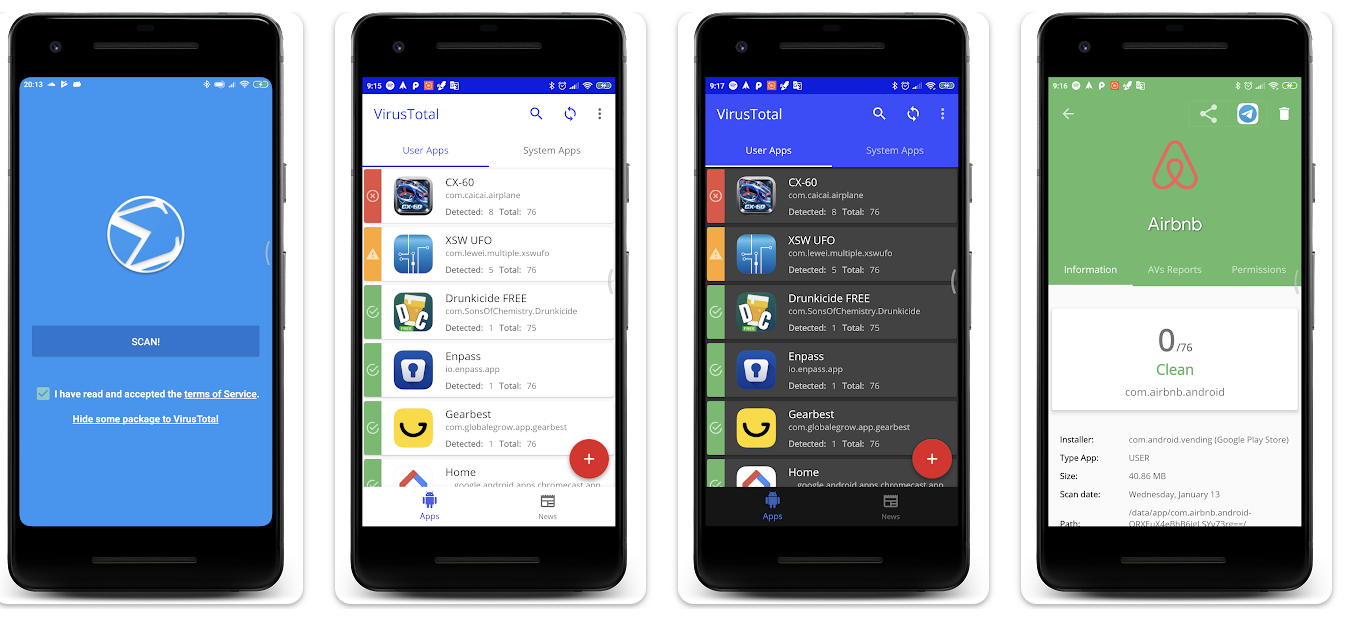
After a full scan, it will show the Android icon at the front of the scan results. The Green Android icon means a clean scan result, but the red icon indicates an app that has been detected for potential malware by a specific (or multiple) antivirus service. Tap on the app title to see the detailed results. In this, you will be able to check out the details of various threats detected by each individual vendor. It will also show the detected threat alongside each vendor.
This is not an Antivirus app. It only shows the potential threats on apps. You will be able to know the status of the app. To remove these threats, you will have to install an Antivirus app.
Download Virus Total App on Android