


Snapchat is a popular app for staying connected with friends. You can send snaps, chat, and share your moments. But sometimes, you may want to hide a chat from your screen. Maybe you want to keep a conversation private or just remove it from your chat feed.
If you are looking for a “hide chat” button in Snapchat, you will not find one. That is because Snapchat does not offer any direct feature to hide chats like WhatsApp or Instagram. But there are some simple workarounds you can use to make chats less visible. These tricks will help you keep your chat feed clean and private.
Here are a few ways to hide chat in Snapchat:
Clear the Conversation
The easiest way to hide a chat is to clear it from your chat feed. This removes the chat from your screen but does not delete the conversation from the other person’s account.
Steps to clear a chat:
- Tap your profile icon → gear icon (Settings).
- Under Account Actions, tap Clear Conversations.
- Tap the X next to any chat that you want to clear. The conversation will vanish from your feed.

It is important to note that it only hides the chat thread from your view, doesn’t erase the chat contents. If the other person sends a new message, the thread returns.
Set Messages to Delete After Viewing
By default, Snapchat deletes messages 24 hours after they are viewed. But you can change this setting so messages disappear right after someone opens them. This helps if you do not want messages to stay in the chat.
How to delete chats after viewing:
- Open the chat with the person.
- Tap on their name or Bitmoji. It will open the Profile
- Tap the three horizontal dot icon at the top right corner and select Chat and Notifications Settings.
- Tap Delete Chats.
- Choose After Viewing.
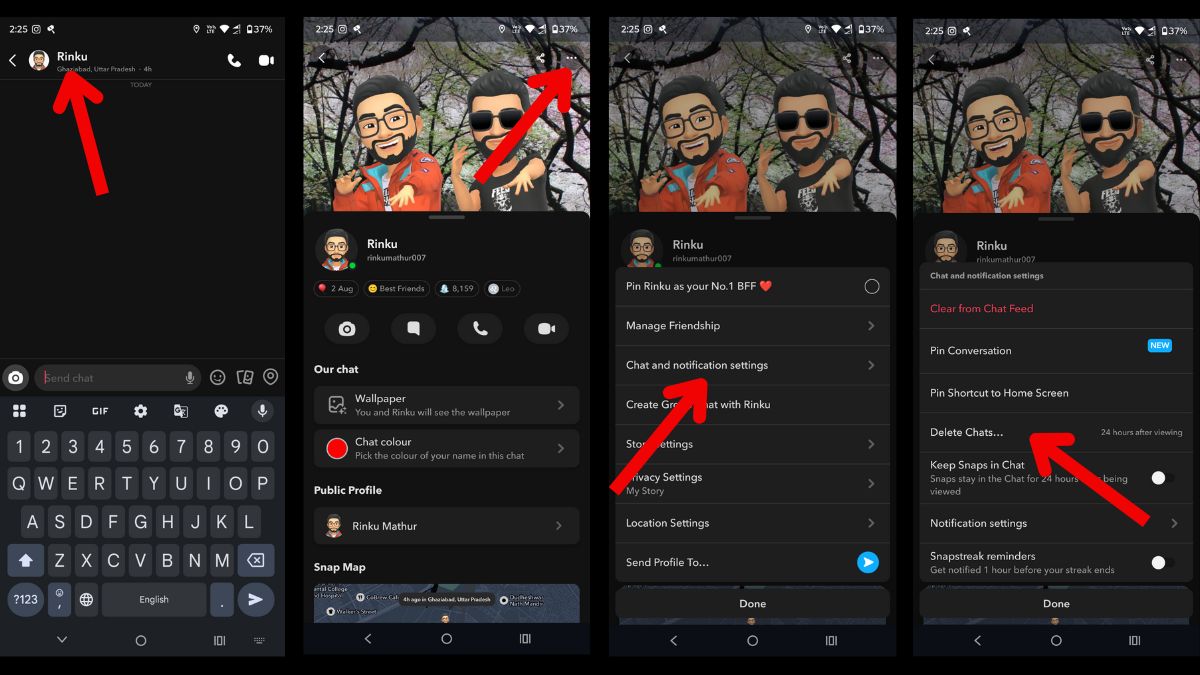
Now, all messages will disappear immediately after being opened. It is not the same as hiding the entire chat, but it keeps the chat empty.
Final Words
Snapchat does not have a built-in option to hide chats, but you can still make your chats less visible by using these simple methods. Whether you clear the chat, mute it, or set messages to delete after viewing, you have some control over how chats appear.
These tricks will not hide chats from Snapchat completely, but they are useful if you want to keep your conversation feed clean and private.
If Snapchat adds a proper “hide chat” feature in the future, that will make things easier. But for now, these workarounds do the job.
Also read:
- Snapchat Planets Order and Meaning: Friend Solar Systems
- How to Delete Snapchat Account Permanently
- Snapchat Emoji Meanings







