MightyText is a nice service that allows users to send and receive SMS of your phone in the browser. Initially, this service was only available as Chrome extension, but Web app is now available which works on all browsers.

The concept behind this app is similar, it syncs your smartphone’s SMS and MMS messages directly to the cloud. So all your SMS and MMS are also available in the web interface od the app. Thus it allows you to send and receive your phone’s messages from any browser.
Installation process is very simple. First of all you need to download MightyText Android app into your Android smartphone. Visit Google Play store and download. Then you need to setup it into your browser. Here are setup process for all the popular browsers..
Google Chrome: Download and install MightyText Google Chrome Extension from app store. Then, Launch MightyText Web App.
Firefox: Download and install MightyText Firefox add-on in the browser. Then, Launch MightyText Web App.
Safari: Directly launch the app. There is no add-on has been released yet.
Internet Explorer (IE9)
- In IE, Click the Settings icon, then select Internet Options
- Select the Security tab
- Click the Green Trusted Sites icon, then the Sites button
- Under “Add this website to the zone:”, type in textyserver.appspot.com, then hit Add. Then, also add mightytext.net to this same list. Then hit Close, then OK.
- Make sure the box “Require server verification (https:)…” is UNCHECKED
- Restart the IE9 browser, then Launch MightyText Web App.
Opera: This app does not support Opera browser, but company has promised to announced support for Opera soon.
It uses your Android phone number to send and receive SMS. When you run the app, you will see the inbox message list at left sidebar and all messages for selected conversations in the main screen of the app.
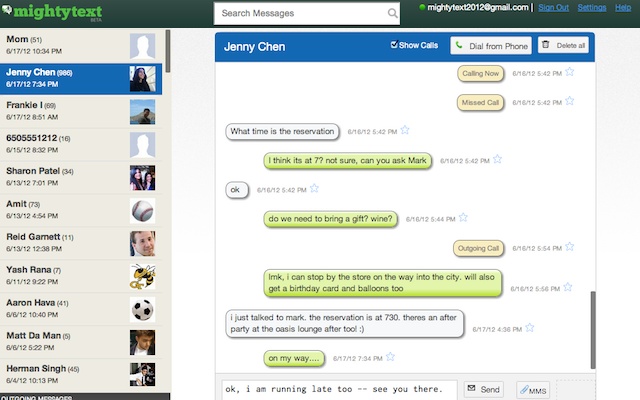
Not only can you send SMS or MMS using this interface but you can also make a call by dialing from this interface and it will immediately execute the action on your Android phone.
One thing to note that, You can still send/receive texts on your phone as you normally would. It will not interrupt your phone’s working. It will only synchronize messages with cloud. So your messages will also be available on the web app.
Via MightText