How to Get Delete Button Back in New Gmail for Android

Deepanker Verma June 6, 2013
How to Get Delete Button Back in New Gmail for Android

Add Techlomedia as a preferred source on Google. Follow on Google News

Few days back, Gmail has updates Android app with new features and look. But it has removed the delete button from the toolbar. In new app, when you select an email, it only shows “archive,” “Mark as unread,” and “Move to a folder.” To delete an email, now you need to click on settings and then delete option. We are not sure why Google has made it difficult to delete emails, but you can get delete button back to your toolbar.

By default, it looks like this:

Get back Delete in Gmail Android
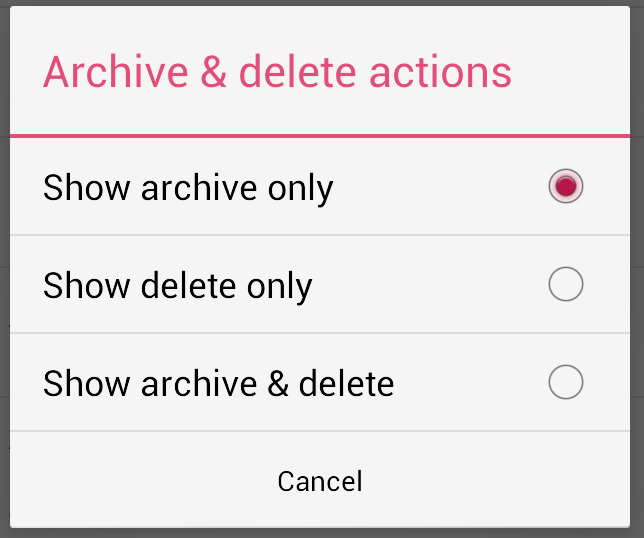
Press the menu ad then tap on settings. Now select “General Settings.” Now select “Archive & Delete” option.
Get back Delete in Gmail Android
Here you, you will find three options. archive only, delete only, and archive & delete. Archive Only is the default selected option. Select any of the other two to get the delete button back in toolbar. Selecting third option will remove the ‘move to folder’ button from toolbar.

Get back Delete in Gmail Android

Gmail has also made few changes in the app. If you want to change anything, just take a look in all options in the settings and you will find most of the options there.

If you are facing any kind of other problem in Gmail app for Android after the update, ask via comments.

Follow Techlomedia on Google News to stay updated. Preffered Source

Affiliate Disclosure:

This article may contain affiliate links. We may earn a commission on purchases made through these links at no extra cost to you.

Deepanker Verma

About the Author: Deepanker Verma

Deepanker Verma is the Founder and Editor-in-Chief of TechloMedia. He holds Engineering degree in Computer Science and has over 15 years of experience in the technology sector. Deepanker bridges the gap between complex engineering and consumer electronics. He is also a a known Security Researcher acknowledged by global giants including Apple, Microsoft, and eBay. He uses his technical background to rigorously test gadgets, focusing on performance, security, and long-term value.

Related Posts

Stay Updated with Techlomedia

Join our newsletter to receive the latest tech news, reviews, and guides directly in your inbox.