


Recently, I wrote an article on how to apply for a duplicate PAN Card. If you lose your PAN Card, you can request the Income tax department for a duplicate PAN Card. After you submit the application, it may take up to 15 days to dispatch the duplicate copy of your PAN Card.
The Income Tax Department of India has recently introduced the e-PAN. This is issued only to the individual taxpayer of the country. If you want a soft copy of your PAN Card instantly, you can download the e-PAN from the Income tax website. It won’t take more than 2 minutes to get a copy of your e-PAN in PDF format.
You can only download e-PAN if you have linked your PAN Card with the Aadhaar. If you have not linked your Aadhaar with PAN then, you should do it before March 31, 2022.
Also see: How to Download e-Aadhar Card
How to download an e-PAN card?
First of all, you need to open the income tax website department’s e-Pan download form. Enter your PAN Card number, Aadhat number, and data of birth. Then submit this form.
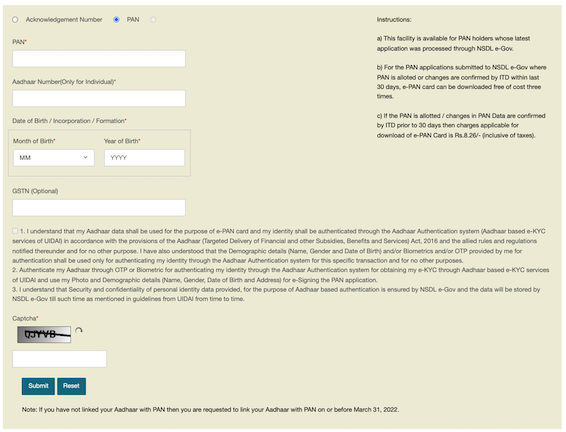
After you submit this form, you will receive an OTP on your phone number. Enter the OTP and confirm. You will have to make a payment of Rs. 8.26 before you could download e-PAN card. You can pay using UPI, Debit card, or credit card.
After the successful payment, you will get an option to download your e-Pan card. Your e-PAN will be password protected. The password to open e-PAN will be your date of birth.
Frequently asked questions about E-PAN?
Yes, e-Pan card is PAN is equally valid and can be used at the place of the original PAN card
As I already said, e-PAN is equally valid and can be used for KYC.
Yes, you can submit e-PAN as identity proof for opening the bank account.
You can either use the soft copy or get it printed.







