There could be several reasons why you want to compress a PDF file. I also saw a surge in searches for “compress pdf to 100kb,” ‘compress pdf files to below 100 kb,” compress pdf files to 100kb online,” and similar keywords. Not sure why people want to reduce PDF to 100kb or less. It seems there are a few forms where the upload limit has been set to 100kb. 100KB is a very small file size. If you want a PDF file to compress to 100Kb or below, you need to use an effective PDF compression tool. There are many PDF compressor tools. If you are not sure what tool to use, check this list of the best PDF compression tools.
Compressing a PDF reduces the file size, making it easier to upload to websites with file size limits, share via email, or store on devices with limited space.
Before I start, let me make it clear that PDF compression doesn’t guarantee the output size. PDFs with lots of images and graphics are typically larger in size. So, it is hard to compress it to 100Kb without quality loss. If you over-compress a file, it can affect text readability and image clarity. It all depends on the input PDF. You cannot upload a PDF file of 500MB and expect the PDF compression tool to compress this PDF to 100KB. All the PDF compressor tools listed in its article are effective and will surely give you the best possible compression.
Also see: Combine PDF files: Merge PDF
1. Compress PDF by Smallpdf

Compress PDF is a good online tool that effectively compresses PDF files. You just need to drag and drop the PDF file in the box and wait for the compression. It is an online tool, so it can be used from any platform including Windows, Mac, Linux, Android, or iOS. This online PDF compression tool reduces scanned PDF files to 144 dpi. It also has a limit of 5GB. I don’t think most people deal with PDF files of this much side.
In the free version of this tool, you can easily get compression of up to 40-50%. The tool also offers a Pro version which it offers compression of up to 75-80%.
Also see: How to convert PDF to Word document for free
2. Docupub Compress PDF

This PDF compression tool gives you more control over PDF compression. The tool lets you select the compression level. For best compression, select the compression level saying Maximum Compression. You can select the image quality of the target PDF file. If you want better compression, you can use the quality of color images, gray images, and mini images for the compressed PDF file. There are also more advanced settings options for better PDF compression.
This is also an online tool, so you don’t need to install any software. It works fine on any platform including Windows, Mac, Linux, Android, and iOS. This tool has a max upload size of 24MB.
Also see: How to convert a PDF to EPUB
3. Soda PDF: Compress PDF

Compress PDF is another excellent tool for making PDF files smaller by compressing it. This is an online PDF compression that automatically compresses PDF files by using computer algorithms. It reduces bits by identifying and eliminating statistical redundancy for PDF compression. You can either upload files from your computer or directly upload them from Google Drive and Dropbox.
4. PDF Compressor
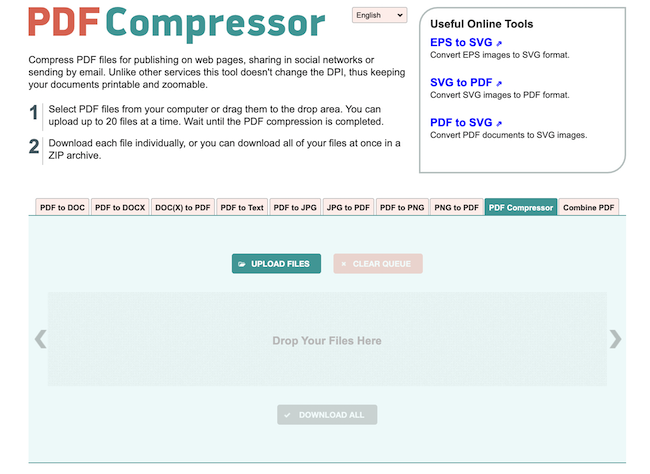
If you want a bulk PDF compressor tool, this is for you. Pdfcompressor.com lets you upload up to 20 PDF files at a time and compress them simultaneously. Then You can download compressed files one by one or a ZIP file. This is also an excellent tool for PDF compression. I like this website because it also offers several other converter and compression tools.
5. Compress PDF to 100kb on a smartphone
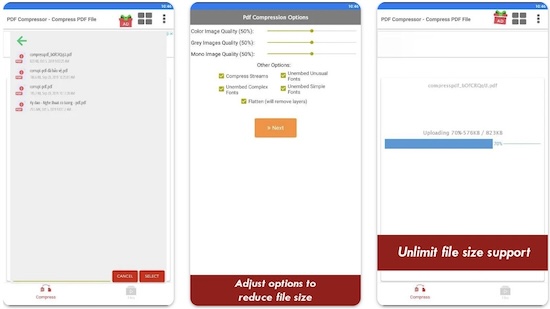
If you want a dedicated mobile app to install on your phone to compress PDF files, you can install the Compress PDF app. The app is available for Android and iOS. You can upload PDF files from air device storage or Drive, OneDrive, Box, and more. It will send your PDF file to the Compress PDF server and return the compressed PDF file. You can then download the PDF file on your phone.
Preview App (Mac)
Mac Preview. Mac users can take advantage of the built-in Preview app to compress PDFs. Open PDF in the Preview app. Go to File > Export. Select “PDF” as the format, then click Quartz Filter > Reduce File Size. Save the compressed PDF.
Wrap up
Compressing a PDF to 100KB can be challenging if you are working with larger, image-heavy PDF files. But you can do it with the right tools and techniques. Whether you choose to use an online service or a desktop tool, always ensure that the text remains readable and the document retains its essential content. Now you have different online tools and mobile apps to compress PDF files. If you want to reduce PDF files to 100KB, you can use any of these tools.