

Home » News » Picsart gets an AI-powered GIF generator

Picsart gets an AI-powered GIF generator

Picsart gets an AI-powered GIF generator

Add Techlomedia as a preferred source on Google. Preferred Source

Popular image editor Picsart has just launched an AI-powered GIF generator. It lets you create cool animated GIFs using text prompts. Unlike other text-to-image generators that generate static images, this new AI tool generates animated GIFs.

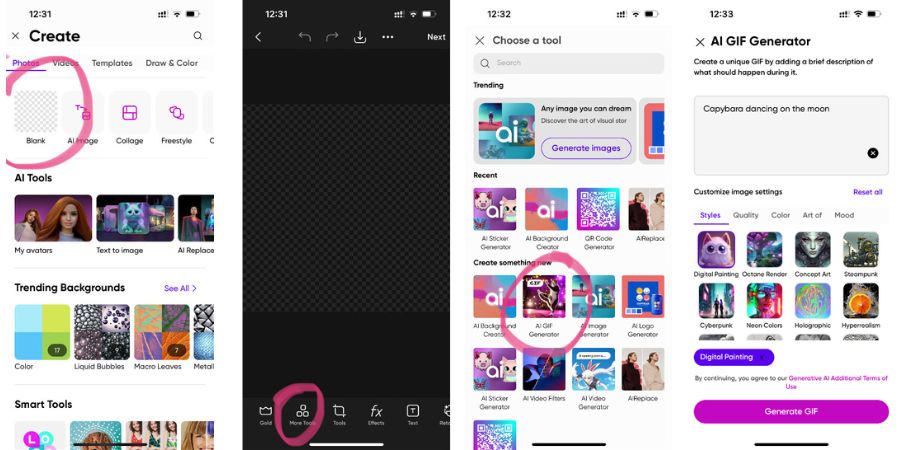
For using this GIF generator, you need to download the Picsart app or update it to the latest version. Open the app and tap the + icon at the bottom of the screen. Start with a blank canvas and go to ‘more tools’ at the bottom of the screen. Find the ‘AI GIF Generator’ and then enter your prompt. Select ‘generate’ to generate GIFs.
Picsart gets an AI-powered GIF generator

You can try using different text prompts and see what kind of GIF it generates. The company has integrated the FIG tool into its Android, iOS, and web apps. So, you can use it on any platform of your choice and generate funny animated GIFs.

The tool generates most GIFs cartoony. So, don’t expect real-looking GIFs. But, this is a fun game to try.

Picsart’s AI GIF generator is now available. So, try it and see how it works for you.

Follow Techlomedia on Google News to stay updated. Follow on Google News

Affiliate Disclosure:

This article may contain affiliate links. We may earn a commission on purchases made through these links at no extra cost to you.

Deepanker Verma

About the Author: Deepanker Verma

Deepanker Verma is the Founder and Editor-in-Chief of TechloMedia. He holds Engineering degree in Computer Science and has over 15 years of experience in the technology sector. Deepanker bridges the gap between complex engineering and consumer electronics. He is also a a known Security Researcher acknowledged by global giants including Apple, Microsoft, and eBay. He uses his technical background to rigorously test gadgets, focusing on performance, security, and long-term value.

Related Posts

Stay Updated with Techlomedia

Join our newsletter to receive the latest tech news, reviews, and guides directly in your inbox.