The strength of your password is important. The hard password you use, the more secure your account becomes. Cybercriminals can easily crash weak and easy to guess passwords using available tools. Still, there are thousands of people who use a common pattern or easy passwords.
SplashData has compiled a list of passwords and prepared a list of commonly used and worst passwords of 2019.
Like every year, 123456 tops the list of worst passwords in 2019. It was also at the top in 2018. The password is now in the fourth position dropping from second last year. 12456 has been at the top since 2013 and the password had been in second place from 2013 to 2018.
List of top 25 worst passwords of 2019
- 123456
- 123456789
- qwerty
- password
- 1234567
- 12345678
- 12345
- iloveyou
- 111111
- 123123
- abc123
- qwerty123
- 1q2w3e4r
- admin
- qwertyuiop
- 654321
- 555555
- lovely
- 7777777
- welcome
- 888888
- princess
- dragon
- password1
- 123qwe
“Invoking the name of the president or any other celebrity as your password is a dangerous decision, one that hackers will exploit and put you at substantial risk of having your identity stolen,” said Morgan Slain, CEO of SplashData, Inc., a developer of password security solutions for personal and business protection.
In case you are interested in historical data to learn the worst passwords of previous years, you can see the list below.
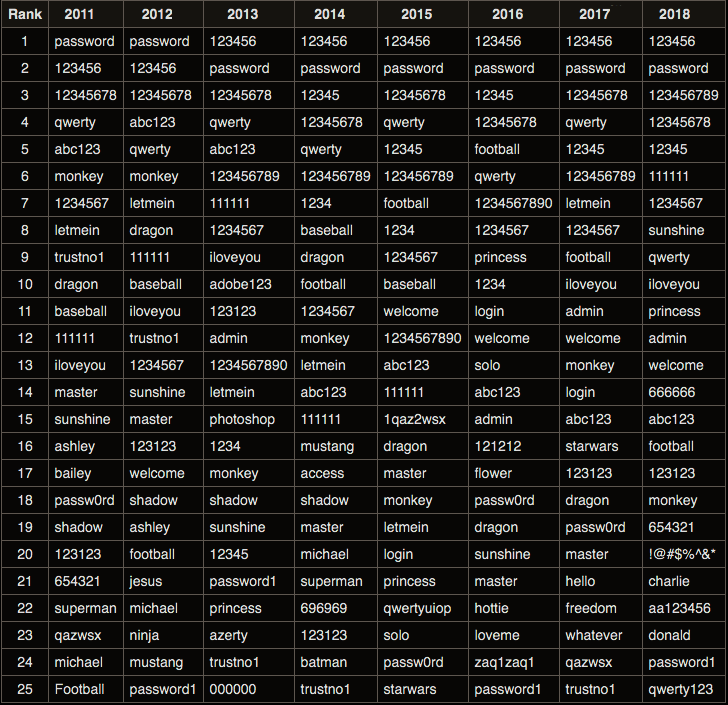
If you are using any of these passwords, you must change and stop using any of these in the future. Most of the password cracking tools begin with trying these passwords while performing brute force attacks. If you are not sure what password to use, you can use a secure password generator to generate a strong password and use a password manager if you find it hard to remember passwords.
You can also check if any of your web accounts have been compromised in the past. Google Chrome now also warns you if you are using an email and password combination leaked in previous data leaks.