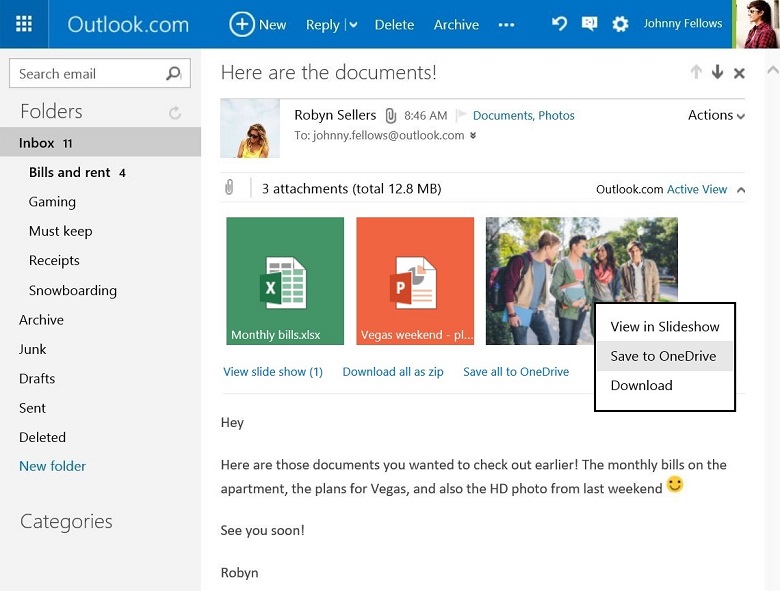
Microsoft’s email service Outlook.com has been updated with one important feature. Now, it lets you save email attachments directly to your OneDrive cloud storage.
Users can do this by clicking on “Save to OneDrive” link in the dropdown menu on attachments. Multiple files can also be saved at once and attachments will be saved in the OneDrive folder called “Email attachments” which you can access any time. So, you can easily access these attachments by using OneDrive’s web of mobile apps.
You will still have an option to download the attachments in your system.
This feature is now live and you can use this starting today. Share your views about this feature with us via comments.
Follow Techlomedia on Google News to stay updated.
Affiliate Disclosure:
This article may contain affiliate links. We may earn a commission on purchases made through these links at no extra cost to you.
About the Author: Deepanker Verma
Deepanker Verma is the Founder and Editor-in-Chief of TechloMedia. He holds Engineering degree in Computer Science and has over 15 years of experience in the technology sector. Deepanker bridges the gap between complex engineering and consumer electronics. He is also a a known Security Researcher acknowledged by global giants including Apple, Microsoft, and eBay. He uses his technical background to rigorously test gadgets, focusing on performance, security, and long-term value.