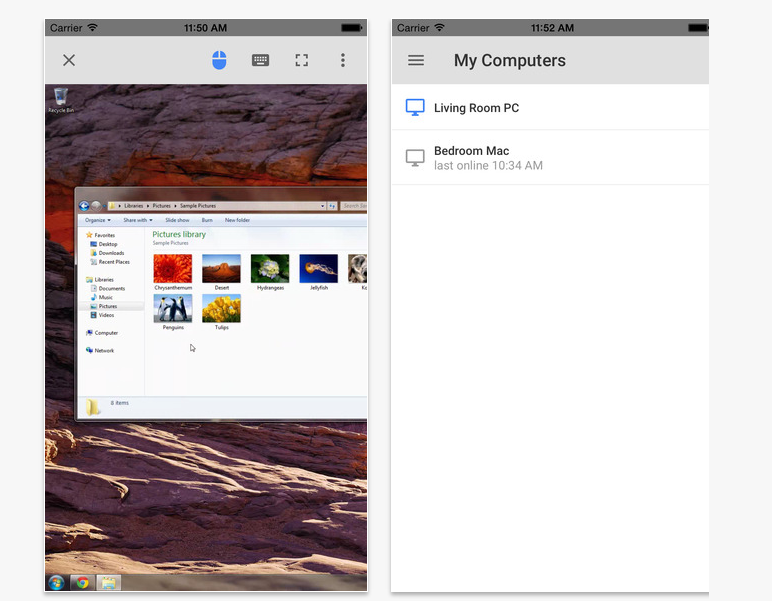
Google today released its Chrome Remote Desktop app for iOS devices. If you have installed remote desktop extension in Google Chrome from desktop, you can use this iOS app to control your desktop browser direct from your iPhone or iPad.
This app has already been available for Android devices for few months. And now Google has made it available for iOS users too.
One of the best use of this app is to offer remote technical support. You can help your parents and friends via remote location by controlling their computer by using this app.
Chrome Remote Desktop app for iOS supports all iOS devices running on iOS 7.0 or higher.
Follow Techlomedia on Google News to stay updated.
Affiliate Disclosure:
This article may contain affiliate links. We may earn a commission on purchases made through these links at no extra cost to you.
About the Author: Deepanker Verma
Deepanker Verma is the Founder and Editor-in-Chief of TechloMedia. He holds Engineering degree in Computer Science and has over 15 years of experience in the technology sector. Deepanker bridges the gap between complex engineering and consumer electronics. He is also a a known Security Researcher acknowledged by global giants including Apple, Microsoft, and eBay. He uses his technical background to rigorously test gadgets, focusing on performance, security, and long-term value.