Facebook is changing its looks constantly from last few months. In respect of it, now facebook releases a new look for pages but Facebook is not calling it Timeline for pages, rather it just says it’s revamping Facebook Pages.
Just like with regular users, page admins have a period to get accustomed to the change and curate their timeline before it goes live for everyone, but it will go live for everyone by 30 march whether admins like it or not.
When an admin click on preview button, the new look of facebook is ready to use which is only visible to admin. If admin don’t like this new look, he/she may switch to previous one. But this new look will automatically set to all pages after 30 march, weather the admin like it or not.

Apart from the new look, there are some things that page admins should like about the new design. For one, they can pin posts which will stay on top of the timeline for up to a week, to highlight important stories. A new posting icon ‘milestone’ is also added with this new look in the page.
An admin panel is there which is visible to admin only. Notifications, likes, insights and messages are the features of this admin panel. Admin can manage page, edit page by the ‘manage’ button. A ‘build audience’ option is also there for advertisement of the page. You can share your page and invite friends via e-mail through this. A ‘help’ button is also there to help out admin about page and its activity.
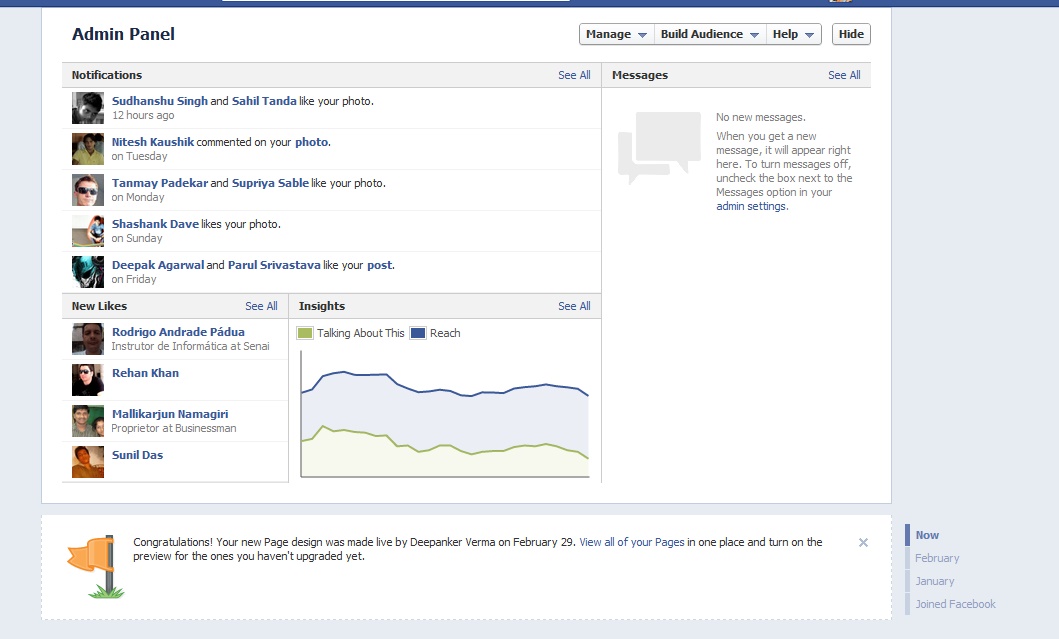
A new and great feature of this new timeline view is messages. Admin can also start using private messages to talk to fans, though fans have to initiate the conversation, presumably to prevent spam. This is part of a brand new admin dashboard that is also rolling out.
Page admins can already preview how their pages will look like when the new design goes live. They can also customize the timeline, to add or remove entries, photos and so on.