Have you ever wished to save a web page as a PDF? Saving a webpage in PDF form is better than saving it as HTML. You can later read it using any PDF reader or web browser. There are many tools available for converting HTML to PDF but you can also save a web page as a PDF with Google Chrome. Chrome has a built-in option to save any HTML page into a PDF. In this article, I will tell you how you can save a web page as a PDF in Google Chrome.
Follow these steps
Go to the webpage you want to save as PDF.
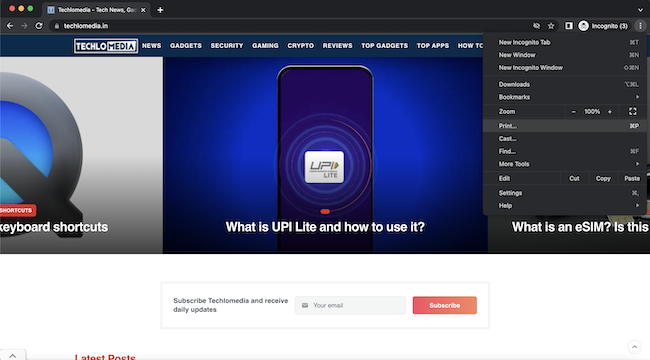
Now click on the Three vertical dot icon to open Menu and then select Print. Alternatively, you can also press CTRL+P on Windows and COMMAND+P on macOS.
Now you will be redirected to the print page. Here select Destination as “Print to PDF”
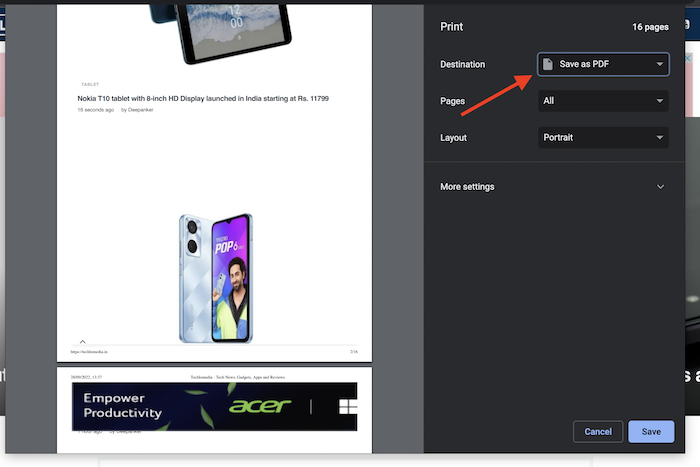
Now click on the Save button. It will ask you to select the destination where you want to save the page.
This is a simple way to save a web page in PDF form with the Google Chrome web browser.
Now you know how to quickly save a webpage to PDF quickly using Chrome.