
Cloud gaming is slowly changing the way people play games. Instead of buying expensive hardware and downloading huge game files, players can now stream games directly from the internet. Microsoft’s answer to this is Xbox Cloud Gaming.
If you have heard terms like xCloud or Game Pass cloud gaming and felt confused, this article explains everything in simple words.
What is Xbox Cloud Gaming?
Microsoft Xbox Cloud Gaming is a game streaming service that lets you play Xbox games over the internet without installing them locally. The game actually runs on Microsoft’s servers, and the video stream is sent to your device in real time. You only see the gameplay video and send back your controller inputs through the internet.
Think of it like Netflix, but for games.
Earlier, you needed a powerful gaming PC or an Xbox console to play high-end games. With cloud gaming, even a basic laptop or phone can run AAA games because all the heavy processing happens in the cloud.
Microsoft originally launched the service as Project xCloud before rebranding it to Xbox Cloud Gaming.
Official Website: Xbox Cloud Gaming
How Does Xbox Cloud Gaming Work?
When you launch a game, the game runs on Xbox hardware inside Microsoft data centers, and your device receives a live video stream. Your controller or touch inputs are sent back to the server instantly, and the server processes the action and updates the stream. The process happens within milliseconds, so you play games like the game is running on your own device.
But you can understand that internet quality matters a lot in cloud gaming. A slow or unstable connection can cause input lag, blurry graphics, audio stutter, and delays in controls. For the best experience, Microsoft recommends stable high-speed internet with low latency.
Do You Need an Xbox Console?
No. This is one of the biggest advantages of Xbox Cloud Gaming. You can play Xbox games without owning an Xbox console at all.
You only need:
- A compatible device
- Internet connection
- Xbox Game Pass Ultimate subscription
- Supported controller in most cases
This makes gaming much more affordable for many users.
Devices That Support Xbox Cloud Gaming
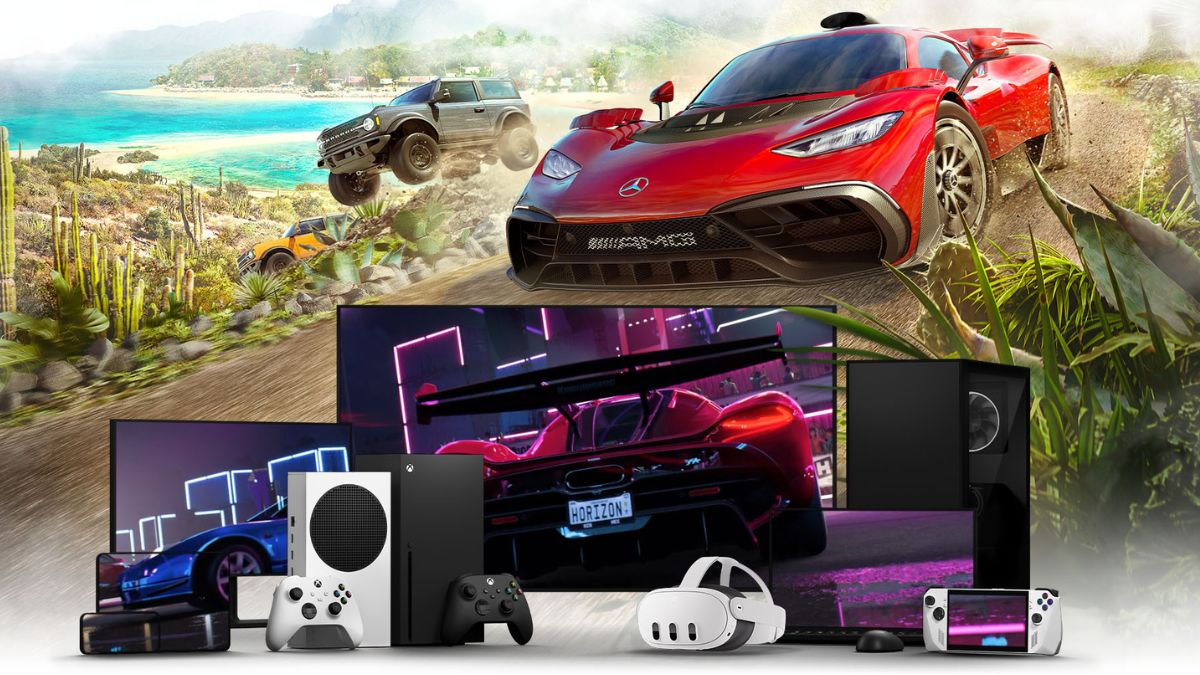
Xbox Cloud Gaming works on many devices, including:
Smartphones and Tablets
- Android phones and tablets
- iPhone and iPad through a browser
PCs and Laptops
- Windows PCs
- MacBooks and Macs
Smart TVs
Some Samsung and LG smart TVs support Xbox Cloud Gaming directly through the Xbox app.
Streaming Devices
- Amazon Fire TV devices
Xbox Consoles
Interestingly, Xbox consoles themselves can also stream cloud games. This helps users instantly test games before downloading them.
What Games Can You Play?
Xbox Cloud Gaming mainly works through Xbox Game Pass Ultimate, so the games you can stream depend on the current Game Pass library. The good thing is that the library is huge and includes games from different categories like racing, shooters, RPGs, sports, strategy, simulation, indie titles, and family-friendly games.
You can instantly stream many popular AAA games without downloading them. Some of the most played cloud gaming titles include:
- Forza Horizon 5 for open-world racing
- Halo Infinite for multiplayer and campaign action
- Starfield for space exploration and RPG gameplay
- Minecraft for creative sandbox gameplay
- Microsoft Flight Simulator for realistic flying experience
- Sea of Thieves for co-op adventures
- Diablo IV for dungeon-based action gameplay
- DOOM Eternal for fast-paced combat
- Age of Empires IV for strategy lovers
- Persona 3 Reload for story-driven RPG gameplay
One of the biggest advantages of Xbox Cloud Gaming is that first-party Xbox games often arrive on Game Pass on day one. That means you can stream many new Microsoft titles immediately after launch without spending extra money.
Microsoft also owns studios like:
- Bethesda
- Activision Blizzard
- Mojang
- Obsidian Entertainment
Because of this, Game Pass keeps getting major games from these studios regularly.
However, there is one important thing most people should know. Not every Game Pass game supports cloud gaming. Some games are only available for console or PC download. Microsoft usually marks cloud-supported games with a cloud icon inside the Xbox app.
The library also changes over time. New games are added every month, while some older titles leave the service due to licensing agreements. This is very similar to how Netflix rotates movies and shows. I also keep writing articles when new game arrives or existing games leave Xbox Game Pass. So, you should regualrly check Techlomedia for all the updates.
Is Xbox Cloud Gaming Available in India?
Yes. Microsoft officially expanded Xbox Cloud Gaming support to India. Indian users can now access the service without relying on VPN tricks that were common earlier.
However, performance still depends heavily on your internet quality and distance from servers. In India, users generally report:
- Good experience with fiber broadband
- Decent performance on 5G
- Better results in the browser compared to some apps
- Slight input lag in competitive games
Single-player games usually work much better than fast-paced esports titles.
Internet Speed Requirements
Microsoft recommends:
- At least 10 Mbps for mobile devices
- Around 20 Mbps or higher for stable HD gaming
But speed alone is not enough. Low latency matters more than raw speed. A 100 Mbps unstable connection can still perform worse than a stable 30 Mbps fiber connection. For best results, use a 5 GHz Wi-Fi connection. If possible, use wired internet on PC.
Do You Need a Controller?
Most games work best with a controller. Supported controllers include:
- Xbox Wireless Controller
- PlayStation DualSense
- Third-party Bluetooth controllers
Some games also support touch controls on mobile. Touch controls are useful for casual gaming, but serious gaming still feels better with a physical controller.
Is Xbox Cloud Gaming Actually Good?
In my opinion, Xbox Cloud Gaming is one of the best ways to casually enjoy AAA games today, especially for people who do not want to spend heavily on gaming hardware. I have already explained how Cloud gaming makes sense than buying console.
It feels almost magical when a basic laptop or even a phone can run games like Forza Horizon 5 smoothly. But it is still not a full replacement for local gaming. If you mainly play story-based games, racing games, or casual multiplayer games, cloud gaming works surprisingly well.
If you are a serious competitive gamer who plays shooters daily, you will still notice latency differences compared to native gaming.
Advantages
- No Expensive Hardware Needed
- Instant Gaming
- Play Anywhere
- Saves Storage Space
Limitations
- Internet Dependency
- Input Lag
- Streaming Compression
- Game Availability Changes
Is Xbox Cloud Gaming Worth It?
For most casual gamers, yes.
If you already subscribe to Xbox Game Pass Ultimate, cloud gaming becomes a very valuable bonus feature. It is useful for students, casual gamers, and people without gaming PCs or consoles.
But if you already own a powerful gaming PC or Xbox console, cloud gaming works better as a secondary convenience feature instead of your main gaming setup.
Final Thoughts
Xbox Cloud Gaming shows where the future of gaming is heading. Cloud gaming is now getting popularity. The technology is not perfect yet, but it has improved massively over the last few years. For many users, especially in countries where gaming hardware is expensive, cloud gaming can become the easiest way to access high-end games.
But it is important to understand that cloud gaming does not replace traditional gaming completely. Instead, it makes gaming more accessible.