Amazon is rolling out a major redesign for Fire TV. The new interface puts more focus on content and makes navigation simpler. Amazon says this is the first big Fire TV user experience update in years. Today, Fire TV users can access movies and shows from purchases, rentals, streaming apps, live TV, sports, podcasts, music, games, and short-form videos. Over time, this made the interface feel crowded and harder to use.
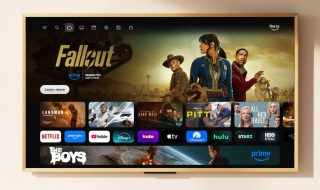
The updated Fire TV design looks cleaner and more organised. Amazon has added rounded corners, smoother gradients, consistent fonts, and more space between rows. This makes the home screen feel less cluttered.
You can still scroll down to see sections like what you are watching next. At the same time, your apps now appear in a wider horizontal row, making them easier to access.
Earlier, users could pin only six apps on the home screen. With the new update, app icons are smaller, which allows up to 20 apps to be visible and scrollable. This addresses one of the most common complaints from Fire TV users.
At the top, navigation is now divided into clear categories such as Movies, TV, Live TV, Sports, and News. A dedicated search button sits next to the Home tab, making it easier to find content quickly.
The new tabs bring together content you are already watching and shows or movies available on your subscribed services. Fire TV also highlights new recommendations under sections like “For You,” along with free movies, top trending titles, and content from other services you may want to explore.
These pages do not scroll endlessly, but they are still detailed enough to show the depth of content available across platforms.
The Live TV tab groups all live streams in one place. This includes live channels from streaming services, as well as broadcast or cable TV if you have a subscription. The Sports section focuses on live matches currently playing and upcoming events.
Other features, such as Games, Appstore, Music, Art and Photos, My Stuff, and Setting,s are now placed under a three-line menu icon.
Amazon has also made settings easier to reach. By long-pressing the Home button, users can quickly adjust display and audio settings, enable accessibility tools, set a sleep timer, or access smart home features.
From this quick menu, you can change screen brightness, improve dialogue clarity, or even view your Ring camera feed while watching TV.
Amazon says the redesign also includes rewritten code. On popular Fire TV devices, the interface is said to be 20 to 30 percent faster for common actions.
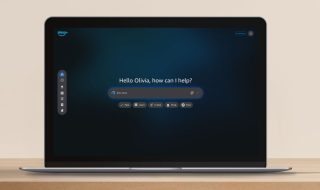
The new Fire TV experience includes Alexa Plus, Amazon’s AI-powered assistant. Users can search for content using natural language, ask follow-up questions, and refine their requests easily.
For example, you can ask for similar movies based on what is on screen or say something like “tell me more about this” while a show tile is selected. Alexa Plus can also help with photos, artwork, and general queries.
Alexa Plus will be offered as a paid add-on after early access ends. It will also be included with an Amazon Prime subscription.
Amazon has also refreshed the Fire TV mobile app. The app still works as a remote but now focuses more on content discovery. This allows users to browse and choose what to watch on their phones instead of relying on one person using the TV remote.

Rollout Timeline and Supported Devices
The redesigned Fire TV interface and updated app will start rolling out in the US in February. The first devices to receive the update include Fire TV Stick 4K Plus, Fire TV Stick 4K Max second generation, and Fire TV Omni Mini LED Series.
Later this spring, the update will expand to more devices and regions. Supported models will include Fire TV Cube third generation, Fire TV 2-Series, Fire TV 4-Series, Fire TV Omni QLED Series, and partner TVs from brands like Hisense, Panasonic, and TCL.
The new interface will also be available at launch on Amazon’s upcoming Ember Artline TVs.