


Microsoft has released a small Windows app that can change the default search engine in Chrome, Firefox and Brave to Bing. Called Microsoft Recommended Search Settings, the app is meant to promote Bing, but the way it changes browser settings has raised concerns about how Microsoft is pushing its search engine.
The app was spotted by Windows tester XenoPanther and later tested by Windows Latest. It comes as a standalone MicrosoftSettings.exe file measuring about 22.2MB. It is hosted on Microsoft’s servers, but it is not currently being distributed through Windows Update or the Microsoft Store. Users have to download and run it themselves.
The setup screen asks whether you want to make Bing your default search engine. The option is already enabled, so users who simply accept the recommended settings can end up switching their browser to Bing.
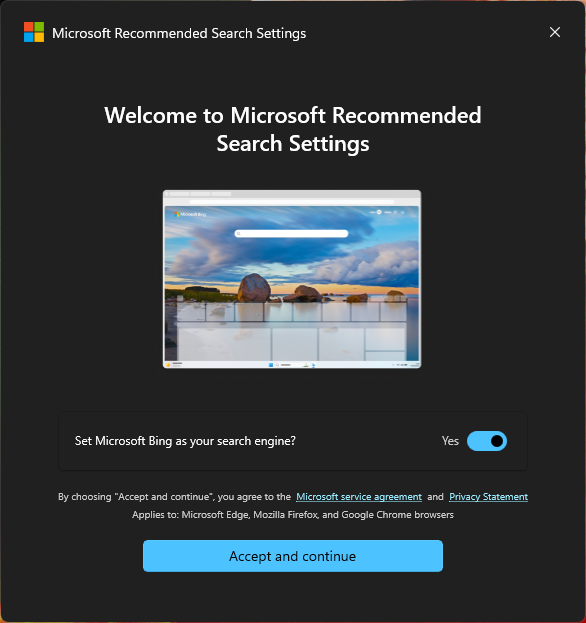
The app can make the change across installed browsers. Windows Latest tested it with Chrome and Brave, while the setup screen also mentions Firefox and Edge. The tool uses Microsoft’s Bing browser extension to apply the changes.
In Chrome, the extension is called Microsoft Bing Homepage & Search for Chrome. Chrome shows its own warning about the extension’s permissions, including the ability to read and change data on websites and modify search and homepage settings.
That permission should not be treated as proof that Microsoft is secretly reading everything you do online. It describes what the extension is technically allowed to access. The extension is also publicly listed in the Chrome Web Store as a Microsoft extension.
The app is not just about changing the search engine. After the setup, Windows Latest found that it opens a Microsoft Rewards page. This is not surprising because Microsoft has long used Rewards to encourage people to use Bing.
The strategy is to get Bing in front of more Windows users, make it the default search engine, and give users an incentive to keep using it.
Microsoft is free to compete with Google and other search engines. The issue is whether a separate Windows utility is the right way to do that. Users already have a search engine setting in their browser. They do not need another Windows application to change it.
The most controversial part is not that Microsoft promotes Bing. It is how the promotion interacts with the browser. When Microsoft’s extension changes Chrome’s search engine, Chrome can show a warning asking whether the user wants to switch back. Windows Latest found that Microsoft’s extension displays a “Wait, don’t change it back!” message below Chrome’s warning and encourages the user to keep Bing.
Microsoft has used similar tactics before. In 2024, Microsoft showed Chrome users a Bing prompt that could change the search engine and install the Bing extension. Chrome then displayed its own warning, followed by Microsoft’s message asking users not to change it back.
This makes the new app look less like a simple recommendation and more like another attempt to keep Bing in front of Windows users.
If you have not installed the app, you do not need to worry. There is currently no evidence that Microsoft is silently installing Microsoft Recommended Search Settings through Windows Update. It is a separate download that users have to run.
If you do find it installed and you did not install it yourself, check your Windows apps and browser extensions before using it further.
The extension permissions are also worth checking, but there is no evidence from this discovery alone that Microsoft is using the extension to secretly monitor all of your browsing activity.
How to remove it
If you installed the app and want to return to your previous browser setup, remove the app and check the browser settings it changed.
Uninstall the Windows app
Go to Settings > Apps > Installed apps, find Microsoft Recommended Search Settings, click the three-dot menu and select Uninstall.
Remove the Bing extension
In Chrome, open chrome://extensions and remove Microsoft Bing Homepage & Search for Chrome.
In Brave, open brave://extensions and remove the Microsoft Bing extension if it is listed.
In Firefox, open about:addons, select Extensions and remove the Bing add-on if it was installed.
Restore your search engine
In Chrome, go to Settings > Search engine and select your preferred search engine.
In Firefox, go to Settings > Search and change the default search engine.
In Brave, open brave://settings/search and select the search engine you want.
You should also check the homepage and new-tab settings if they were changed.
Microsoft should let users make this choice themselves
There is nothing wrong with Microsoft wanting more people to use Bing. It can advertise Bing, improve the service and offer Rewards to users. But a Windows utility that installs an extension and changes settings in other browsers is a much more aggressive way to promote a search engine.
The app is optional, and it is not currently being pushed through Windows Update. That is important. But if you come across Microsoft Recommended Search Settings, treat it as what it is: a Microsoft tool designed to move your browser towards Bing.
If you do not want Bing, there is no reason to accept the recommended setting. Your browser already gives you everything you need to choose a search engine yourself.