
Security researchers at LayerX have uncovered a large-scale malicious browser extension campaign targeting Chrome and Microsoft Edge users. The operation involves at least 12 interconnected extensions disguised as TikTok video download tools and has impacted over 130,000 users.
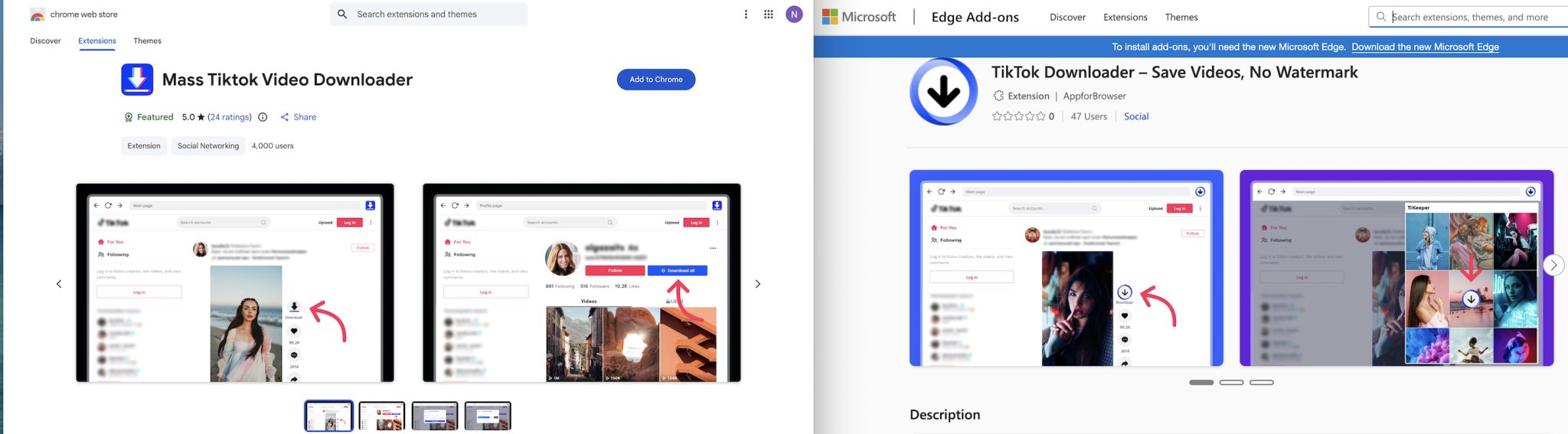
The extensions appear to offer normal features like downloading TikTok videos without watermarks, but also collect user data, track activity, and connect to external servers for remote control.
According to LayerX, all identified extensions share a common codebase and are either clones or slightly modified versions of each other. This indicates a coordinated campaign by the same threat actor or a closely linked group.
The extensions use different names, such as “TikTok Video Downloader” and “Mass TikTok Downloader,” but function in a similar way behind the scenes. At least 12,500 installations were still active at the time of analysis.
A key concern is the use of remote configuration servers. These allow attackers to change extension behavior after installation without user awareness or marketplace detection. This enables features to be enabled, disabled, or modified over time, including data collection methods.
LayerX also found that the extensions collect detailed device and usage data, including browsing activity, language, timezone, user agent, and even battery status, which can be used for device fingerprinting.
Some of these extensions were marked as “Featured” in official browser stores, a label that usually indicates trusted software. This likely helped increase installations and user trust.
Many extensions initially functioned as advertised and introduced suspicious features later through updates, often after several months. This helped them avoid early detection and build credibility.
If you use browser extensions, it is important to check them regularly. Remove any extension that you do not actively use, especially if it comes from unknown developers.
You can check installed extensions by going to your browser settings and reviewing the extensions list. Look for anything related to TikTok downloaders or similar tools, and uninstall them immediately if found. Also, check permissions. If an extension has access to all websites or can read and change data, be extra careful.
Only install extensions from trusted developers and official sources. Avoid tools that offer “free downloads” of copyrighted content, as they often carry hidden risks. Keep your browser updated, as newer versions often include security fixes for extension abuse.
For organizations, I recommend monitoring browser extensions continuously instead of relying only on store approval. Behavior after installation is often where the real risk appears.