
Instagram has introduced a new feature for its Direct Messages to make voice messages even better. The company is now rolling out AI Voice Effects for voice notes. This update allows users to change how their voice sounds before sending a voice message.
The new feature adds different character style effects to voice notes. Users can apply these effects while recording a message in chat.
Instagram says the AI technology modifies the sound of the voice while keeping the original rhythm, tone, and emotion of the recording. In simple words, the voice changes but the natural feeling of the message remains.
The feature is interactive. When someone receives a voice note with an effect, the chat will show which voice effect was used. The recipient can tap on the effect label and use the same effect in their reply. This makes it easier for both people in the conversation to continue using the same style.
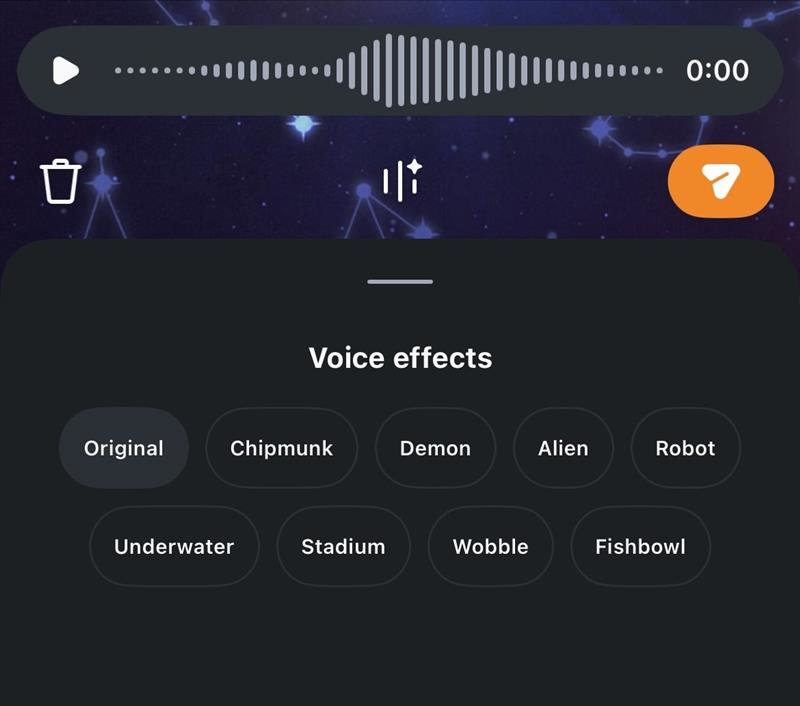
To use this feature, follow these steps.
- First, open a chat inside Instagram Direct Messages.
- Then press the voice message button to start recording.
- While recording, tap the Voice Effects option to see the available audio filters. Users can preview different effects before sending the message.
Once the voice note is sent, the applied effect will appear in the chat. The person receiving the message can tap the effect and apply it to their own voice reply.
Now that voice messaging is popular, adding voice effects is a welcome move. Instagram is trying to make voice notes more entertaining and interactive. The feature may also encourage users to send more voice messages during conversations.