

Home » News » Google Lens For Android Gets Offline Translation S...

Google Lens For Android Gets Offline Translation Support

Google Lens For Android Gets Offline Translation Support

Add Techlomedia as a preferred source on Google. Preferred Source

Google has added offline translation support on Google Lens for Android app. So, it doesn’t need an active internet connection for real-time translation feature for many languages. Yes, offline translation support is still for select languages.

Before using the offline translation feature, you need to download the offline language pack for languages you need to use in translation. In the translation feature, tap on language and it will open the ton to select a language. Here, you will also see a download option for supported language.
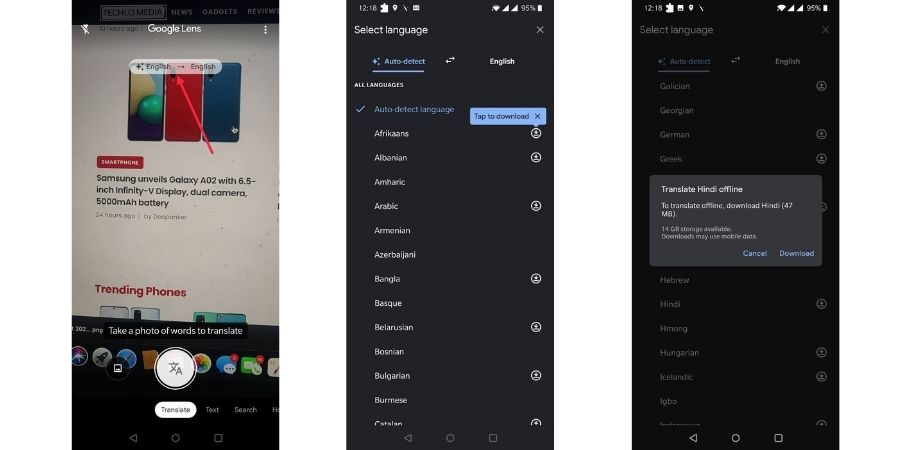
When you download a language pack, it shows the size of the pack and also the available storage on your device.

Offline translation feature is useful if you are traveling to places where you will get limited or no data connectivity.

Google has already started rolling out offline translation support to all Android users globally. If you don’t see it yet, make sure you are using the latest version of the Google Lens app.

Follow Techlomedia on Google News to stay updated. Follow on Google News

Affiliate Disclosure:

This article may contain affiliate links. We may earn a commission on purchases made through these links at no extra cost to you.

Deepanker Verma

About the Author: Deepanker Verma

Deepanker Verma is the Founder and Editor-in-Chief of TechloMedia. He holds Engineering degree in Computer Science and has over 15 years of experience in the technology sector. Deepanker bridges the gap between complex engineering and consumer electronics. He is also a a known Security Researcher acknowledged by global giants including Apple, Microsoft, and eBay. He uses his technical background to rigorously test gadgets, focusing on performance, security, and long-term value.

Related Posts

Stay Updated with Techlomedia

Join our newsletter to receive the latest tech news, reviews, and guides directly in your inbox.