
Home » News » WhatsApp Enables Two-Step Verification for Android...

WhatsApp Enables Two-Step Verification for Android Beta and Windows Phone Beta

WhatsApp Enables Two-Step Verification for Android Beta and Windows Phone Beta
Deepika November 11, 2016 Internet

Add Techlomedia as a preferred source on Google. Preferred Source

After months of announcing, WhatsApp has finally added two-step verification in the latest Android beta and Windows beta. This is for the better security of this messaging app.

After this two-step verification, whenever anyone attempt to verify your mobile number on WhatsApp messenger app they should have to confirm six-digit passcode or email id. For getting this passcode you have to enable two-step verification. (There is a APK link of Whatsapp Beta at the end of this post. You can download this new feature from there.)

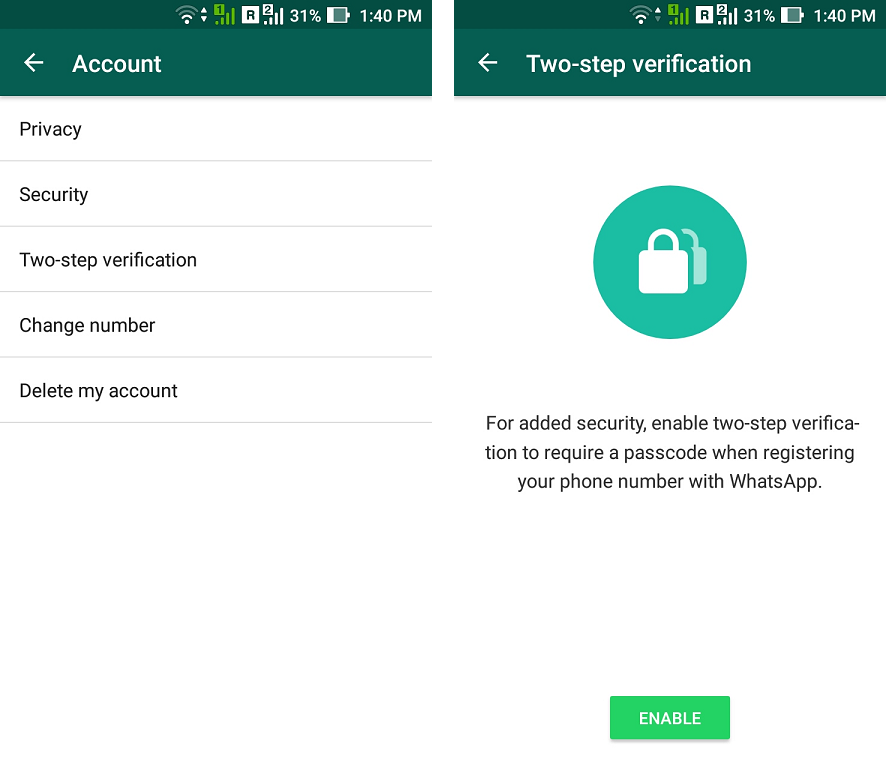
To enable this two step verification you have to follow below step:

Settings –> Account –> Two-step verfication –> Enable
whatsapp1

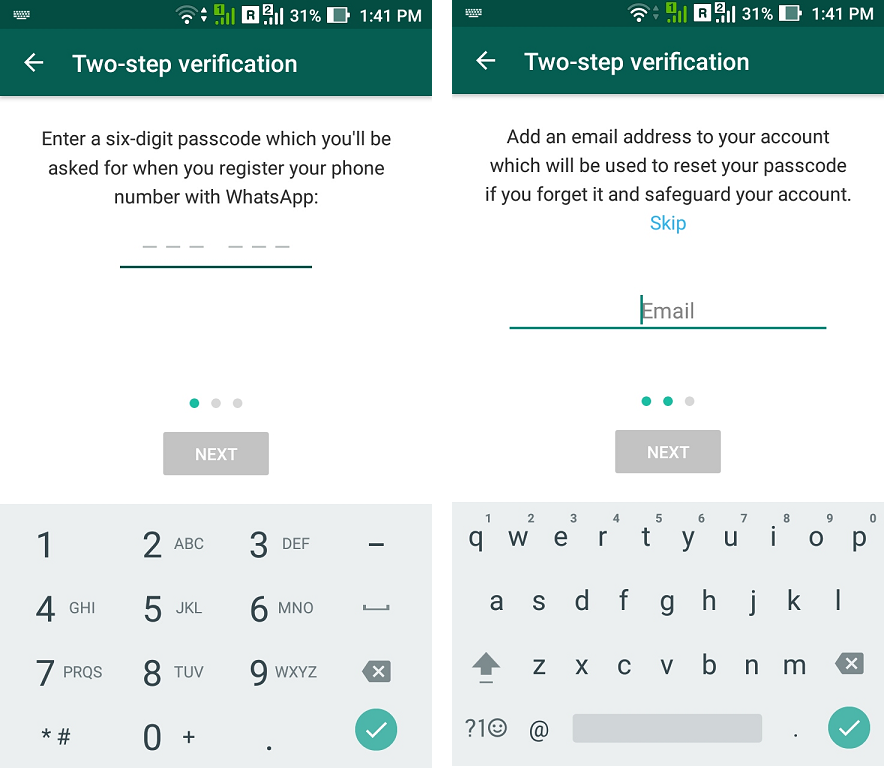
After click on enable button, you have to enter 6 digit passcode. Make sure to remember this passcode for future. After confirming passcode, adding email is an optional step but we recommend you to add email as this will help you when you forget your passcode.
whatsapp2

After you complete your two step verification for WhatsApp, below window will appear.

screenshot_20161111-134233

Now, no one can assess your phone number for WhatsApp unless they have your passcode or mail id. Enjoy your secured WhatsApp from now onward.

You can update this new Two-step verification of WhatsApp from here: APK Mirror link 

Via

Follow Techlomedia on Google News to stay updated. Follow on Google News

Affiliate Disclosure:

This article may contain affiliate links. We may earn a commission on purchases made through these links at no extra cost to you.

Deepika

About the Author: Deepika

Deepika Singh is a Senior Tech Analyst at Techlomedia, specializing in mobile ecosystems and application performance. She holds an M.Tech from IIT Dhanbad, where she developed a deep technical understanding of hardware-software integration. Combining her academic background with a passion for Mobile UX and Graphic Design, Deepika provides expert-level comparisons of gadgets and apps. Her reviews go beyond the surface and focuses on real-world use cases. Her 12 years of experience help her draft valuable content for readers.

Related Posts

Stay Updated with Techlomedia

Join our newsletter to receive the latest tech news, reviews, and guides directly in your inbox.