
With the growing use of smartphones, you can do most of the tasks on the go. What if you want to recharge your mobile, your DTH or data card on the go? Try FreeCharge Android app. Freecharge.in is a popular online recharge portal. With the Android app of freecharge.in, you can now recharge your mobile, data card or DTH on the go with few easy taps. Not only recharge, it also offers free coupons for online and offline retailers. In this post, we are going to review FreeCharge Android app.
Freecharge android app is available for free of cost. Best thing about the app is that it does not display any kind of ads. When you first run the app, it asks you either login or create a new account. You can also login via your Facebook and Google account. If you do not have freecharge account, you can create new account.

Once you are in your account, it lands to the quick recharge screen. Here, you can just enter the mobile number, select operator and enter the recharge amount. Interface of the app is simple and clean. App is user-friendly and smooth. It depends on your internet connection. If your connection is slow, it can lag. This default screen is for pre-paid. At top, you can see tabs for postpaid, DTH and data card. You can select the respective tabs based on your need. You can either click on tabs or swipe left or right to navigate through tabs.

Just enter the details to recharge. It also shows the link for selecting the tariff plans in case you want the info. You can see the traffic available for your mobile operator. You can see the top up plans, data plans and other special recharge plans. Swipe right or left to navigate through tabs. If you like a recharge plan and want to use it, just tap on it to select.

When you are done, click on Recharge button.
Then it asks you to select the discount coupons for various online and offline retailers including “McDonalds,” “Dominos”, “Costa Coffee”, “ebay”, “Myntra” and many other. Few coupons are available for free of cost. But for few, you need to pay. This amount will be added in your billing invoice of recharge. You can also see the details of the coupon by clicking on it.

Once you are done with selecting the coupon, click on ‘continue’ button to proceed with payment.
At next screen, it will ask you to review your invoice and payment option. You can either select your Freecharge credits or pay with online banking, credit or debit card. Save your card details in the to pay quickly. If you have Freecharge promo code, you can use here for more discount.
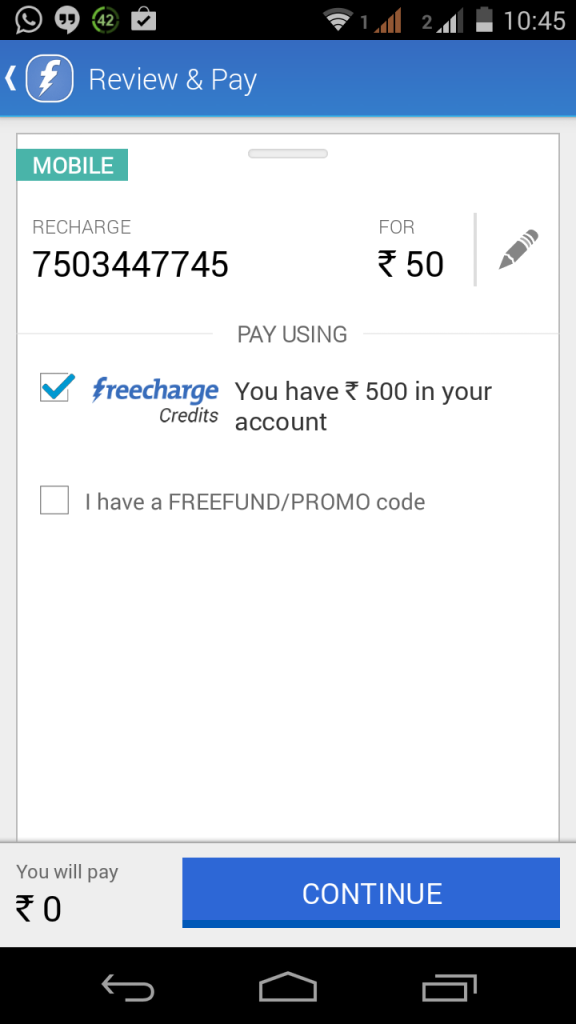
If you have balance in your Freecharge credit account, it will not take more than 10 seconds for a recharge. If you do not use this Freecharge account, you will have to pay it via other payment options which will take few minutes. It claims that your payment process is 100% secure with 128 bit SSL.
At the top left side, it has menu icon. tap here to open menu links. It has links including ‘My Recharge’, ‘Credits’ and few other.

You can access your recharge history in ‘My Recharge’ section.

In case you want to add fund to your Freecharge credits account, just go to my credits and here select “Add Money”. Enter the amount and pay via net banking or debit/credit cards.
In my verdict, you must always have enough balance in your Freecharge account. If you are going for long journey, you should always add funds here. It will let you recharge your mobile, pay your prepaid bills, recharge your DTH or recharge your data card quickly. I takes less than a minute in recharging anything by using Freecharge credit.
Why Should You Use This App:
- Recharge mobile on the go.
- Get Free coupons.
- Freecharge credit for quick recharge
Why Should You Not Use This App
- The only thing I missed the landscape mode.
- On WI-FI, it works smooth. But on 3G or EDGE, sometimes it lags.