When it comes to video editing, there are many video editing tools are available. And there are plenty of tools available for video converting from one format to another format. If you want to download videos, there are many tools available that let you download videos from YouTube and other video sharing website. But what if you want all features in a single software. Here comes a nice tool called iSkysoft Video Converter Ultimate. This tool comes with so many video features including video conversion, video editing, screen recording, video downloading and much more.
It is a multi-purpose video software but name suggests that it is a video converter tool. These are the main features of the tool.
- Convert Videos and DVDs
- Burn Videos to DVDs
- Download and Record Videos
- Convert any 2D video to 3D for a 3D fun
- Crop a part of video
- Add watermark in video
- Add subtitle
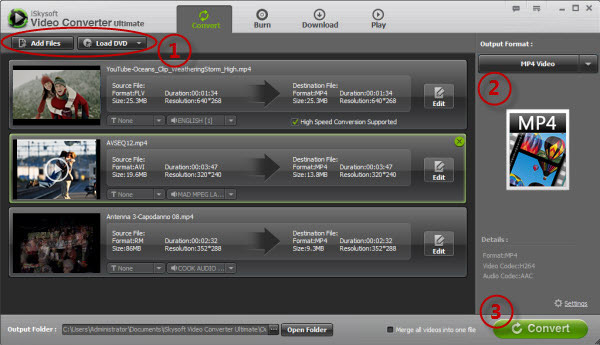
It is a easy tool and comes with easy interface. You can perform most of the task easily. When you run the software, you will see four main options at the top. These options are Convert, Burn, Download and Play. Videos can be imported into the software via file browser.
It also works as a nice video downloading tool. It provides 2 ways to download videos from YouTube, Daily Motion and other video sharing website. First one it to add URL and then start downloading. If you are not able to download with this way, you can record video with built in video recorder. Just run iSkysoft Video Recorder and follow on screen instruction. All video recordings are saved in WMV format but you can convert it to any format with iSkySoft.

You can preview the recording clip, take snapshot, trim, split, crop and add subtitles. You can also apply various effects like brightness, contrast, saturation, amplifier.
This video converter tool requires high amount of system resources, but gives good performance. It does what it claims. If you are willing to pay, this tool is highly recommend.
iSkysoft Video Converter Ultimate is not a free tool, but it comes with a free trial. You can download iSkySoft Video Converter Ultimate On Mac and Windows.