Epomaker is known for experimenting with keyboard designs. I have already reviewed some of their keyboards and found them impressive. Recently, I started using Epomaker RT65. The keyboard has a compact 65% keyboard with a retro-inspired design and a built-in joystick. Yes, this time Epomaker wants us to enjoy the joystick on the keyboard. I have been using Epomaker RT65 for a long time and here’s the detailed review to tell you everything you need to know about it.
Buy Here: Epomaker
The RT65 comes in a secure package. Inside the box, you get the following things.
- Epomaker RT65 Keyboard
- USB-A to USB-C cable
- Switch Puller
- Extra Switches
- Extra Keycaps for Mac
- Detachable Mini Display
- User guides

Epomaker RT65 Review
Design
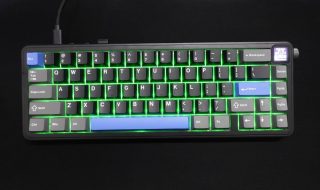
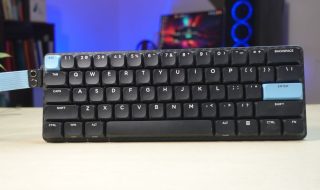
The Epomaker RT65 is a 65% keyboard with only 67 keys. It retains all essential keys while eliminating the clutter of a full-sized keyboard. So, it is perfect for small desk spaces. People who want a minimalist design without compromising functionality will surely love it. It has a retro-inspired color scheme that includes white keycaps with gray accents and a touch of brown that stands out. The ABS plastic case ensures a lightweight build as the keyboard carries a weight of just 0.8kg. The build also feels durable enough for everyday use. It has PBT keycaps with a Cherry profile design and a textured surface to resist shine and wear over time.
The most notable feature of the keyboard is the joystick located at the top right side. You can move the joystick up or down to control music tracks and left or right to control volume. Press it to put your PC to mute. Pressing the joystick with the Fn key switches to mouse mode. Now you can use it as a trackpad for your PC and press the joystick when you need to click something.


The keyboard misses all function keys usually found at the top of the keyboard. Here, you can press the Fn key along with any of the number keys for using as the Function key. For example, the Fn key + 1 key will act as the F1 key.
At the top above all keys, it has a RGB lightbar that looks really cool. It is just for design purposes and doesn’t have any functionality. The light bar adds a stylish touch to the keyboard and makes it visually striking.
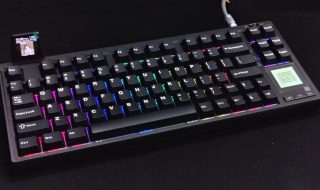
The keyboard also has south-facing RGB lights on all keys with a wide range of customizable RGB lighting effects. You can quickly toggle between different RGB lighting modes and control brightness using different keyboard shortcuts. Refer manual to learn all those.
At the top edge of the keyboard, you see a Type-C on the right side. This is to plug the Type-C cable for wired connectivity. On the left, there’s the same hidden compartment that hides the wireless dongle and Tyoe-C port. You can use this Type-C port to attach the mini Display that comes with the keyboard. This mini-display shows the date, time, and battery status. You can customize it to add a photo or animation using Epomkaer software.


On the back, It has five rubber feet at the bottom to offer an antislip grip on the desk. But it lacks height adjustment which could be a disappointment for a few people. At least it was for me.


Epomaker Software
The Epomaker software is a powerful tool designed to unlock the full potential of Epomaker keyboards. The software interface is clean but slightly overwhelming for first-time users. Epomaker’s software allows full key remapping that’s a big advantage for productivity and gaming. You can assign custom functions to any key, including media controls, shortcuts, or even launching specific applications. The software also lets you create macros, allowing users to record sequences of key presses and assign them to specific keys.


The Screen section lets you customize the mini display. You can Personalize the screen with logos, gifs, or static images. You can go to the Share section and find cool animations to add to the mini-display. Here, it curates Light Animation, Settings, and Macros shared by other users. You can also share your own with the community.
The RGB lighting customization is also there. It offers several effects such as wave, reactive, and breathing. You can adjust brightness, speed, and direction, as well as assign unique colors to individual keys. It also lets you customize the RGB lighting of individual keys. There’s also a dedicated section for customizing Light Strip’s RGB lighting.
Performance
I got the Epomaker RT 65 with Wisteria switches which are linear switches known for a smooth and buttery feel. Their unique design and lubrication provide a satisfying typing experience that’s both quiet and tactile. Typing on the RT65 produces a satisfying thock sound and feels software compared to traditional linear switches. When combined with the RT65’s gasket-mounted design, the result is a keyboard that feels incredibly smooth and responsive.
Typing comfort is slightly affected by the lack of height adjustment. The keyboard’s angle is fixed, so users who prefer steeper or flatter typing angles might need to use an external wrist rest or risers. For gaming, it offers a good performance due to smooth travel and low actuation force. The anti-ghosting and N-key rollover features ensure that simultaneous key presses are accurately registered. The compact layout also makes sure that you have enough space on the desk for mouse movements. The lack of height adjustment can also be a disappointment for many gamers.
Like other Epomaker keyboards, this one also has Hot-Swappable Switches which means you can remove and replace the switches directly without needing to desolder them. This makes the keyboard good for people who want to customize their typing experience or gaming performance by trying different switches, whether tactile, linear, or clicky. The keyboard supports 3-pin and 5-pin switches to ensure compatibility with a wide variety of switches available on the market. The 5-pin compatibility ensures a more stable fit and minimizes wobbling, although 3-pin switches will also fit into the sockets.

To swap the switches, all you need to do is remove the keycaps using a keycap puller and gently pull the switches out of their sockets. New switches can be pushed in with minimal effort.
Hot-swapping comes with several benefits. You can tailor the keyboard to your exact preferences. It also makes maintenance easy as it doesn’t require soldering for changing switches.
The RT65 supports wired Type-C, Bluetooth, and 2.4GHz wireless connections. It has a polling rate of 1000Hz on 2.4GHz and 125Hz on Bluetooth. Use the given 2.4 GHz wireless USB dongle for quick pairing it wirelessly. It offers a stable and faster connection compared to Bluetooth. However, I recommend wiring more for gamers who need zero input delay. With Bluetooth, you can pair it with up to three devices simultaneously. Switching between devices is seamless using keyboard shortcuts, whether you are working on your PC, tablet, or smartphone.
Since the keyboard lacks the connectivity toggle normally found in other Epomaker keyboards, you need to learn how to switch to Bluetooth and Wireless modes. Everything is in the manual, so I am not explaining that.

The Epomaker RT65 offers a decent battery life, but it can vary depending on usage patterns and backlight settings. Typically, it can last for several days on a single charge with moderate use and minimal backlight. If I talk about continuous usage, you can expect around 16-18 hours using Bluetooth and slightly better using wireless mode.
There’s also an interesting way to check battery life. Press the Fn+B shortcut and it lights up LEDs of the number row keys to indicate the remaining percentage.
Verdict
The Epomaker RT80 is a good mechanical keyboard that blends retro charm with modern functionality. The 65% layout provides the perfect balance of compactness and features. Its excellent build quality, customizable features, and impressive performance make it a standout choice. Whether you are a typist looking for comfort or a gamer seeking precision, the RT65 has you covered. However, the keyboard isn’t recommended for people who need adjustable angles.
Pros
- Compact 65% Layout
- Premium Build Quality
- Smooth Wisteria Switches
- Hot-Swappable switches
- Customizable mini display
- Versatile Connectivity options
Cons
- Lack of Adjustable Typing Angles
Buy Here: Epomaker