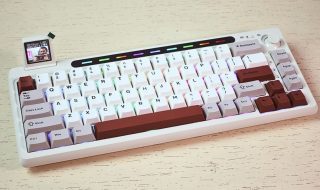
I wrote a detailed review of Epomaker TH80 Pro V2 VIA a few months back. I was so impressed with the keyboard that I wanted to try another keyboard from Epomaker. Epomaker RT100 got my attention due to its Retro-style design. Epomaker was kind enough to send me this keyboard for review and testing. Epomaker RT100 took me back to the early 2000s. Although it has a retro design, it comes with modern features. I have been using this keyboard for around three weeks now and have used it to type my articles, play games, and also write several codes. Based on my experience, here’s a detailed review of Epomaker RT100.
Epomaker RT100 Review
What’s in the box?
- EPOMAKER RT100 mechanical keyboard
- Smart Screen
- USB cable
- Keycap and switch removal tool
- User guides

Design and Build Quality
The Epomaker RT100 arrived in a sleek and minimalist package. The keyboard boasts a retro-inspired aesthetic with a 95% layout. It misses seven keys that are ground above the primary cursor control key setup. They are not critical keys, so it won’t impact your workflow. Although a 95% layout doesn’t make it compact, it still saves space compared to a full-size keyboard. Epomaker RT100 comes in five different colors and I have the Retro White color. This is the color variant that actually makes it feel like the retro keyboard that existed back in the 90s and early 2000s.

The keyboard has a plastic construction but offers a premium feel and durability. The sleek, minimalist design and high-quality materials offer a sophisticated look that complements any workspace.
At the top right corner, there are two slider switches. One is the power toggle to turn it on or off. When it is off, you can use it in wired mode and turn it on for use in wireless mode. The second toggle is to switch between Windows and Mac mode. There’s also a knob for multimedia control Turn counter-clockwise to reduce volume, turn clockwise to reduce volume, and press to play or pause. The knob provides a good clicky and satisfying feedback. The best thing is that you can also customize it using the software. I will talk about it later. On the top edge, it has a USB-C port to charge the keyboard or use it as a wired keyboard.


At the top left corner, there’s a removable plastic cover that hides a 2.4GHz dongle and a USB-C port. This USB-C port is designed to attract the Smart Display that comes in the box. The tiny Smart Display looks like the old CRT monitor. I will talk about this display and its use cases later in the review.


If you turn the keyboard around, you see the plastic case clearly. There are five rubber pads to prevent the keyboard from sliding. The keyboard has also non-skid feet. It offers two stages of elevation. So you can customize the angle of the keyboard ergonomics as you need.


The keyboard comes with a thick and high-quality cable. It is around 2 meters long, so can suit any kind of PC setup.
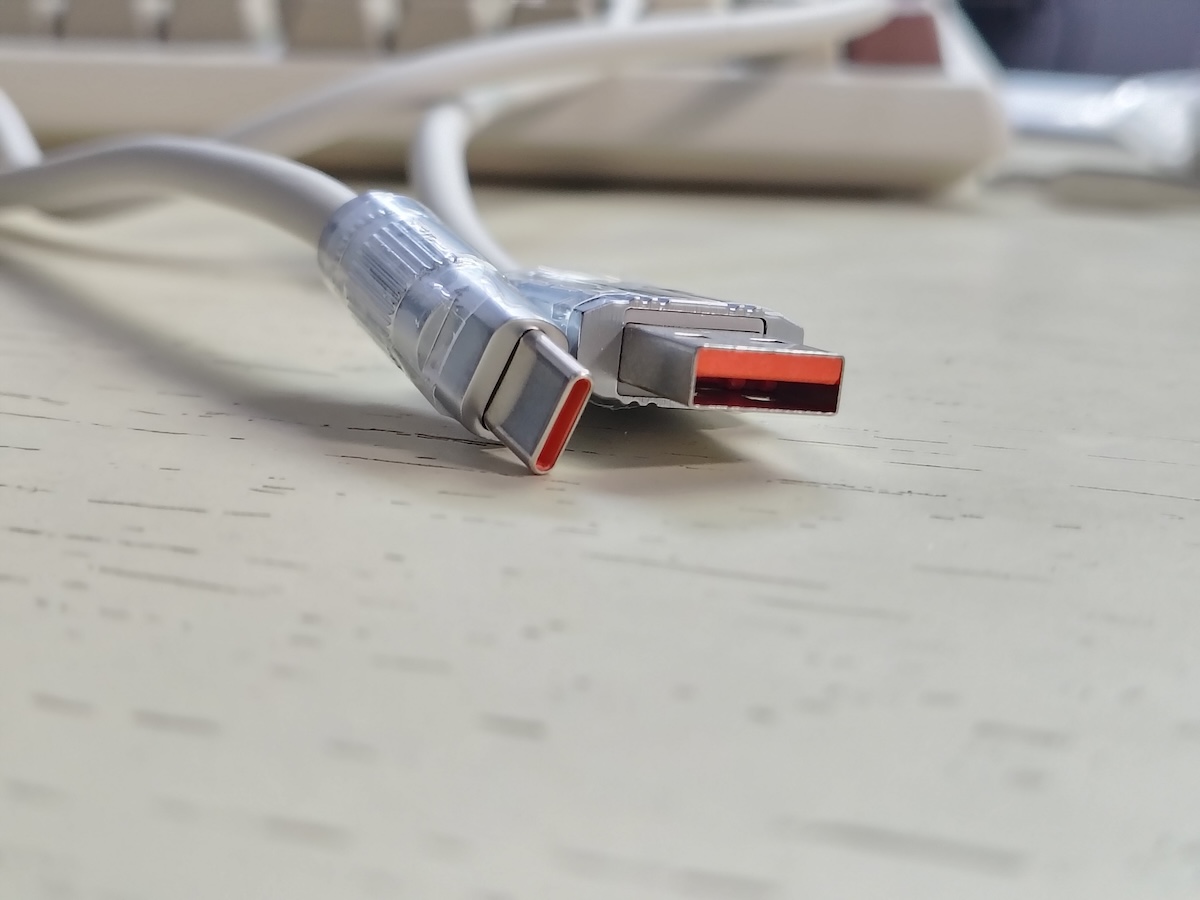
Epomaker also sent me a custom coiled Keyboard cable set that has two different cables. These cables can be attached using the aviator connector. These are braided cables with soft padding to look and feel great. After connecting both, you get a Type-C to USB-A cable for the keyboard. However, you can also use it for data transfer and charging other devices.


Keycaps, Switches, and Typing
The keycaps are made of thick PBT plastic with a matte finish. These keycaps are known for their durability, resistance to oil, and shine There’s a clear crisp brown labeling. The font is clean and legible. It ensures easy identification of keys even in low-light conditions. The keyboard also has RGB backlighting effects. There are south-facing LEDs under the switches that cycle through the various effects.


I have the Epomaker RT100 keyboard with Sea Salt Silent Switches. The Sea Salt Silent Switch is a linear switch providing a smooth keypress without any tactile bump or audible click. It produces very slow sound making it ideal for office environments. Keys also require very little force to press, so it feels good for both typing and gaming. For people who want a mechanical keyboard with quiet performance, these switches are the ideal choice.


The typing experience on the RT100 is exceptional. With high-quality keycaps and Sea Salt Silent switches you will enjoy a smooth, quiet, and satisfying typing experience. The keyboard is also really comfortable to use for extended periods. The ergonomic design, with a slight negative tilt and well-spaced keys, offers a comfortable and efficient typing experience.
The keyboard also supports hot-swappable switches. So, users can easily replace switches without soldering. It allows users to experiment with various switch types and weights to find a good typing feel as per their preferences. You can also create a unique typing experience by mixing and matching different switches on the same keyboard.
The keyboard also features NKRO (N-Key rollover). It means it registers each keypress independently, so you can simultaneously press as many keys as you want. While the RT100 is not specifically designed for gaming. However, the responsive keys and low input latency also make it suitable for casual gaming.
The keyboard works with both Windows and Mac. Whenever you want to use it with Mac, use the toggle at the top right corner to switch to Mac for using it with Mac. You get CMD and OPTION keycaps to replace the WIN and ALT with OPTION and COMMAND.

Smart Screen
The Smart Screen accessory can be plugged into the Type-C port located at the top left corner. It features a 1.33-inch color LCD display that is bright and clear. It provides access to various information such as essential system details including CPU usage, memory usage, battery status, and network connectivity. It can also show real-time clock and weather information based on your location. You can also customize the display with various themes, wallpapers, and animated GIFs. The Smart Mini Display doesn’t impact the performance of the keyboard and also draws minimal power.


Unlike the Epomaker TH80 Pro V2 VIA, the Epomaker RT100 doesn’t support VIA software. This can be a bit disappointing for some users. However, the keyboard supports its own software for all customization. The software lets you customize keys to launch apps, adjust the RGB lighting, change sleep timer, design macros, and more.
This is the software we use to customize the screen. You can upload gifs and images to the screen from your computer. There is also an option to create custom images using the pen tool. there is also a section called Share. Here you also find several user-created GIFs and images to use. You can directly download and upload any of the images or GIFs to your Keyboard’s screen. If you have made a creative animation for the display, share it with other Epomaker users. The software has a clean UI and works well. However, it sometimes tests patience while uploading a new image or GIF to the display. In some cases, it took more than 10 minutes. That was frustrating.


The RT100 offers both wired (USB-C) and wireless (2.4GHz or Bluetooth) connectivity. So, it is a good keyboard for different usage scenarios. Although I mostly use it as a wired keyboard, the wireless connection is also reliable and stable. I didn’t face any latency issues with wireless connectivity.
The keyboard packs a large 5000mAh battery that provides a good battery life. With backlighting on, the battery lasts for around 10-12 hours. Without backlighting, it lasts for around 13-14 hours. Epomaker suggests not to charge the keyboard using a charger. The overload current could burn the port. Keep that in mind.
Who Should Use It?
The Epomaker RT100 is a versatile keyboard that can appeal to a wide range of users. It is particularly well-suited for:
- Individuals who prefer a compact and minimalist design.
- People looking for a high-quality mechanical keyboard with a premium feel.
- Users who value customization options and features like hot-swappable switches and a customizable knob.
- Casual gamers.
The Epomaker RT100 offers excellent value for money. The combination of premium build quality, customizable features, and a satisfying typing experience makes it a competitive option in its price range. While the price may be slightly higher than some budget-friendly options, it justifies its price tag for users who prioritize quality and versatility.
Pros
- Quiet and Comfortable
- Retro-inspired design
- Hot-Swappable Switches
- Pre-lubed stabilizers
- Customizable RGB Lighting
- Multiple Connection Options
- Customizable Knob
- Detachable LCD screen
Cons
- Plastic Construction
- Software UI needs improvements
- Priced on the higher-end
Conclusion
The Epomaker RT100 is a well-rounded mechanical keyboard that excels in design, build quality, and performance. Its compact form factor, customizable features, and comfortable typing experience make it an attractive option for those seeking a premium keyboard. The quiet operation can also be a plus for many users.
If you value a quiet typing experience, want a mechanical keyboard, and appreciate unique features like the customizable knob and hot-swappable switches, the RT100 is a good option to consider.