


Pokemon Go is a famous game played by many people worldwide. It is a location-based game that allows you to change your location, catch Pokemon, and unlock different amazing rewards. However, to change your location, you have to move, which is definitely a complex task as not everyone prefers to walk because of bad weather, unsafe neighbourhoods, or personal convenience.
To increase your gaming experience without walking, teleportation is the best option available. If you’re unfamiliar with this term and how to teleport in Pokemon Go, this guide will explain everything about it.
Can I Teleport to Any Location in Pokémon GO?
Yes, you can easily update your favorite location in Pokemon Go using the teleport feature. It allows you to change your game’s location by modifying mobile phone GPS. With this feature, players can easily change any location on the game map without even walking. Isn’t it amazing?
But the main question is how can you teleport in Pokemon Go? To teleport in Pokemon Go, you’ll need a location spoofer tool, and one of the best options available is iToolab AnyGo-Best Pokemon Go Spoofer. This all-in-one location spoofer helps you to change your in-game location with a single click.
iToolab AnyGo offers an intuitive interface that helps beginners and non-tech users to teleport locations easily. This tool works with all location-based apps, including Snapchat, WhatsApp, Instagram, and more.
How to Teleport in Pokémon GO to Avoid Soft Ban?
Teleporting with iToolab AnyGo is a straightforward process, but before getting into the steps, let’s explore why this tool is the best choice for the Pokemon Go hack. Below, we have mentioned its top features so that you can easily spoof your location in the game.
1. Compatibility
One of the best features of iToolab AnyGo is its compatibility with a wide range of devices, including Android, iOS, Windows, and Mac. Furthermore, it fully supports the latest operating systems, such as iOS 18 and Android 15, a capability that many other location spoofers lack.
2. Joystick to Control
This program’s joystick control feature allows you to easily update walking or other movements in Pokemon Go. Users can use an on-screen joystick to move characters in any direction.
3. Multiple Modes
iToolab AnyGo offers multiple modes to update GPS movement that helps you to enjoy Pokemon Go without needing physical walking. These modes include Teleport Mode, 2-Spot Movement Mode and Multi-Spot Movement Mode.
4. Customized Speed to Fake Walk
The program enables users to change movement at various speeds, including walking, cycling, and driving. Users can choose a fixed or variable speed ranging from 3.6 km/h to 100 km/h.
5. No Jailbreak and Root
This tool offers an easy location spoofing experience without jailbreaking your iOS device or rooting your Android device.
6. No Error 12 “Failed to Detect Location”
When using spoofing tools to fake your location, games like Pokemon Go often detect location changes and show Error 12: “Failed to detect location.” However, with this tool, you don’t have to worry about this issue.
7. Import GPX File to Move
AnyGo allows users to import GPX files to create predefined routes for movements.
8. Supports All Location-Based Apps
The best part of this program is that it doesn’t just support Pokemon Go–it also works with all location-based apps, including popular apps like Snapchat, Facebook, Instagram, WhatsApp, and many more.
Let’s walk you through how to teleport in Pokemon Go on iPhone/Android using iToolab AnyGo. Follow the instructions below for a smooth and hassle-free process.
- Download and install iToolab AnyGo on your iOS device and launch it.
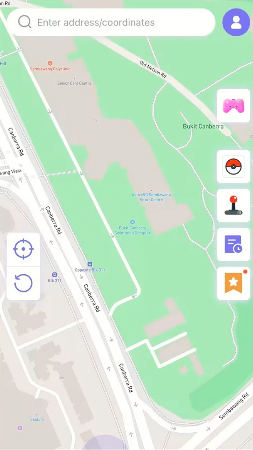
- Enter the location where you like to teleport yourself to. Click “Search.”
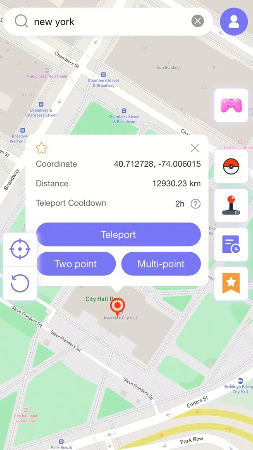
- The program will display your desired location on the map. Click the “Teleport” button to instantly teleport to the selected location.
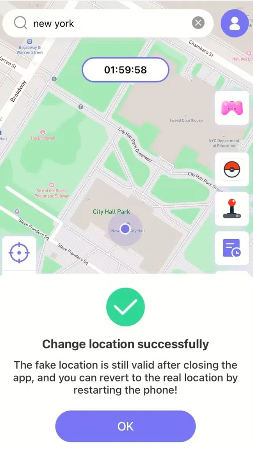
What’s the Best Place to Teleport in Pokémon GO?
The best places to teleport in Pokemon Go depend on your goals. Locations with rare Pokemon spawns, numerous PokeStops, frequent raids, and active players are considered the best spots to enhance your gameplay. Here are some popular locations to teleport in Pokemon Go:
- Pier 39, San Francisco, United States
- Disneyland, Anaheim, United States
- Big Ben, London, United Kingdom
- Circular Quay, Sydney, Australia
- Millennium Park, Chicago, United States
- The Colosseum, Rome, Italy
These locations are widely regarded as the top teleportation spots in the game.
What are the Cooldown Periods between Teleports?
In Pokemon Go, the cooldown period is generally described as the waiting time after teleportation. Yes, it is the time when the players can easily perform the in-game actions, including catching different Pokemon, spinning and more. If you want to know about the exact cooldown time, you can check the table below.
| Distance | Cooldown Periods | |
| Short Distances | 1 km | ≤ 1 minutes |
| 3 km | ≤ 2 minutes | |
| Medium Distances | 5 km | ≤ 2.5 minutes |
| 10 km | ≤ 7 minutes | |
| Large Distances | 20 km | ≤ 10 minutes |
| 40 km | ≤ 19 minutes | |
| Very Long Distances | 100 km | ≤ 35 minutes |
| 1500 km | ≤ 2 hours |
Additional Tips When You Teleport Pokemon Go
Here are some additional tips to help you make the most of teleporting in Pokemon Go. These tips will make your teleporting experience better.
- Plan Your Route
Make sure to plan your route properly before starting the game. Above, we have discussed the cooldown times which will improve your gaming experience during teleportation.
- Avoid Frequent Teleports
Don’t cover large distances in one jump as it will increase your risk of soft ban. Make sure to jump only when it is required.
- Respect Cooldown Period
Always wait for the appropriate cooldown time after teleporting. This is the best tip that every player should follow while playing the game.
- Use Trusted Spoofing Tools
Ensure to use a reliable tool like iToolab AnyGo to reduce the chance of errors or bans.
Final Words
If you want to learn how to teleport in Pokemon Go, this guide is your best option. In this article, we have explored iToolab AnyGo, one of the top spoofing programs that allow players to teleport to different locations in games like Pokemon Go. We have also mentioned some of the best locations to teleport to and provided additional tips to enhance your teleporting experience while keeping your account safe.







