


ChatGPT is an interesting AI chatbot that can do a lot of things. It can also write answers to different questions, articles, blog posts, and research papers. So it has also created a big problem for companies that hire content writers. Several contact writers have started using ChatGPT for writing blog posts and articles. AI-written articles may include plagiarism and lack of content. It can include misinformation that can have serious consequences. In several instances, we have seen the biases of Ai language models. So, it is really important properly read and proofread Ai-generated content. When employers are hiring a content writer, they expect human-generated content that includes empathy, context, and analysis. But how can they detect if the content was written by AI or humans? Now it is really important to know how to detect AI-generated text.
There are several AI tools that can detect if the content piece was written by AI tools. In this article, I will explain how to detect AI-Generated text using different tools.
OpenAI AI Text Classifier
OpenAI itself released an AI Text Classifier, fine-tuned GPT model, that can predict if the text was written by a human or generated by AI from a variety of sources. OpenAI’s AI text classifier is available as a free tool.
You just need to open this tool on your browser. There’s a big Text area where you need to paste the entire text. The tool requires at least 1,000 characters. After pasting the content in the text area, click submit button. It will show you the result.

This tool labels text as very unlikely, unlikely, or unclear. As you can see in the screenshot, it says unlikely AI-generated. Very Unlikely that AI-Generated means content could have been written by humans. Likely AI-Generated says that content may have been generated by AI. If the tool cannot be sure if the content was written by a Human or AI, it will say Unclear.
AI Content Detector by Write.com
AI Content Detector is a similar tool that claims to detect Ai-written content. You can either paste the text in the text area or enter the URL of the article. It automatically fetches the content from the URL to analyse. Once you have entered the text, click the Analyse text button. It will tell you If the text was written Human or AI.
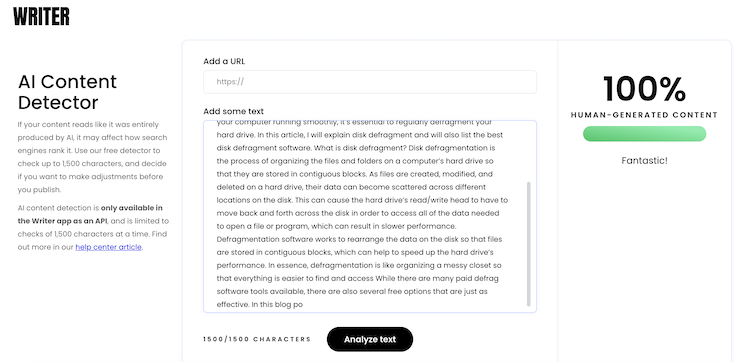
It analyses the text and tells you if the content was written by a Human or an AI tool. This AI text detector also works well.
Wrap Up
Now you know two different tools that can detect AI-generated content. If you hire content writers for your work, don’t forget to check the content using any of these tools to find out of the content was human-written or AI-generated. I also made a list of the best plagiarism checkers to find out about Plagiarism in the content. If you are paying someone for content, it shouldn’t be AI-written.
Both the AI content detector tools are free to use. OPenAI’s AI text classifier requires you to sign in but the 2nd tool can be used without creating an account. Using these AI content detector tools is easy. You just need to paste the text and hit the button to analyse the content.







