

If you are new to macOS, you will realize that keyboard shortcuts for copy, cut, and paste is different on macOS. Windows users use CTRL+C to copy and CTRL+V to paste the item at the desired location. In macOS, you will have to use Command+C to copy and Command+V to paste. For cut and paste, Windows users use CTRL+X and CTRL+V to paste. On macOS, Command +X doesn’t work for the cut. Then how do you cut and paste files or folders on macOS?
Cut and Paste using the keyboard shortcut
The cut is basically the process of moving files and folders from one location to another location. The process to cut and paste files or folders is a bit different on macOS.
First of all select all the files or folders you want to cut. Then press Command+C to copy all selected items.
Now go to the desired location where you want to paste the file. Now press Command+Option+V. It will move all the selected items from the original location to the new location.
That’s how you cut and paste in macOS.
Cut and Paste with a Finder Menu Option
If you are someone who mostly does work using the mouse, then there is another way to cut and paste on macOS.
First of all, select all the files or folders you want to move to a new location. Right click to open the context menu and select Copy.

Now navigate to the new location where you want to paste selected items. Here right click to open the context menu and hold down the Option key. You will see the option to Move files.
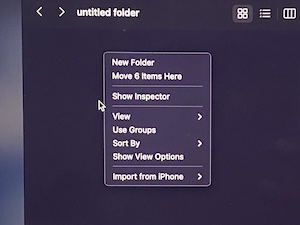
Now all files will be moved from the original location to the new location.
Now you know how to cut and paste files on macOS to move files from one location to another.