


The keyboard is an essential part of a computer. It is used for inputs. There is no universally accepted standard for the keyboard. So, we have different types of keyboards with varying numbers of keys. The number of keys on a keyboard depends on the size and shape of the keyboard. Apple offers a different keyboard than the keyboard we get in normal PCs running Windows or Linux.
The standard keyboard found on a PC usually features 104 keys including alphanumeric keys, number pad, function keys, and special keys. On many compact laptops, we don’t get the numeric pad. Laptops mainly offer a keyboard with 74 keys. Brazilian, Korean, and Japanese keyboards have more keys. Some keyboards that come with multimedia keys and dedicated keys for gaming actions offer 110 to 115 keys. Apple keyboard features 78 keys but the Apple keyboard with a Numeric keypad comes with 109 keys.
Now let’s talk about this in detail.
IBM/PC keyboards
- 83 keys on the first IBM PC keyboard (1981).
- 84 keys on the AT keyboard
- 84 keys on the updated IBM PC Keyboard (1984).
- 101 keys on the AT Enhanced Keyboard
- 101 keys on a traditional US keyboard
- 102 keys on the Enhanced European Keyboard
- 104 keys on the Windows keyboard
- 86-key laptop keyboard for Windows
- In multimedia keyboards for Windows, the number of special keys on the keyboard varies.
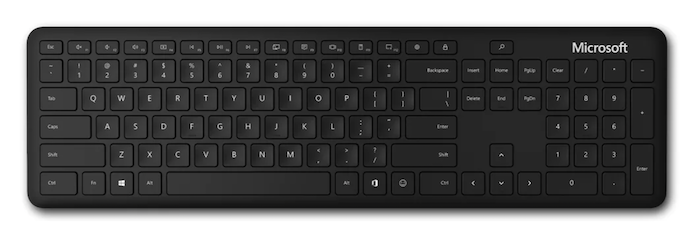
Apple keyboards
- 109 keys on the Apple Keyboard with Numeric Keypad
- 78 keys on the Apple Wireless Keyboard
- 78 keys on the Apple MacBook Air laptop

What Are the Different Types of Keys on the Keyboard?
Keyboards have different types of keys. The classification has been done based on their functions.
Alphabet Keys
Alphabet Keys are the keys that we use to type the alphabet. These keys are from A to Z . You get 26 different alphabet keys.
Number Keys
The numeric keys 0 to 9 are found just above the Alphabet Keys. If the keyboard also includes a numeric keypad on the right, you get a total of 17 keys.
Modifier Keys
Modifier Keys modify the normal action of a key. Control, Shift, and the Alt are most widely used modifier keys on a keyboard
Special Keys
Special keys have special actions assigned to them. Tab, Backspace, Space bar, Enter, Delete, and Windows are special keys on the keyboard.
Navigation Keys
Navigation keys are used to move the cursor in different directions. These keys include cursor keys, Home, End, Page Up, and Page Down.
Toggle Keys
Toggle Keys are used to toggle the action of particular keys until the toggle key is active. Num Lock, Caps Lock, and Scroll Lock are the three toggle keys.
Function Keys
Function Keys are the key at the top of the keyboard. These are keys from F1 to F12. These keys have different functions depending on the application you are currently using.
Frequently asked questions about Keyboard
How many function keys does a keyboard have?
All modern keyboards feature 12 function keys. These function keys have functions depending on the software you are using.
What is a numeric keypad?
A numeric keypad holds the input buttons for numbers. The location depends on the keyboard. Numeric keys are just above the alphabet keys and on the right side of the keyboard if you have a keyboard with 104 keys.
How many alphabetic keys are on a keyboard?
On an English QWERTY keyboard, there are 26 keys for the 26 letters.
How many symbols are on a keyboard?
On an English QWERTY keyboard, there are 40 symbols on 28 different keys.
How many arrow keys are on a keyboard?
There are four arrow keys on the keyboard. If your keyboard also has a number pad on the right side, you get eight arrow keys.







