Google has started rolling out end-to-end encryption (E2EE) for Gmail on Android and iOS. The feature expands Google’s existing client-side encryption (CSE), which was introduced for Gmail on the web earlier. However, this rollout comes with a major limitation. It is only available to enterprise users under Google Workspace.
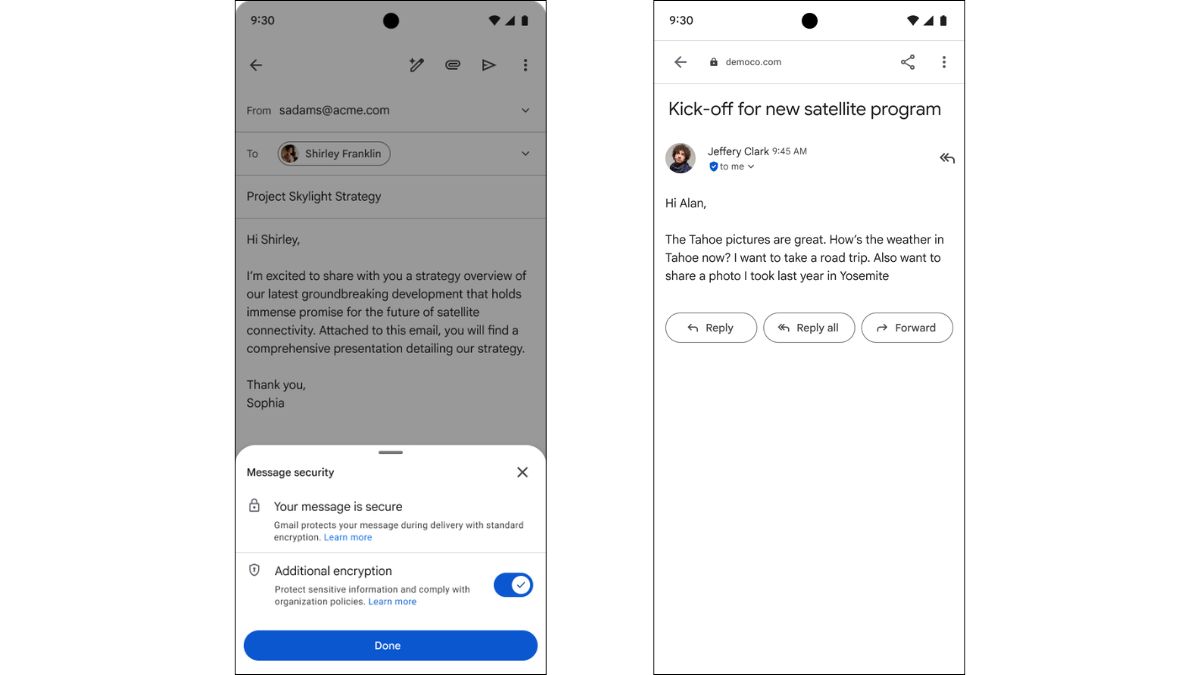
With this update, eligible users can send and read encrypted emails directly within the Gmail mobile app. There is no need for third-party tools or external portals. If the recipient is also using Gmail, the encrypted email appears like a normal conversation thread. If not, they can still securely access and reply through a browser, regardless of their email provider.
Google says this approach combines strong encryption with a simple user experience, making secure communication easier for businesses.
To enable it, administrators need to configure encryption settings from the admin console. Users also need specific add-ons like Assured Controls or Assured Controls Plus, which are designed for organizations handling sensitive data.
Sending an encrypted email requires an extra step. While composing a message, users need to click the lock icon and enable additional encryption. After that, emails and attachments can be sent as usual. The encryption ensures that only the sender and recipient can read the content.
A key comparison here is Proton Mail. Unlike Gmail, Proton Mail offers end-to-end encryption by default for all users, including free accounts. It is built with privacy as the core focus, and even the company cannot access user emails. This makes it a strong alternative for users who want secure communication without needing an enterprise plan.
This update comes at a time when encryption is under constant discussion. WhatsApp claims to offer end-to-end encryption by default, but recent controversies have raised questions about how private conversations really are. Instagram has stepped back from its earlier push toward full end-to-end encryption for messages.
For regular users, secure email is still not easily accessible within Gmail.