
Whether you are a bedroom producer looking to create a chart-topping remix, a DJ needing a clean vocal for a live mashup, or a karaoke enthusiast, knowing how to isolate vocals is a game-changing skill. In the past, extracting a clean acapella required expensive studio software and advanced engineering knowledge. Today, thanks to AI-powered Acapella Extractors, you can strip the lyrics from any song for free on your PC in seconds.
In this guide, we’ll dive into what these tools are, why they are essential for music production, and the top 5 tools you should use today.
What is an Acapella Extractor?
An Acapella Extractor is a specialized software or web-based tool designed to separate the vocal track (the “acapella”) from the instrumental backing (the “track”) of a finished song.
Traditionally, this was done using a technique called “phase cancellation,” which often left the vocals sounding “underwater” or tinny. Modern extractors use Artificial Intelligence and Deep Learning. These AI models are trained on millions of songs to recognize the specific frequencies of human speech and singing, allowing them to “unweave” the vocals from the drums, bass, and melodies with surgical precision.
The Importance of Vocal Elements in Music Production
In modern music, the vocal is the soul of the track. Having a clean acapella allows producers to:
- Create Official-Style Remixes: You can take a famous vocal and place it over entirely new chords and rhythms.
- Study Songwriting: Isolating the vocal helps you hear the nuances in timing, pitch correction, and harmony layers.
- Sampling: Hip-hop and House producers often “chop” vocal phrases to create catchy hooks or textures.
- DIY Acapellas for DJs: Transitioning between tracks becomes much smoother when you can blend a vocal from one song over the instrumental of another.
Top 5 Acapella Extractors for PC (Free & Paid)
If you are looking for the best results on your PC, here are the top five tools currently dominating the market.
1. EaseUS Vocal Remover (The Best Choice)
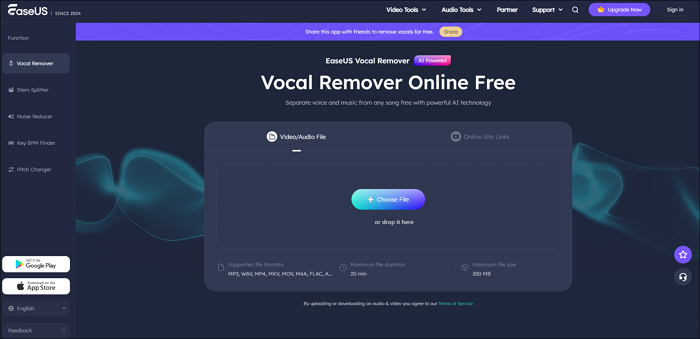
When it comes to the perfect balance of speed, quality, and ease of use, EaseUS Vocal Remover stands out as the premier choice for PC users. It is an AI-powered online and desktop solution that processes audio at lightning speeds without sacrificing the crystal-clear quality of the vocal.
Pros:
- High-Quality AI Engine: It identifies and extracts vocals with almost zero “bleeding” from the background instruments.
- Multiple File Support: Handles MP3, WAV, FLAC, and more.
- All-in-One Utility: Beyond just extracting acapellas, it can change pitch, adjust volume, and even find the BPM of your track.
- Fast Processing: Batch processing allows you to clean up multiple songs at once.
Cons:
- The free version may have daily limits on the number of files.
2. LALAL.AI
LALAL.AI is a popular web-based service known for its “Phoenix” algorithm. It’s highly effective if you want to extract more than just vocals—it can also isolate drums, bass, and piano.
Pros:
- Extremely high-fidelity results.
- No software installation required (works in your PC browser).
- Unique “stem” separation for different instruments.
Cons:
- The free tier is quite restrictive regarding file length and download formats.
- Can be expensive if you process a high volume of music.
3. Audacity (with OpenVINO Plugins)
Audacity is the world’s most famous free, open-source audio editor. While it doesn’t do AI extraction natively, Intel’s OpenVINO plugins allow you to add AI vocal removal directly into the software.
Pros:
- 100% Free and open-source.
- Runs locally on your PC (no internet required once set up).
- Full suite of editing tools to polish the acapella after extraction.
Cons:
- Steep learning curve for beginners.
- Requires a decent PC CPU/GPU to run the AI plugins efficiently.
4. Moises.ai
Moises is often the “go-to” for musicians because it’s built by musicians. It offers a clean interface for PC via their web app and focuses on helping you practice along with tracks.
Pros:
- Includes a built-in metronome and pitch shifter.
- Very intuitive and modern UI.
- Cloud storage for your processed tracks.
Cons:
- Free accounts are limited to 5 songs per month.
- Processing can be slower during peak hours for free users.
5. Vocalremover.org
For those who want a “no-frills,” instant result, this website is a staple. You simply upload a file, wait a few seconds, and download your two tracks.
Pros:
- Completely free with no hidden registration for basic use.
- Includes a simple “Joiner” and “Cutter” tool.
- Very fast for quick previews.
Cons:
- The AI is slightly less sophisticated than EaseUS or LALAL.AI, sometimes leaving “artifacts” (ghost sounds) in the vocal.
- Limited control over the extraction parameters.
Summary Table: Which Tool is Right for You?
| Tool | Best For | Price | Ease of Use |
| EaseUS Vocal Remover | Professional Quality & Speed | Free/Paid | Very Easy |
| LALAL.AI | Multi-stem isolation | Paid (Free Demo) | Easy |
| Audacity + AI | Tech-savvy producers | Free | Hard |
| Moises.ai | Practice & Education | Freemium | Easy |
| Vocalremover.org | Quick, simple tasks | Free | Very Easy |
Conclusion
Creating your own acapellas no longer requires a professional studio or hundreds of dollars in software. If you are looking for a reliable, high-quality, and user-friendly experience on your PC, EaseUS Vocal Remover is the most well-rounded option available today. It provides the clarity needed for professional-sounding remixes while remaining accessible to beginners.
Now that you have the tools, the world of sampling and remixing is open to you. Grab your favorite track, run it through an extractor, and start creating!