Gmail is one of the popular free email services of Google. Google engineers always try to add some exciting features to make the service better. There are many features which Google has added to Gmail but for testing purposes. So you will not be able to use those features until you have enables the features for your Gmail. Undo send is also the same feature of Gmail which allows users to undo a sent mail within some specific time. It means you can stop an accidentally sent mail within that time period and the mail will not be sent.
Undo send email in Gmail
To enable this feature, follow these steps:
- Login to your Gmail account.
- Click on the “Gear icon” at the top right corner of the page and select “Mail Settings”.
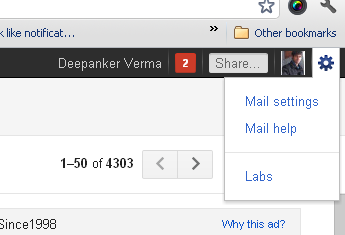
- In the Setting page, you will see many tabs. Now select the “Labs” tab. You will see the list of long features.
- Search for “Undo Send” and click on “Enable” just in front of this.

- Now click on save changes.

After you have enabled the feature, you will see the undo link after sending each mail to undo send mail.

This feature only works after a few seconds of sending the mail. You need to take quick action while using the feature.
Related Posts