WebP and JPG are popular image file formats, but they differ in compression techniques. WebP image format was developed by Google for providing compressed images for the web. It uses both lossy and lossless compression to achieve smaller file sizes without significantly losing image quality. WebP also supports animations and transparency making it good for usage on websites. On the other hand, JPG is a widely used image file format that uses lossy compression for smaller file sizes.
If you download images from a website, you may get a JPG or WebP image. Many web browser and software supports WebP, but some old browsers, some image editing software, and some image preview tools do not support WebP. If any of the software doesn’t support WebP, you may think of converting WebP to JPG. Whatever the reason, if you want to convert WebP to JPG, you are at the right place. In this detailed guide, I will mention different ways to convert WebP to JPG.
Also see: How to convert HEIC to JPG
Online WebP to JPF Conversion Tools:
Several online tools let you convert WebP to JPG images. I have tried many and am now mentioning a few good online WebP to JPG conversion tools.
Iloveimg

Iloveimg is a popular website that provides different online tools including a WebP to JPG converter. You just need to upload a WebP image on this website and it will instantly convert it to JPG. The website also supports bulk image conversion. It also has integration of Google Drive and Dropbox. So, you can pock images directly from Drive and Dropbox for WebP to JPG conversion.
Cloudconvert
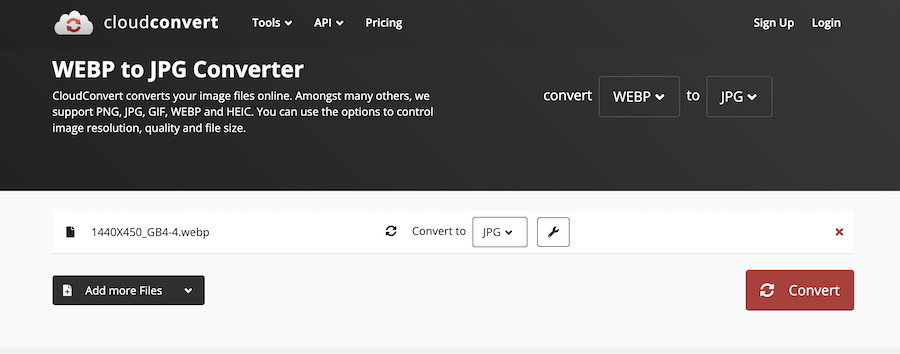
Cloudconvert is a popular website that has several online file conversion tools including a WEBP to JPG Converter. You can use this online tool to convert WebP to JPG, PNG, GIF, or any other file format. This website also lets you adjust the height, width, and quality of final image. Upload one or more WebP images and select the final file format as JPG. Then click the Convert button to convert the image from WebP to JPG.
WebP to JPG On macOS
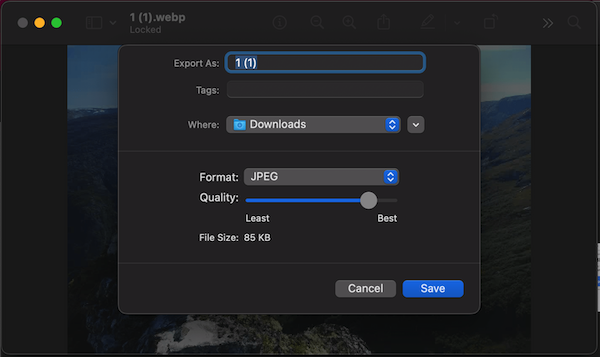
If you use macOS, you can convert WebP images into JPG by using the Preview app of macOS. If you open WebP image on macOS, it opens in the Preview app. Now click File and select Export. Here, select the target format as JPG. If you want to adjust JPG image quality, use the quality slider. Then click Save. It will save the WebP image as JPG.
WebP to JPG On Windows
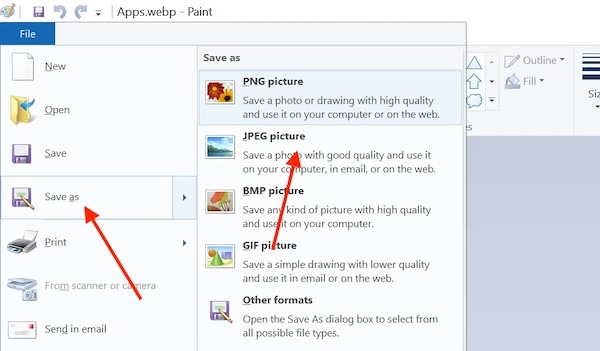
If you are using a Windows PC or laptop, you can use the Paint app for converting WebP images to JPG. Open the WebP image on Paint, click File Menu, and select Save As. Here, save the image as JPG.
Convert WebP to JPG on Android and iOS
Online tools also work on mobile devices. You can use any of the online WebP to JPG converters to convert WebP images to JPG images on Android or iOS devices. If you use Google Photos, you can use it to convert WebP images to JPG images. Upload the WebP image on Google Photos and then open it in Google Photos. Now tap Edit. Make any slight adjustments like slight crop or anything else. Then tap the Save copy button. When you Save the copy button, It will save the newly edited image in JPG format.
The Files app on iPhone also lets you quickly convert images. It can be used to convert WebP to JPG. Save Webp image to Files app. The open Files app, long tap it and then select Convert image from Quick Actions.

Wrap Up
When I use MacBook, I use Preview app to convert WebP to JPG. On other devices, I use online WebP to JPG converters for converting WebP images to JPG. Although I mentioned only two WebP images, there are also several other good online Image converters that can quickly convert WebP to JPG images. Now you know how to convert webP to JPG on different devices. Let me know if you still have any question.
Related Posts