


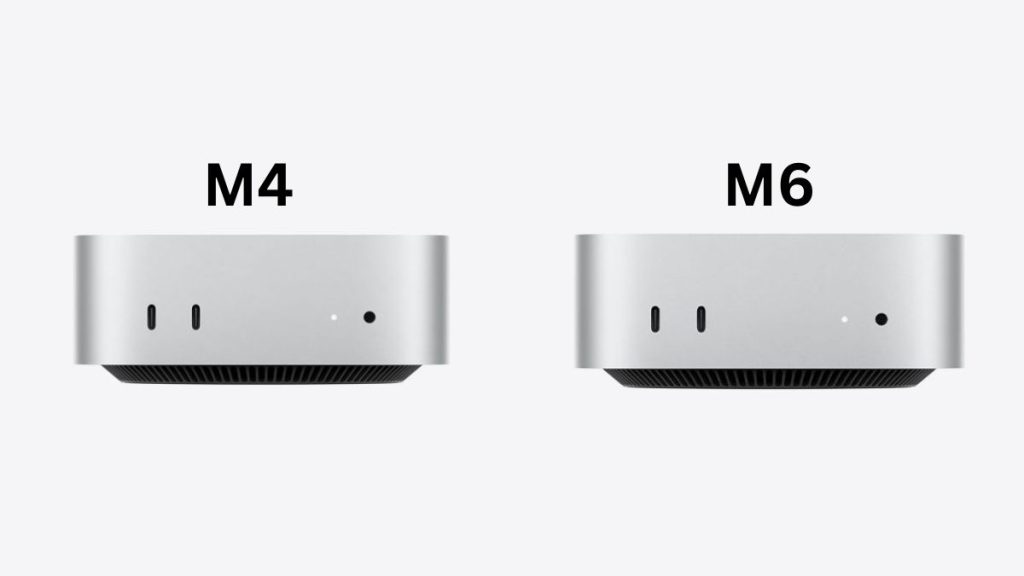
Apple has launched its new Mac mini with the M6 chip and promises a major performance upgrade to the compact desktop. The new model keeps the same tiny design that made the Mac mini M4 so interesting, but Apple has made some important changes inside.
The Mac mini M6 is powered by Apple’s first 2nm chip and comes with a 12-core CPU, 12-core GPU, a new Dual 16-core Neural Engine, faster memory and improved connectivity. Apple claims up to 40 percent faster CPU performance, up to 2x faster graphics and up to 4x faster AI performance compared with the M4 model.
But there is an important question here. The Mac mini M4 was already an excellent compact desktop, and it started at just ₹59,900 in India when it launched in 2024. Apple later increased its price, and the M4 eventually started at ₹94,900 in India.
The new Mac mini M6 starts at ₹99,900 in India for the configuration with a 12-core CPU, 12-core GPU, 16GB unified memory and 256GB SSD.
Buy Here: Amazon
So, if you are buying a Mac mini today, the M6 looks like the obvious choice. But if you already have an M4, the decision is more complicated. We have compared both models across design, display support, specifications, performance, gaming, AI, connectivity, storage and pricing to see exactly what has changed.
Apple Mac mini M6 vs Mac mini M4: Specifications
| Mac mini M6 | Mac mini M4 | |
|---|---|---|
| Chip | Apple M6 | Apple M4 |
| CPU | 12-core | 10-core |
| GPU | 12-core | 10-core |
| Neural Engine | Dual 16-core Neural Engine | 16-core Neural Engine |
| Memory | 16GB, 24GB, 32GB | 16GB, 24GB, 32GB |
| Memory bandwidth | Up to 170GB/s | 120GB/s |
| Storage | 256GB to 2TB SSD | 256GB to 2TB SSD |
| Wi-Fi | Wi-Fi 7 | Wi-Fi 6E |
| Bluetooth | Bluetooth 6 | Bluetooth 5.3 |
| Front ports | 2x USB-C, 3.5mm headphone jack | 2x USB-C, 3.5mm headphone jack |
| Rear ports | 3x Thunderbolt 4, HDMI, Ethernet | 3x Thunderbolt 4, HDMI, Ethernet |
| Ethernet | 2.5Gb Ethernet, configurable to 10Gb | Gigabit Ethernet, configurable to 10Gb |
| External displays | Up to 3 | Up to 3 |
| Dimensions | 5 x 5 x 2 inches | 5 x 5 x 2 inches |
| Starting India price | ₹99,900 | ₹94,900 |
Design: Almost Nothing Has Changed
The easiest way to tell the difference between the Mac mini M6 and M4 is probably to look at the name on the box. From the outside, the two machines are remarkably similar. Apple has retained the same compact aluminium body with a 5 x 5-inch footprint and a height of just 2 inches.
The M4 introduced a major redesign that made the Mac mini dramatically smaller than its predecessor, and I think Apple has no reason to change the design that works so well. The machine takes very little space on a desk and can easily sit beside a monitor without becoming a distraction.
The compact design is useful for people who want a powerful desktop without building a traditional PC. You can pair the Mac mini with your existing monitor, keyboard and mouse, and the small enclosure makes it easy to move between workspaces.
The M6 therefore does not offer a compelling reason to upgrade if you already own an M4 from a design perspective. Both machines offer essentially the same physical experience.
Ports Are Mostly Unchanged
Apple has retained the same general port selection on the M6. There are two USB-C ports and a 3.5mm headphone jack on the front. The rear includes three Thunderbolt 4 ports, HDMI and Ethernet. The M4 offers essentially the same arrangement.
This is interesting because Apple has introduced Thunderbolt 5 on the higher-end M5 Pro version of the new Mac mini, but the standard M6 continues to use Thunderbolt 4.
I don’t consider that a major problem for most buyers. Thunderbolt 4 is still fast enough for external SSDs, docks, displays and other accessories. If you need the absolute fastest external connectivity, however, the M5 Pro model is the one to look at.
Display Support: Both Can Run Up to Three Displays
Apple has also kept display support largely unchanged. The Mac mini M4 can connect to up to three external displays, depending on the configuration and resolution. This includes support for multiple high-resolution displays through Thunderbolt and HDMI.
The M6 continues to support up to three displays, so there is no major advantage here for people who already have a multi-monitor M4 setup. Both machines are capable of being used as serious desktop workstations with multiple screens.
The difference is that the M6 has considerably more graphics performance available for applications running across those displays. This can be useful if you are editing high-resolution video, working with large Photoshop projects or running demanding applications while using two or three monitors.
For normal office work with one or two displays, however, the M4 is already more than capable.
M6 Gets a 12-Core CPU
The biggest upgrade is obviously the processor. The Mac mini M4 uses Apple’s M4 chip with a 10-core CPU, while the new M6 comes with a 12-core CPU.
The M6 is based on a newer 2nm manufacturing process. Apple says the new chip delivers the world’s fastest single-threaded performance and brings a significant improvement in both performance and efficiency.
Apple claims up to 40 percent faster CPU performance compared with the previous-generation Mac mini with M4. That is a substantial improvement, although the actual difference you experience will depend heavily on the workload.
For daily tasks such as browsing, writing, watching videos and using office applications, the M4 already feels extremely fast. I don’t expect someone using an M4 for these tasks to suddenly feel that their computer has become slow just because the M6 has arrived.
The difference should be much more obvious in demanding workloads. Developers compiling large projects, video editors exporting files, professionals working with large datasets and users running many demanding applications simultaneously should benefit more from the additional CPU performance.
M6 Also Has a More Powerful GPU
The graphics processor gets an upgrade from 10 cores on the M4 to 12 cores on the M6. However, the difference goes beyond the additional two cores. Apple has added Neural Accelerators to every GPU core in the M6. The new GPU also gets an updated shader architecture, Dynamic Caching and hardware-accelerated ray tracing.
Apple claims up to twice the graphics performance of the M4. The company also says the M6 offers significantly higher geometry performance, which should help with demanding games and professional graphics workloads.
This makes the M6 more interesting for users who work with video editing, 3D applications and other GPU-intensive software. It should also provide more headroom for games that take advantage of Apple’s graphics APIs.
The M4 is still a surprisingly capable machine for graphics work, but the M6 has clearly been designed to push much further.
AI Performance Gets a Major Boost
AI is another area where Apple has made significant changes. The M4 already has a 16-core Neural Engine and supports Apple Intelligence, but the M6 introduces a Dual 16-core Neural Engine along with Neural Accelerators built into its GPU cores.
Apple says the new Neural Engine delivers up to twice the performance of the previous generation, while the combination of the new GPU architecture and AI hardware can deliver up to four times faster AI performance compared with the M4.
Those numbers come from Apple’s own testing, so they should not be treated as universal performance figures. Different AI applications will see different levels of improvement depending on how they use the hardware.
Still, this could become one of the most important differences between the two machines over time. More applications are beginning to run AI models locally, rather than sending every task to a cloud server.
Apple also says its testing showed the M6 processing LLM prompts in LM Studio up to 4.8 times faster than the M4. If local AI becomes a bigger part of desktop computing, the M6’s additional hardware could give it a meaningful advantage.
Both Offer Up to 32GB RAM
Memory capacity has not changed as much as the other hardware. The Mac mini M4 supports 16GB, 24GB and 32GB unified memory configurations. The M6 offers the same maximum of 32GB, so there is no increase in the amount of RAM you can install.
The important difference is memory bandwidth. The M4 provides up to 120GB/s, while the M6 can reach up to 170GB/s. That is roughly a 42 percent increase in memory bandwidth. Because Apple silicon uses unified memory, the CPU, GPU and Neural Engine all share this memory. Higher bandwidth can therefore help when large amounts of data need to move between different parts of the chip.
This will be more useful for demanding workloads such as video editing, 3D rendering and AI than for basic browsing or office work.
For buyers choosing between the two, I would also recommend thinking carefully about the RAM configuration. Since the memory is integrated into the system and cannot be upgraded later, buying 24GB or 32GB at the time of purchase can make sense if you expect to keep the machine for several years.
Storage Is Faster, But Capacity Remains the Same
Apple has kept the same basic storage range. Both the M4 and M6 can be configured with 256GB, 512GB, 1TB or 2TB of SSD storage. The difference is storage performance. Apple says the M6 can deliver up to twice the SSD performance of the previous generation.
Faster storage can help with large file transfers, application loading and workloads that constantly read and write data. Video editors and people working with large projects should benefit more than ordinary users.
The bigger issue remains storage capacity. A 256GB SSD can fill up quickly if you install large applications and games or keep photos and videos locally. Video editors may relate to this.
I would therefore consider the 512GB configuration the more practical choice for most users who can afford it. External SSDs can always be used later, but having enough internal storage makes everyday use much more convenient.
Connectivity: M6 Gets Wi-Fi 7 and Bluetooth 6
The M6 also gets newer wireless connectivity. The Mac mini M4 supports Wi-Fi 6E and Bluetooth 5.3, while the M6 moves to Wi-Fi 7 and Bluetooth 6. Wi-Fi 7 can offer higher speeds, lower latency and better performance in congested networks, but you need a compatible Wi-Fi 7 router to actually benefit from it. If you are still using an older Wi-Fi router, this upgrade will not suddenly make your internet connection faster.
The Ethernet upgrade could be more useful for certain users. The M6 gets 2.5Gb Ethernet, with an optional 10Gb Ethernet configuration.
This is useful if you have a fast local network or NAS. Moving large video files or backups across a network can be significantly faster with a multi-gigabit connection. For ordinary home users, Gigabit Ethernet on the M4 is still perfectly adequate.
Everyday Performance: M4 Is Still Very Fast
Everyday Performance is where we need to put the M6’s performance claims into perspective. The Mac mini M4 is already extremely fast for everyday computing. When I use an M4-class Apple silicon Mac, basic tasks such as opening applications, switching between windows, browsing the web and handling office work feel almost instantaneous.
The M6 will be faster, but the difference will not necessarily be dramatic for those workloads. The upgrade becomes much more meaningful when you regularly push the processor and GPU. Video editing, software compilation, 3D work, AI applications and heavy multitasking can make better use of the M6’s additional resources.
So if your M4 is mostly being used for Chrome, writing, email, YouTube and office applications, there is no reason to upgrade. If you are constantly pushing the machine to its limits, the M6 makes much more sense.
Performance for Developers
The Mac mini has become popular among developers because it combines strong performance with a very small footprint.
The M6 should make that proposition even stronger. The additional CPU cores can help with compilation and other processor-intensive tasks, while the higher memory bandwidth should help when running several development tools simultaneously.
Developers working with Xcode can also benefit from the faster CPU and improved graphics performance when running multiple simulators and other resource-heavy tools.
For web developers using PHP, Node.js, Docker and similar tools, the M4 is already more than sufficient in many cases. But people working with large codebases, multiple containers or virtual machines can benefit from the additional performance of the M6.
If you are buying a development machine that you expect to keep for several years, I would lean toward the M6.
Gaming: M6 Has More Headroom
Gaming is another area where the M6 has a clear advantage. The M4 already surprised us with how capable it can be at gaming, with games that have been properly optimised for Apple silicon. Hardware-accelerated ray tracing also allows it to handle more advanced graphics effects.
The M6 takes this further with its 12-core GPU, updated graphics architecture and improved ray tracing capabilities. Apple claims up to twice the gaming performance with ray tracing in Cyberpunk 2077: Ultimate Edition compared with the M4. That is a significant claim, although actual gaming performance will depend on the game, resolution and graphics settings.
I still would not recommend buying a Mac mini primarily as a gaming PC. macOS game support remains a bigger limitation than the hardware in many cases. But if you want one compact machine for work and occasional gaming, the M6 is the better option.
Cooling, Noise and Power Efficiency
One of the most impressive things about the M4 Mac mini is how much performance Apple managed to put into such a small enclosure.
The M6 keeps the same compact design while moving to a newer 2nm process and delivering more performance. Apple’s focus on performance per watt should also help the machine remain efficient under load.
For normal workloads, both machines should be relatively quiet and efficient compared with traditional desktop PCs.
The M6’s advantage should become more apparent during sustained workloads, where its newer architecture can deliver more performance without requiring a dramatically larger cooling system.
This is another reason why the unchanged design does not bother me. Apple has managed to put substantially more processing capability into essentially the same box.
Software and Apple Intelligence
The Mac mini M6 ships with Apple’s latest macOS experience and is designed to take advantage of the company’s latest Apple Intelligence features.
Apple is continuing to expand AI across macOS, including smarter Siri, Visual Intelligence, improved Shortcuts and AI-powered features in system applications.
The good news for M4 owners is that they are not being left behind. The Mac mini M4 also supports Apple Intelligence and the latest macOS features.
This means you do not need to buy the M6 simply to get Apple’s latest software features.
The M6’s advantage is hardware performance. As AI workloads become more demanding, its stronger Neural Engine, GPU and higher memory bandwidth should allow it to handle those workloads more comfortably.
Mac mini M6 vs M4: Price in India
Pricing makes this comparison interesting in India.
The Mac mini M4 launched in India in 2024 at ₹59,900. That made it an extremely attractive option for anyone looking for a compact desktop with desktop-class performance. However, Apple later increased the price considerably. The Mac mini M4 eventually started at ₹94,900.
The new Mac mini M6 starts at ₹99,900 in India. The base configuration includes a 12-core CPU, 12-core GPU, 16GB unified memory and 256GB SSD.
That means the current difference between the two models is only ₹5,000.
| Model | Configuration | Price in India |
| Mac mini M4 | 10-core CPU, 10-core GPU, 16GB RAM, 256GB SSD | ₹94,900 |
| Mac mini M6 | 12-core CPU, 12-core GPU, 16GB RAM, 256GB SSD | ₹99,900 |
This changes the buying decision quite a bit.
The M4 was an amazing deal at ₹59,900. At ₹94,900, it is much harder to recommend when the M6 costs only ₹5,000 more. For that extra ₹5,000, the M6 gives you a newer 2nm chip, additional CPU and GPU cores, higher memory bandwidth, significantly stronger AI hardware, faster storage, Wi-Fi 7, Bluetooth 6 and faster Ethernet.
The M4 only becomes the more attractive option if you can find it at a substantial discount from a retailer.
Mac mini M6 vs M4: Which One Should You Buy?
If you already own the Mac mini M4, I would not recommend upgrading simply because the M6 is faster. The M4 remains an extremely capable machine, and most everyday users will have no problem continuing to use it for years.
The upgrade makes more sense if you regularly use applications that can take advantage of the M6’s additional CPU and GPU performance. Local AI, video editing, 3D work, software development and demanding games are some of the workloads where the new machine makes the strongest case for itself.
For someone buying a Mac mini for the first time, I think the decision is much easier. At ₹99,900, the M6 is only ₹5,000 more expensive than the current ₹94,900 starting price of the M4. The performance and connectivity improvements are significant enough that I would choose the M6.
If you find an M4 for ₹70,000 or ₹75,000, the calculation changes completely. At that kind of discount, the M4 becomes a compelling value and remains fast enough for most users.
So, if I were buying a new Mac mini today, I would choose the M6. If I already had the M4, I would keep using it unless I specifically needed the additional CPU, GPU or AI performance.
The M6 is the better Mac mini, but the M4 can still be the better deal when you find it at the right price.
Related Posts


