Google already had an Android TV operating system for smart TVs. But it surprised us by launching Google TV in September 2020. Google TV is based on Android and feels like a rebranded Android TV. Both Google TV and Android offer a similar set of smart TV apps and games, support for Google Assistant, smart home controls, Chromecast, and games via Stadia. If Google TV is similar to Android TV, what was the point of launching it when Android TV was already there? Google had its own reasons for launching Google TV. In this article, I will explain all the key differences to give you an idea of why Google TV was necessary.
Android TV was released back in June 2014 and proved to be a game-changer for home entertainment tech. It was developed from Google’s Android mobile operating system and offers access to the Google Play Store for apps and games on your TV. The company also made changes to make it work on widescreen. The UI was made to offer content discovery.
In 2020, Google launched Google TV based on Android TV. Google TV was basically the successor to Chromecast with Google TV. The smart TV interface integrated Google’s machine learning and AI to offer a more personalized experience. Google TV comes with a refined design, an improved interface, and a personalized experience.
Google TV is basically the UI built on top of Android TV to offer a better user experience. Google TV also adds several features that are missing on Android TV. In this article, I will explain how Google TV is different from Android TV.
If I talk about similarities, Google TV and Android TV both offer the same selection of smart TV apps and games. You have similar features such as Google Assistant, smart home controls, casting with Chromecast, and media streaming.
The primary difference between Google TV and Android TV is the recommendations. Android TV offers recommendations based on apps but Google TV uses machine learning, Knowledge Graph information, and Google Assistant to offer recommendations based on personal taste.
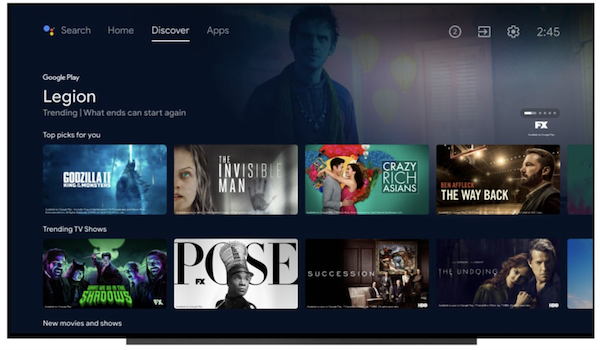
Google TV comes with an improved interface that puts content first. Google TV interface is much cleaner which makes it easier to find content without having to browse app by app. Android TV interface lets you scroll through the menu of row after row to find content.
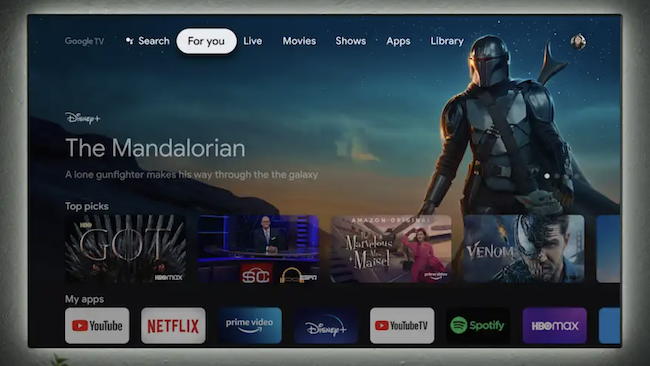
Google TV includes a dedicated tab for live TV. It pulls live content from YouTube TV and Sling TV. So, you can find and watch live content. Other live TV services will be added to this section over time.
You can also use your Android smartphone as a remote control for your Google TV.
Google TV also offers a watchlist feature where you can create content that you want to watch. You can also save Movies and TV series to watchlists of your profile using your phone.
Google TV also gets smart Home integration with Google Assistant. It lets you control all your smart home devices with voice using Google Assistant.
Unlike Android TV, Google TV supports multiple Kids’ profiles under a single Google account. Each kid’s profile will offer personal recommendations while offering content restrictions based on system-wide parental settings. You can use Google Family Link to set content restrictions.
We are also expecting Android TV to get UI features of Google TV in the upcoming update but Google will surely keep Google TV smarter than Android TV and keep it different. If multiple people watch TVs at home and have different tastes, Google TV feels better as it can manage separate user profiles. Content recommendations and personalization are the only difference maker. So, it is hard to recommend if you should buy a smart TV running Google TV or Android TV. You should still prefer picture quality and performance over UI. Google TV offers everything that is in Android TV but offers better content discovery and more control over the content. So, it is recommended to get a smart TV running Google TV if it is under your budget. Android TV still has the core capabilities that Google TV and will surely get some of the key features of Google TV in the coming months.
Related Posts