WhatsApp is now working to add colorful chat themes to the messaging platform. The feature lets users change chat themes and have a personalized chat experience. Themes could have different backgrounds and chat bubble colors.
Wabetainfo spotted the Chat Themes option in the recent WhatsApp beta for iOS version 24.17.10.71. The option has been added to the chat info screen. It also shared some screenshots to confirm how the feature works.
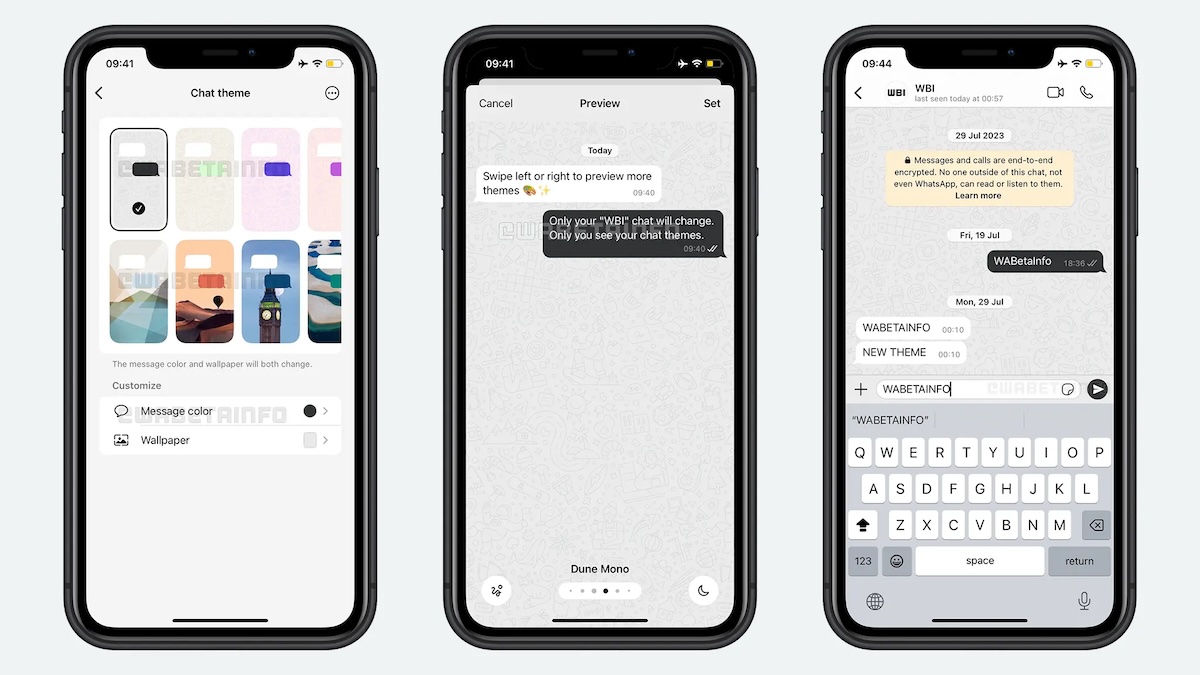
To change the Chat theme, open the conversation and tap on the contact’s name at the top. Here, tap on the Chat theme option. See all the available themes and tap the one you want to apply. It also offers the option to change message coordinates and wallpaper. Before you apply the chat theme, it also provides a preview of the theme. Once you are ready, tap Set at the top right to apply the theme.
There are 10 default themes for users to choose from. It is also important to note that your Chat theme selection will be private. It will only be visible to you. The other person involved in the conversation won’t see this theme design.
Chat themes are visually appealing and it also helps to organize your chats. You can assign themes to different contacts or groups.
This feature is currently available for iOS beta users. The company could soon add it to the Android beta before making it available to all users. We don’t know when the company will roll out the feature to all users.
Related Posts