


If you are the one who plays around with the phone a lot but still prefers iOS over android, then this tutorial is for you. In this tutorial, we are going to help you to jailbreak your iPhone/iPad/iTouch device running on iOS8 – iOS8.1. Before we start, we need to keep in mind some important things:
- First and foremost, Apple does not recommend jailbreak or any changes to their software. So basically, jail breaking you iDevice voids warranty. So if you are planning to take your iDevice to an Apple Store, then do not jailbreak your device now. If you have already done it, it is advisable to restore your device using iTunes to fresh state.
- This tutorial is only for iPhone4S onwards,iPad2 onwards, iPad Mini and Mini2, Mini3 and the latest generation iTouch. So basically any iDevice running iOS8 – iOS8.1 only. This tutorial is NOT for devices running iOS8.1.1. There will be a separate tutorial for that once a stable solution has been provided by the jail breaking team.
Pre-Requisites to Jailbreak:
- Of course any iDevice running iOS8 – iOS8.1
- Windows computer with a USB port to connect your device
- Latest version of iTunes installed on your computer
- Ensure that Find my iPhone has been disabled (Settings > iCloud > Find my iPhone) on the device and Passcode lock is turned off (Settings > General > Touch ID & Passcode >turn off Simple Passcode).
- Ensure that your device is completely backed up on the iCloud or on your computer so that if anything goes wrong, you don’t lose anything.
- Put your device in Airplane mode. You can turn it off once you are done with the jailbreak.
- Supported devices:
- iPhone 6
- iPhone 6 Plus
- iPhone5s
- iPhone 5c
- iPhone 5
- iPhone 4s
- iPad (2, 3, 4, Air, Air 2, mini 1, mini 2, mini 3)
- iPod touch5
- Supportedfirmwares:
- 8.0
- 8.0.1
- 8.0.2
- 8.1
One thing to keep in mind is that if you have upgraded to iOS8-iOS8.1 via OTA update, or via the update button on iTunes, then it is recommended that you do a Restore using iTunes for a successful jailbreak.
How to Jailbreak iOS 8 / 8.1 Untethered Using Pangu
Step 1: Download Pangu for Windows from here.
Step 2: Right-click on the Pangu icon and then click on Run as Administrator.
Step 3: With Pangu up and running, connect your iPhone iPad or iPod touch to your PC using USB.
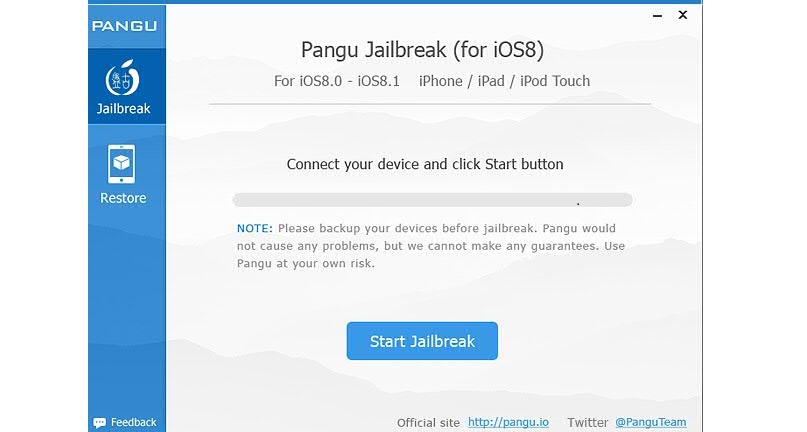

Step 4: Click on the big ‘Start Jailbreak’ button in the center of the display, followed by ‘Already did’ on the next screen to begin the jailbreak process. Your device will reboot couple of times during the process so be patient.
Step 5: Once the Pangu tool says ‘Jailbreak succeeded’, that’s it. It’s done, you will find Pangu app along with Cydia app icon on the home screen. Simply run Cydia and start installing your favorite tweaks!
Related Posts

