Finding the nearest grocery store is easy if you have lived in the area for a long time. But what if you are new to the place and don’t know how to find a grocery store? In this digital era, finding everything is easy using your smartphone or tablet.
A grocery store is an essential part of our life. So, you need to know a good grocery store near your location. You can also use Food and grocery delivery apps to order groceries, but what if the product is not available on the app? This is the reason most people still prefer getting groceries by themselves.
We can use Google Maps or Apple to quickly find the nearest grocery store. In this guide, I will explain how to navigate to the closest grocery store. You will learn how to get directions to the nearest grocery store.
Directions to the nearest grocery store
Open the Google Maps app on your Android or iPhone. In the search box, search for ‘grocery store’ and it will show you nearby grocery stores.
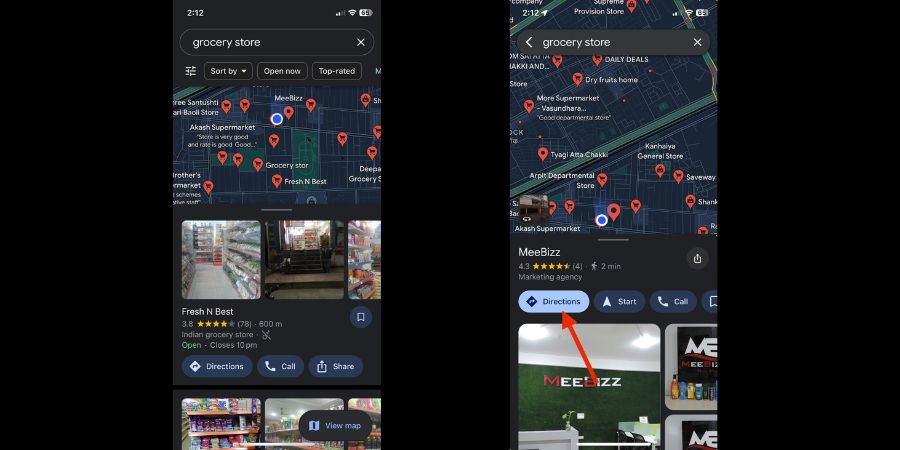
Look for one that’s closest to your location. Tap the one grocery store and then click Directions. It will show you directions using different transportation modes.
If you have an iPhone, you can also ask Siri to navigate to the nearest grocery store. It will show you a list of the nearest grocery stores. Select one and get the directions.
Most stores will also have Opening Hours listed. Make sure to check the opening hours before navigating to the grocery store.
I am sure most people already use Google Maps to navigate to the nearest grocery store. But people who didn’t know have now learned it. I hope this article was useful and helped you learn something new. We have already published several useful articles.
Related Posts