A grammar checker tool is invaluable for several reasons. It caters to most people including students and professionals. A good grammar checker tool can help in fixing writing and ensure you write correct emails, reports, and documents. These tools also enhance writing quality and make your writing a bit more professional. I have already made a list of the best Grammar checker software. In that article, I added Grammarly at the top. Today, I will be writing a detailed review of Grammarly to tell you good and bad things about this grammar checker tool. This detailed review will help you decide whether you should use Grammarly or not.
Also read: QuillBot’s Paraphraser Tool
What is Grammarly?
Grammarly is an AI-powered writing and grammar-checking tool that improves the clarity, correctness, and overall quality of writing. This tool automatically identifies and corrects grammar and spelling mistakes. You will get real-time feedback and suggestions to improve sentence structure and word choice.
Grammarly has an online editor. Although I have a dedicated Mac app on my laptop, I mostly use Grammarly’s web app. One of the first things that caught my attention with Grammarly was its clean and intuitive interface. Whether you are a normal user, a professional, or a blogger, the platform’s design is user-friendly, ensuring a seamless experience right from the start.
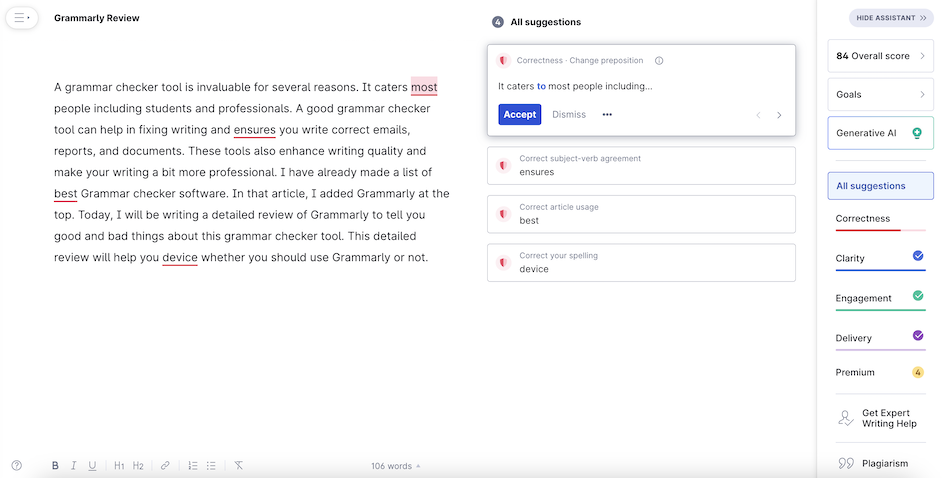
Grammarly editor also provides the overall score of your document on a scale of 100 to tell you the quality of your writing. In this way, it also helps you in becoming a better writer. You learn new words, grammar rules, and more with the help of this grammar checker tool.
Grammarly can recognize American English, British English, Canadian English, and Australian English. You can change your language preference from your profile settings.
The service is also available as a browser extension. So, it provides feedback and helps in correcting mistakes while you are typing on any website or web app including social media platforms, web-based email clients, and more. This makes Grammarly helpful. I use it, and it helped me greatly improve my blog posts. Grammarly on your phone will work as a keyboard app. You will get real-time corrections while typing something. It will make sure there are no grammatical errors.
Grammarly provides real-time suggestions and corrections. It suggests alternative vocabulary to enhance the richness and variety of your writing. The tool also uses AI to detect subtle errors that your tired eyes might overlook. Grammarly’s advanced writing suggestions go beyond the basics. It helps you fine-tune your sentences for clarity and conciseness.
Grammarly also has a built-in plagiarism checker. This tool scans your text against a vast database, giving you the confidence that your work is yours. This feature is only available with a premium subscription. This tool is really helpful for writers and web publishers who deal with different writers.
Is Grammarly safe?
Grammarly takes security and privacy seriously. The company claims that it doesn’t read your text and encrypts user data to keep them private. It also has security features to keep data protected from unauthorized access.
Grammarly Pricing
Grammarly offers a free version along with Premium and Business subscriptions. The free plan offers spelling, grammar, and punctuation correction. It also provides Tone detection and Auto-citations. Premium plans offer more features like full sentence rewrites, formatting, word choice suggestions, help in consistency in spelling and punctuation, plagiarism detection, and more.
Platform Availability
Grammarly is available on all major browsers as browser extensions and desktop apps for Windows and Mac. Mobile apps for Android, iOS, and iPadOS are also available. There’s also a Microsoft Office plugin to help you fix issues in MS Word, Outlook, and other Office applications.
Pros:
- User-Friendly Interface: Grammarly boasts an intuitive design, making it accessible to users of all proficiency levels.
- Versatility Across Writing Styles: From formal reports to casual emails, Grammarly adapts to various writing styles with ease.
- Time Efficiency: The real-time suggestions save valuable time during proofreading, especially for tight deadlines.
- Language Learning Support: Ideal for language learners, Grammarly provides educational insights and corrections as you write.
Cons:
- Limited Free Version: While the free version is robust, some advanced features are reserved for Grammarly Premium subscribers.
- Dependency on Internet Connection: Grammarly’s full functionality relies on an internet connection, which may be a limitation in certain situations.
Review Summary
Grammarly makes your writing better. It fixes mistakes and helps you say things more clearly. It works on your computer and even on your phone. The free version is good, but if you want extra help, there’s Grammarly Premium. It’s like having a smart friend for your writing. Try it and see your words become even better.
While Grammarly is a powerful tool for catching grammar and spelling mistakes, enhancing style, and providing writing suggestions, it cannot entirely replace human editing. This grammar checker tool relies on algorithms and artificial intelligence to analyze text, it may not grasp the nuances, context, and creativity that a human editor can bring. Grammarly is an excellent complement to human editing. It serves as a helpful first pass to catch common errors and improve clarity.
Related Posts