Earlier this year, WhatsApp added Touch ID and Face ID support for iOS users to give an extra layer of security. Now the company is extending this feature to Android users. WhatsApp introduced fingerprint lock support for Android Beta back in August. Now the company is rolling it to supported Android phones globally.
If your phone has a fingerprint sensor and you have updated to latest WhatsApp version, you can enable the fingerprint lock feature.
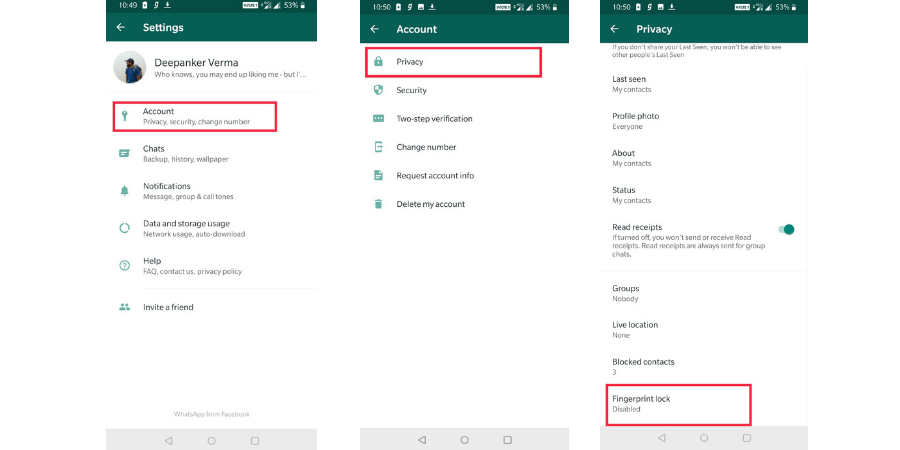
For enabling this, open WhatsApp. Now tap on three dots present on the top right corner, select Account and then Privacy. Here, you will find a new option called ‘Fingerprint Lock.’

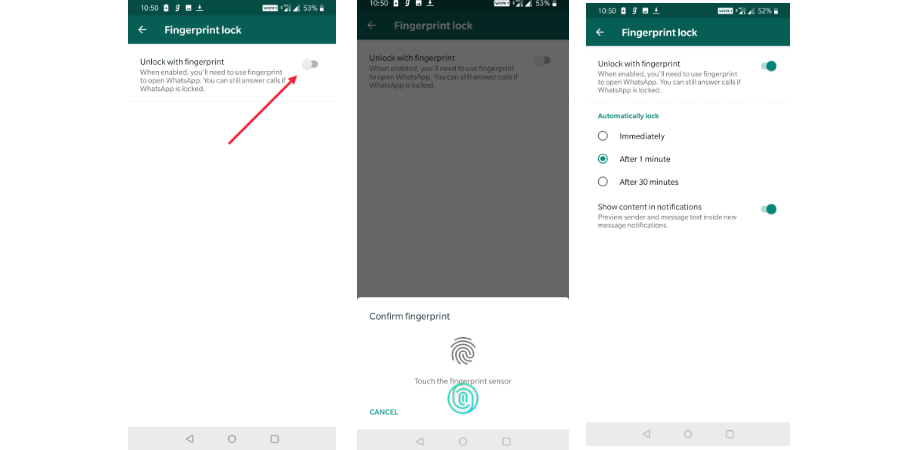
Turn on the ‘Unlock with fingerprint’ option to enable this feature. It will ask you to confirm the selection by touching the fingerprint sensor.
You will have to select any of three options including ‘Immediately’, ‘After 1 minute’, ‘After 30 minutes’.
This feature is being rolled out globally. So, you can check the WhatsApp app on your phone right now to see if the feature is now available to you.
After enabling this feature, WhatsApp will ask for fingerprint authentication to access your conversation. You can still answer to WhatsApp calls and reply to messages from notifications since these features don’t need to open the app.
Related Posts